


Following the buzz of iClone 8’s release in May 2022, the version 8.1 update introduces Unreal Live Link 1.1, and a brand new feature of Motion Director known as Snap to Surface. This release further empowers the popular “Animate in iClone and Render in Unreal” workflow with Live Link headlining features such as Scene Imports from UE5, iClone to Unreal Motion Transfer, and Timecode Sync for Full-frame Recording while iClone 8.1 presents a substantial upgrade for artists who desire to take final renders to the next level, thanks to the industry-only Subdivision Export for fully-animated characters.
Release notes: iClone 8 & iClone Unreal Live Link 1.1v
Unreal Live Link 1.1 – Watch More
Timecode Sync Recording – Watch More
Frame drops were a common downside of Live Link being heavily dependent on hardware performance — especially prevalent while live recording heavy data streams. Live Link 1.1 addresses these hiccups with the advent of timecode-based recording which transmits and records full-frame data, even on substandard system specifications.
Live Link Timeline Sync
Provides lossless frame-by-frame recording. Watch More

Recordable Live-Linked Items:
Character Animation, Facial Performance, Prop Animation, Camerawork, and Light Animation.

High-Performance Production
Send multi-selected or a group of animated characters from iClone to Unreal Engine for full-frame recording and turn into Unreal Engine sequence files. Watch More

Two-Way Data Link – Watch More
Whether you want your iClone characters to interact with the Unreal scene or simply try to position them in the right places, you’ll benefit from the scene transfer feature thanks to the power of bidirectional data linking.
Seamlessly adapt iClone animations to Unreal environment Watch More

Unreal Scene Transfer
Three different modes allow you to transfer your Unreal scene back to iClone to reposition standard re-editable meshes, merged meshes, or simplified/decimated meshes.

- Standard (Items): Standard (Items): Keep separate items for the most accurate alignment. Selectively Show/Hide for flexible scene management. Supports landscape.
- Merged (1 Mesh): Keep the high-poly for better performance and proper alignment.
- Simplified (Remesh): Low-poly for the best performance. For large/far scenes sent into iClone as camerawork reference.
On top of scene transfer, Motion Director 1.1 Snap to Surface can constrain characters traversing across the terrain and adhere to elevations produced with a displacement map

- Response to Terrain Height: Character moments can react to ground elevation. Watch More
- Accurate Reach Target: iClone characters can seamlessly interact with the Unreal scene with the one-step target reach, motion layer editing, and smooth IK/FK transition. Watch More
Motion Transfer and Animation Retargeting
Circumventing the long-winded process of exporting FBX models and motions from iClone to Unreal, iClone can now directly transfer selected models along with their motions to Unreal projects and turn them into animation assets that can be edited in Level Sequencer. These features offer a new avenue for animators looking to integrate iClone and Unreal in practical and intuitive ways.
Direct Character Animations Unreal
Rapidly replace the iClone/CC characters in UE and retain the same motion assets on identically named characters. Watch More
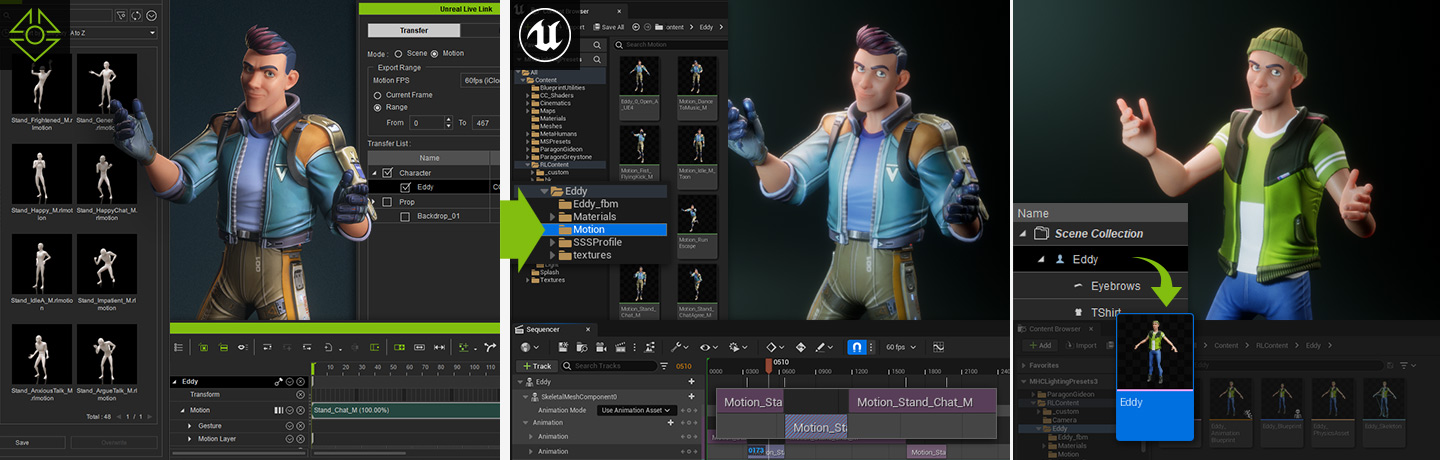
Motion Retargeting for UE Characters & MetaHumans
iClone motions are reusable on UE characters and MetaHumans via standard UE IK Rig and Retargeting process. Watch More | Bring MetaHuman to life

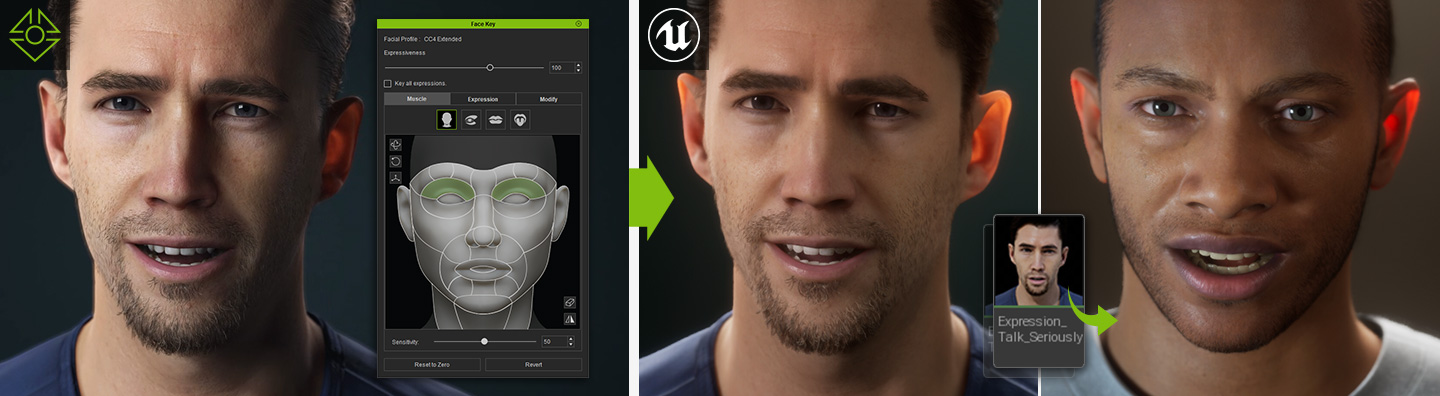
Drive MetaHumans with iClone Facial Animation
iClone facial animation can be sent full-framed into iClone/CC characters in UE, or retargeted to MetaHumans to drive facial expressions and talking character animations. Watch More | Bring MetaHuman to life
Prop Animation
Prop animation transfer includes animated objects, vehicles, and non-humanoid characters such as creatures. Watch More

Morph Animation Support
Live Link morph animations to UE via iClone Morph Animator. Perform organic motion by applying morph animation to props or skin-bone characters. Watch More

Motion Director – Watch More
Motion Director is handy for navigating your characters in 3D space, and great for making NPC animations. In this update, we focus on bringing the ability for characters to move smoothly atop a mesh surface.
React to Surface – Watch More
Characters can now react according to changes in ground elevation while maintaining contact with the floor. Snap to Surface within Motion Director control settings can also support every MD Control Mode for designated characters.

Advanced Surface Sensor Settings
By tweaking the surface sensor settings, you can determine the climb and fall limit on every step.


- Climb/Fall Limit: Cap the character’s upper and lower distances from the current ground level to reach a different elevation. Watch More
- Transpose Damping: Adjust the damping intensity to reduce or smooth jittery movement caused by changes in ground height. Watch More
- Input Forecast: Define the prediction time for surface detection to raise and lower the character ahead of its movement. Watch More
Supports Displacement Terrain
Snap to Surface feature works for irregular mesh generated from displacement texture, and it is fully compatible with the Natural Terrain Generator plugin for iClone.

UE Live Link to Target Scene
Adapt iClone/CC animations to UE scenes via iClone Unreal Live Link. Watch More

Subdivision Export – Watch More
Along with the Character Creator 4.1 update, you can now export your subdivided, animated characters into USD and FBX, then bring them to other major applications like 3ds Max, Maya, Cinema 4D, and Blender. You can even directly live-link subdivided animation to Unreal Engine and Omniverse for detailed real-time rendering. Level of Subdivision | Compatible to All Renderers

Other New Features
Bake Morph Supports
iClone 8.1 lets users bake morph shapes that can be exported to other 3D applications. Watch More

Displacement Texture Supports
iClone Live Link Auto Setup 1.25 creates a Displacement texture channel for proper modulation of surfaces.

Website: iClone 8 | iClone Unreal Live Link | iClone Motion Director
Forum : iClone 8.1 Discussion