


Mesh topology. Probably the most important yet least utilized and discussed topic among those new to 3D modeling and animation. Why? Because it can be hard to master and implement for many users. This is one of those skills most of us can learn but not all of us will be good at it. Many will go about their 3D journey without considering good topology and its effect on the movement of the mesh.
Clean, good topology means the underlying mesh of the model is evenly distributed with consideration given to areas that bend a lot like the eyes, shoulders, and elbows. In some cases, these areas will consist of denser mesh such as armpits or near the mouth.
Even though I have been in 3D for decades, topology was one of those areas that I knew about from a working perspective but had to research to be able to explain it better. This article depends heavily on that research to explain some facts about mesh topology that you may not have considered before.
Exploring Good Topology: Understanding Different Types of Topology
TRIANGLES (TRIS)
In a 3D mesh, triangles are the fundamental building blocks that make up the surface of a 3D object. A 3D mesh is a collection of vertices, edges, and faces that define the shape of an object in three-dimensional space. Triangles are the simplest type of polygon, consisting of three vertices and three edges.
Triangles make up many models, particularly legacy models. While tris can make just about anything they can also collide and collapse causing the mesh to buckle in an unnatural way or stretching of vertices that is noticeable due to the texture stretching with it.
Key points about triangles in meshes.
- Basic Unit: A triangle is the smallest unit of a 3D mesh. It is defined by three vertices and three edges.
- Rendering Primitives: Triangles are commonly used to render primitives in graphics pipelines. Many rendering engines and hardware are optimized for processing and rasterizing triangles.
- Simplicity and Efficiency: Triangles are computationally efficient and simple to work with, both in terms of mathematical calculations and rendering algorithms.
- Interpolation: Triangles allow for easy interpolation of attributes such as color, texture coordinates, and Normals across their surfaces. This is crucial for achieving smooth shading and realistic rendering effects.
- Deformation and Animation: Triangles play a key role in character animation and deformation. They define how the surface of a 3D model deforms as it moves, providing flexibility for realistic animations.
- Smoothing and Normals: Normals (vectors perpendicular to the surface) are often calculated at each vertex of a triangle to achieve smooth shading. This helps simulate lighting effects and create a more realistic appearance.


QUADS
A quad is a polygon with four sides (edges) and four vertices. Quads are often used in 3D meshes to represent planar surfaces or faces of 3D objects. They are an alternative to triangles. Quads have some advantages and are commonly used in certain modeling scenarios.
Key points about quads in 3D meshes:
- Planar Surfaces: Quads are well-suited for representing planar surfaces, as they form a flat, four-sided shape.
- Modeling Convenience: During the modeling process, especially when creating surfaces that align with a grid or require a regular structure, quads can be more convenient and easier to work with than triangles.
- Edge Loops: Quads are often used to create smooth edge loops in character modeling. Edge loops are sequences of connected edges that follow the natural contours of a character, helping with deformation during animation.
- Deformation and Animation: Quads can deform more predictably than triangles in certain situations, especially when modeling characters or objects that need to bend or deform smoothly.
- Subdivision Surfaces: Quads are commonly used in subdivision surface modeling. Subdivision surfaces involve iteratively subdividing the faces of a mesh to create smoother surfaces, and quads play a key role in this process.
- Smoother Shading: In some cases, quads can contribute to smoother shading when rendering, especially if the geometry is planar and the lighting conditions are appropriate.
- UV Mapping: Quads can simplify UV mapping, the process of applying 2D textures to 3D surfaces. UV mapping is often easier with quads compared to triangles.

DECIMATED (OPTIMIZED) MESH
Decimation involves reducing the number of polygons in a 3D model while attempting to preserve its overall shape and appearance. The goal is to simplify the geometry by removing unnecessary detail, which can be useful for optimizing the model’s performance in terms of rendering, animation, or real-time applications.
The process of decimation typically involves the following steps:
- Polygon Reduction: Decimation algorithms analyze the geometry of the mesh and selectively remove vertices, edges, and faces while attempting to retain the essential features of the model.
- Preservation of Important Details: Advanced decimation algorithms aim to preserve critical details and features of the original model, such as edges, contours, and surface characteristics, to maintain the model’s visual fidelity as much as possible.
- Simplification for Performance: The primary motivation for decimating a mesh is often to improve performance in real-time applications or when dealing with large and complex scenes. By reducing the polygon count, the model becomes less computationally intensive to render or animate.
- UV Mapping Considerations: Some decimation tools take into account the UV mapping of the original model to ensure that texture coordinates are preserved, minimizing the need for retexturing after decimation.
- Adjustable Parameters: Decimation tools often provide adjustable parameters that allow the user to control the level of simplification, balancing between reducing polygon count and preserving details.


RE-MESHING VERSUS RE-TOPOLOGY
The primary goal of re-meshing is to alter the overall geometry and structure of a mesh, often by changing the distribution of polygons or altering the topology. Re-topology involves creating a new surface for an existing 3D model, often with the goal of improving the topology for better deformation, animation, or UV mapping.
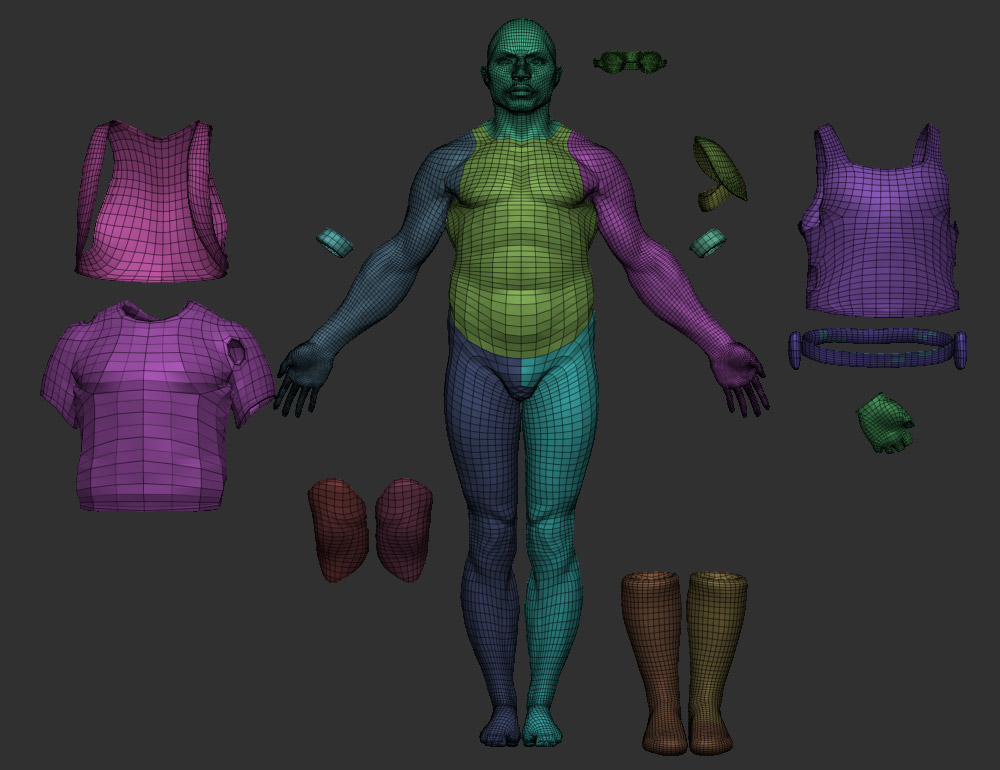
WHY DO WE SAY CHARACTER CREATOR 4 HAS GOOD TOPOLOGY?
- Clean and Efficient Geometry:
Character Creator 4 mesh topology has clean, and efficient geometry with as few polygons as necessary to accurately represent the character shape avoiding unnecessary details in areas that don’t require it. - Evenly Distributed Geometry:
Character Creator 4 mesh also relies heavily on evenly distributed geometry that maintains a consistent polygon density across the model to ensure smooth deformations during animation. - Consistent Normals
The consistent Normals of the CC4 character mesh avoid shading problems and other issues. - Quads (Four-sided polygons):
Character Creator’s four-sided quad topology allows for more predictable deformations than triangles and is generally easier to work with during the modeling process. - Topology for Animation:
The CC4 mesh also takes into consideration the intended use of the model which in this case is smooth bipedal animation. CC4 topology deforms well during rigging and movement. Joints and areas of deformation have sufficient geometry to bend naturally without buckling or collapsing. - Edge Flow:
CC4 character meshes also maintain a logical and consistent flow of edges that follows the natural contours of the object. Good edge flow is also essential for animation and deformation. - UV Mapping Considerations:
The UV Mapping in Character Creator 4 meshes prevents seams from showing up in highly visible areas of the character. Normal maps are used for finer details to optimize performance. - Efficient Use of Detail:
CC4 mesh focuses on adding detail where it matters most, such as the face or areas that will be prominently featured.
Character Creator 4 mesh topology checks off all the important points regarding quality character meshes so you can create a character with the confidence it can withstand the intense scrutiny of a camera closeup.
Learn more: CC3+ Base Model
CLOSING
Before I close, I want to also point out that using tris does not, by itself, mean bad topology. If they don’t collide or bunch up tris are fine. So are less than optimal models that may not have perfect quads and contain mixed tris if they are distributed evenly enough to provide good vertex manipulation for animation and posing.
I repeat… whatever topology you use, even distribution is key. We are not seeking perfection but a workable mesh that won’t twist, collapse, or distort allowing the animator to pay more attention to the details of animation and less time on problematic mesh.
And… as usual, Character Creator has your back when it comes to characters. CC4 takes care of topology by providing clean base meshes and industry-standard optimization and decimation. From smooth, front-line characters to highly decimated background crowd actors, CC4 does the work, while you do the storytelling.


MD McCallum – WarLord
Digital Artist MD “Mike” McCallum, aka WarLord, is a longtime iClone user. Having authored free tutorials for iClone in its early years and selected to write the iClone Beginners Guide from Packt Publishing in 2011, he was fortunate enough to meet and exchange tricks and tips with users from all over the world and loves to share this information with other users. He has authored hundreds of articles on iClone and digital art in general while reviewing some of the most popular software and hardware in the world. He has been published in many of the leading 3D online and print magazines while staying true to his biggest passion, 3D animation. For more information click here.
Related Posts
- 12 Reasons why Character Creator is the Best 3D Character Maker
- Recreating Snoop Dogg: Character Creator and MetaHuman Creator

