


iClone 8.52 delivers a highly anticipated update for professional animation editing, packed with groundbreaking features driven by user feedback. Despite its numerical step from 8.51, this release introduces transformative tools to elevate animation workflows.
Key New Features:
- AccuPOSE Technology
- Motion Trail Editor
- Non-Destructive Editing
- Curve Performance Enhancement
- Curve Filters and Preview Mode
We extend our heartfelt thanks to Martin Mejzlik and Milan Dolezal, acclaimed contributors to the Mafia game series, who advocated for enhancements like non-destructive editing, improved curve performance, and motion trails. Their insights, rooted in extensive industry experience, have been pivotal in shaping this release.
Additionally, renowned 3D expert and YouTuber askNK emphasized the importance of integrating advanced curve filters, inspired by MotionBuilder, to facilitate high-quality motion capture (mocap) data cleanup. iClone 8.52 now empowers animators with these professional-grade tools.
Overview of iClone 8.52 new features
AccuPOSE: Revolutionizing Natural 3D Posing
AccuPOSE, an AI-powered innovation utilizing deep learning models trained on ActorCore’s extensive motion database. AccuPOSE understands human movement across countless scenarios, enabling users to create highly natural poses with minimal effort. Beyond hand-key animation, this technology plays a vital role in connecting motion clips, refining motion layers, and dramatically simplifying mocap data cleanup.
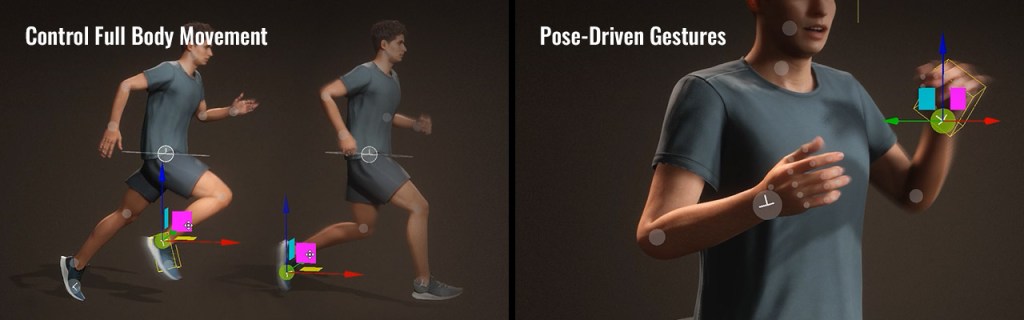
- Control Full Body Movement: Achieve full-body transformations merely from minimal inputs. AccuPOSE’s real-time body pose estimation guarantees natural postures during editing.
- Pose-Driven Gestures: Arm adjustments naturally drive wrist movements and hand gestures, generating authentic human behaviors with minimal effort.

Check out demo on product page
Fully Controllable AI Guidance
To work in harmony with AI technology, controllability is a huge factor. The real brilliance of AccuPose lies in its unmatched flexibility and precision. You have the power to decide which parts of the body the AI adjusts and which parts remain untouched. This allows you to fine-tune every movement to your exact needs.
- Precision & Freedom: By applying Transformation and Rotation constraints to selected joints, designers can control AI pose suggestions with precision and flexibility.
- Constraints & Lock: Utilize T/R Constraints to maintain manual control flexibility. Use the Lock feature to securely fix the end effectors in place.
- AI Suggestion: You can specify which part of the body the AI should provide suggestions for, while preserving the desired sections by using locks and move/rotate constraints.
- Mirror: The Mirror feature ensures that AI-generated poses for hands or legs maintain symmetry with mirrored postures during any adjustments.


Check out demo on product page
Seamless Integration with Existing Works
Getting started with AccuPose is straightforward. Simply open the tool, select an AI behavior model, and transform any pose effortlessly with the guidance of natural posing techniques.
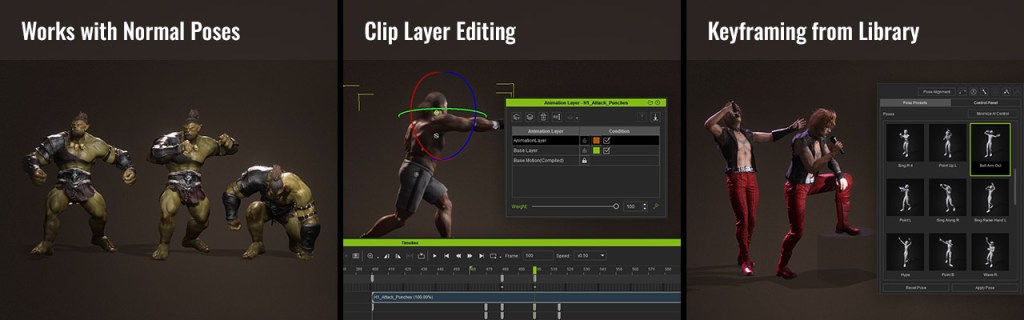
- Works with Normal Poses: Transform existing poses into AccuPoses with selected behaviors, and experience the precision of natural posing with customizable IK constraints.
- Clip Layer Editing: By incorporating AI-assisted layer keys, users can effectively enhance motion velocity in selected motion clips.
- Keyframing from Library: Easily add dynamic poses from the AccuPOSE to arrange keyframes on the timeline, optionally filling in custom in-betweens and curves for smooth transitions.
Check out demo on product page
Accelerate All Key Animation Workflow
Curious about how AI-assisted posing can enhance your workflow? It’s incredibly adaptable and can be applied wherever setting keyframes is needed, making it a valuable tool across various creative tasks.
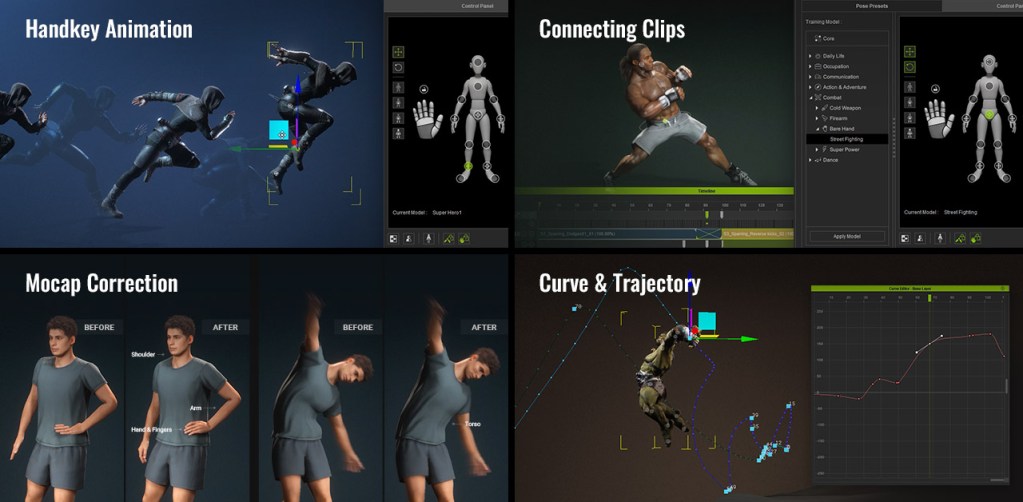
- Handkey Animation: Driven by deep-learned human motions, the posing suggestion enhances the efficiency of quality keyframe posing and supports the creation of compelling animation styles.
- Connecting Clips: The intelligent posing feature simplifies the process of filling in missing poses between motion clips, creating more natural transitions.
- Mocap Correction: The natural AI posing capability can effectively solve the mocap challenges such as shoulder stiffness, motion distortion, and even enhances animations with realistic hand gestures.
- Curve & Trajectory: iClone’s motion curve and motion trail functions empower animators to refine keyframe timing and spatial trajectories, ensuring high-quality animation outcomes.

Check out demo on product page
Download AccuPOSE CORE Free and Subscribe INFINITY for All
3D Posing with the assistance of AI might sound exciting itself, but AccuPOSE is way more than that. It comes with a big library of AI-training models that answer your diverse scenario demands.

The same control applied to a selected joint can yield entirely different results depending on the chosen AccuPOSE model, giving users absolute control over the character’s AI reactions.
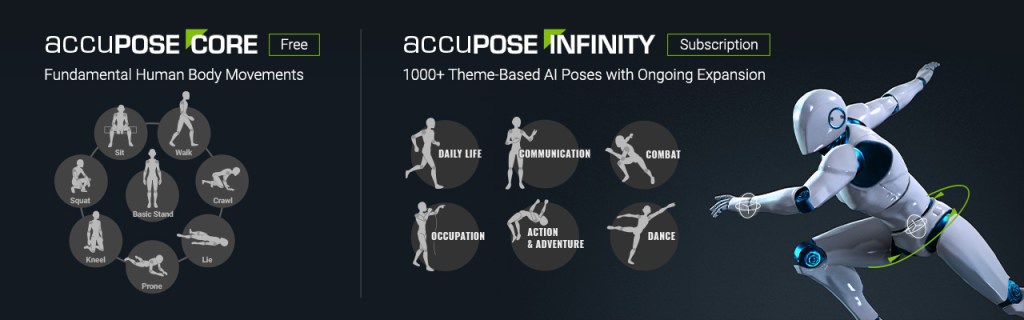
AccuPOSE is a free plugin for iClone 8.52, all users will have access to the CORE Library, it supports fundamental human body movements like stand, sit, walk, kneel, lie, prone, etc.
For those seeking advanced features, the INFINITY expansion offers an extensive library of over 1,000 AI-trained poses across 41 genres, along with continuous updates.
Important Update:
Effective January 6, AccuPOSE INFINITY moves to a one-time purchase ($149 USD). All previous subscribers can switch to the perpetual license at no cost.
Elevates Motion Editing to Pro Level
The iClone 8.52 release brings four highly acclaimed professional animation features, voted by animators as essential to their workflows. These tools are meticulously crafted to serve as the foundation of daily productivity.
- Motion Trail
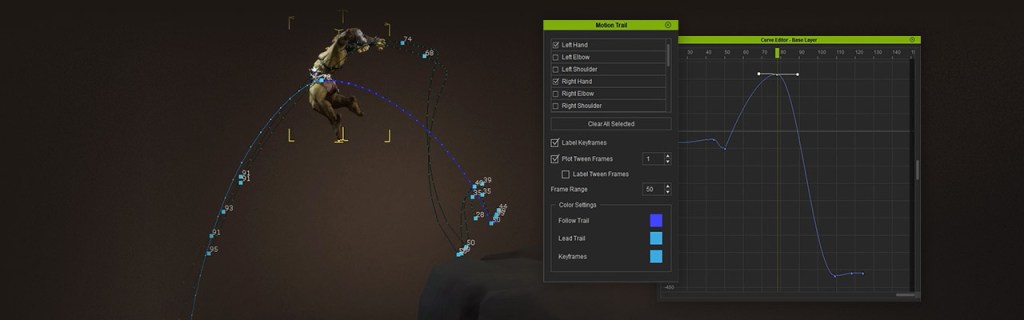
The motion trail feature enables professional animators to visualize trajectories for selected joints. It supports real-time editing of keyframes directly on the trail or within the curve editor, providing an efficient approach to managing motion paths and animation timing. Additionally, users can adjust the path range and customize the trail’s color to improve control and visualization.
Check out demo on product page
- Non-Destructive Editing
Users can now break motion clips without worrying about losing data, as cut-out portions remain recoverable. Additionally, for clips edited with motion layer keys, our non-destructive approach retains all layer data for further editing.

Check out demo on product page
- Curve Filters
Several new filter options are added. These include tools that remove jitters while preserving motion details, fix peak noise, reduce keys for bezier spline editing, and smooth selected tracks seamlessly. In addition, we have introduced a preview mode to enable users to observe filtered results in real time while adjusting parameters for greater precision.

Check out demo on product page
- Curve Performance Enhancement
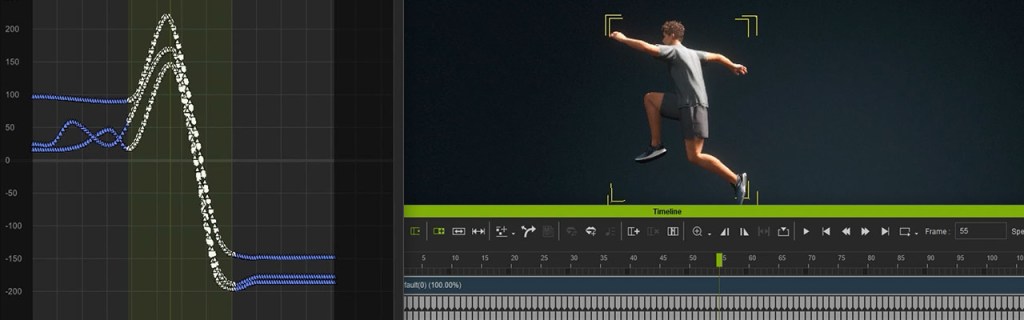
Motion Curve performance has been significantly enhanced for intensive editing across multiple tracks. Users can now enjoy near-instant responsiveness when selecting, moving, copying, pasting, or deleting keys in extended curve sequences.
Check out demo on product page
Related Sources:
Check out iClone 8.52 new features

