


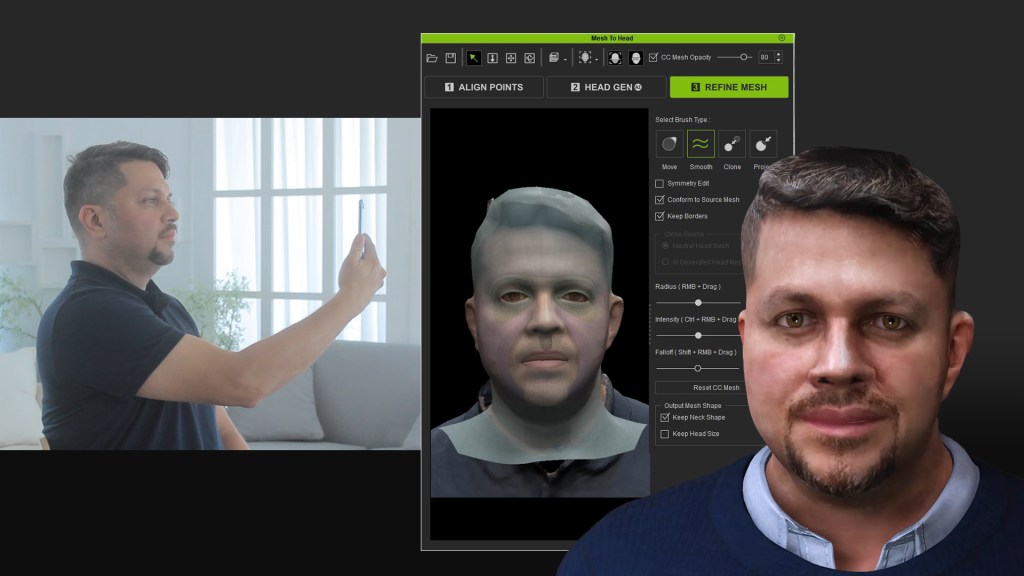
Mobile scanning provides a convenient and cost-effective method for creating 3D models. However, unwieldy scanning conditions may result in compromised quality. By selecting the effective surfaces, Character Creator Headshot 2.0 plugin AI can overcome these challenges by seamlessly filling in the missing areas, such as the ears, skull, and neck, ensuring high-quality results.

In the latest Character Creator Headshot 2.0 plugin release, many people have been curious about how Reallusion managed to create the face scan from an iPhone. Here, we would like to share our own experience with a powerful iPhone 3D scanning app we used in this demo.
While there are numerous 3D mobile scanning apps and AI solutions for converting videos to 3D models available in the market, our production process has been made remarkably easier and the results have been highly satisfactory, thanks to the following key features from SCANDY PRO app:
- Accessibility for iPhone Users: This app is specifically designed for iPhone users, utilizing the iPhone’s depth camera for enhanced model precision. Users can easily access the app as it is standalone. Additionally, the app captures color texture simultaneously with the scanning process, ensuring a comprehensive and accurate result. The affordable pricing makes it accessible to a wide range of users, allowing them to own the app , similar to other Reallusion products.
- No Cloud Computing Required: Scandy app performs all the necessary calculations solely on the iPhone itself. Users can see the scan mesh progressively being built up in real-time during the capturing process. This eliminates the need to send data to the cloud for computing and wait for results. The real-time feedback provided by the app allows users to confirm the scan results and make necessary corrections with ease. The main challenge lies in ensuring that the subject remains still during the scanning process to obtain an accurate mesh.
- Seamless File Transfer: After completing the scan, users can easily send the scan file to their PC via email or use Mac Airdrop if they have a Mac device. No additional registration is required, and users can immediately access the 3D model (OBJ) and texture files (around 1.5k * 1.5k) directly from their iPhone. The polygon count/file size is approximately 50K triangles, and while the mesh quality may not be perfect compared to photogrammetry, it is well-suited for Headshot 2.0 purposes. An important benefit is that users have the option to keep their works private without the need for public display, resulting in a fast turnaround time.
- Mesh and Texture Quality: The app also supports multiple file formats, including OBJ and USDZ. The mesh density and vertex color are optimized to ensure high-quality results. While some limitations may exist, such as potential color banding, the overall mesh and texture quality is satisfactory for most applications.

Download Scandy app:
https://www.scandy.co/
Limited-Time Scandy PRO DISCOUNT CODE – US$25 (normally US$40) for the first year:
https://apps.apple.com/redeem?ctx=offercodes&id=1388028223&code=HEADSHOT
Learn how to use Headshot 2.0:


More Character Creator Headshot tutorials:
https://courses.reallusion.com/home/character-creator/pipelines-and-render/headshot