What’s New with Unreal Live Link 1.3 Upgrade?
Faster, smoother, and more versatile – the latest upgrade of Unreal Live Link 1.3 for iClone is here, now supporting the latest Unreal 5.3 and addressing industry pain points head-on. A notable improvement is overhauling the Live Link transfer process to support masses of characters with speed and stability.
Moreover, our latest upgrade addresses challenges encountered during animation recording in the Unreal Engine Sequencer. This ensures improved performance across diverse scenarios, even when handling multiple full-body rigs at once. Additional streamlining of the manual data setup process necessary for transferring motion to Unreal Engine projects will also improve efficiency — particularly for interdisciplinary collaborations between team members and individual contributors. By offering these improvements for free, Reallusion hopes to provide a smoother and more enjoyable user experience.
Improved Transfer
Live Link 1.3 brings swift parallel processing for iClone FBX to Unreal exchange, guaranteeing seamless editing within iClone and expedited transfer speeds. Direct import within the Unreal Editor provides transparent and informative updates on the transfer process.
Automated Sequencer Construction
Live Link 1.3 enables the effortless utilization of multi-pass exports from iClone scene group manager. Furthermore, camera data can seamlessly transfer and switch from iClone to Unreal, accelerating the entire animation workflow.
Refined Sequencer Positioning
Both static and dynamic objects can be attached to an iClone origin and repositioned independently within Unreal with ease. Whether fine-tuning the placement of key elements or orchestrating dynamic movements, this upgrade transcends complications. Grouped animations from iClone can also be independently transferred and positioned in Unreal, giving artists the final say in scene and shot composition.

Highlight Features of Live Link 1.3
Enhanced Transfer Efficiency

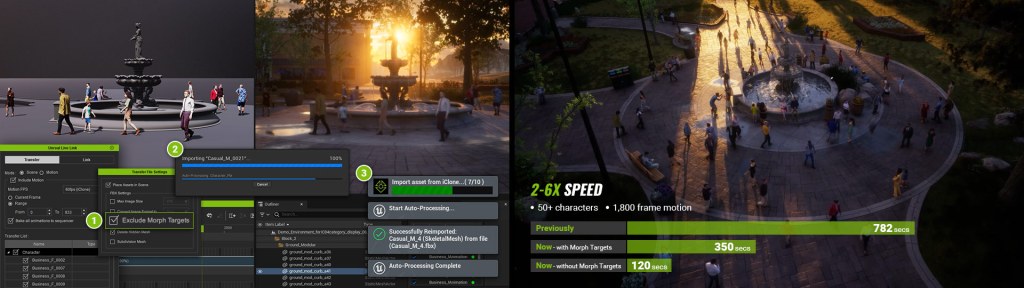
- The Live Link enhancements feature parallel processing for both iClone FBX export and Unreal FBX import, guaranteeing uninterrupted editing in iClone while transfers seamlessly proceed.
- For the Unreal Engine Editor, the transfer progress bar has been enhanced to provide detailed real-time updates regarding import statuses.
- For handling extensive crowd scenes, a new option called “Exclude Morph Targets” is available to accelerate transfers by excluding expression data.
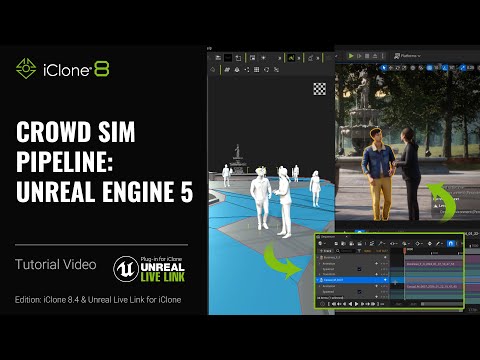
Streamlined Sequencer Management
Automatic Sequencer Creation
Users now have the ability to opt for the “Create Sequencer” feature while performing motion transfer, seamlessly consolidating characters, props, and cameras into Sequencer objects within Unreal, streamlining the process of cinematic animation rendering.
Multi-pass export
Utilizing iClone’s scene group management, individual passes can be merged under the master sequencer as sub-sequencers for added convenience in Unreal.


Effortless Camera Handling
Cameras, along with their motion, can be imported with a single click during the Sequencer creation process. Additionally, iClone’s camera switching data seamlessly transitions to the “Camera Cut” track in the Sequencer.

Flexible Repositioning
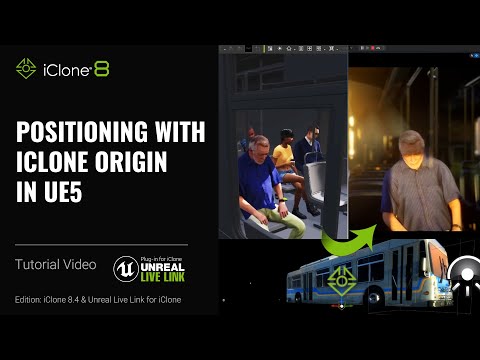
The place of action for Sequencer objects can be defined by attaching them to the iClone origin, which enables manual positioning in Unreal. This feature goes beyond static objects to include dynamic bodies such as moving vehicles. Unreal Engine objects can now influence iClone animations during runtime, allowing for the polishing of character animations within iClone.

Installation Guide
To fully install iClone Unreal Live Link, please make sure to prepare the latest version of the following software.
- iClone 8.4 (8.4.2505.1) – install from Reallusion HUB
- Unreal Live Link Plug-in for iClone 1.3 (1.3.2530.1) – Install from Reallusion HUB. If you have a previous version installed, make sure to update it by selecting “Updates” in the HUB.
- iClone Live Link plugin for Unreal 1.6 – Download and install from Unreal Marketplace / Unreal Launcher
- Auto Setup for Unreal 1.33 (1.33.6129.1) – Download and manually copy folders to the Unreal project. Refer to the provided guide for instructions.
For a comprehensive installation guide, refer to the manual and tutorials listed below:
- Installation Guide for iClone Unreal Live Link | iClone 8 Tutorial
- Getting Started with iClone Unreal Live Link 1.3 | Unreal Live Link 1.3 Tutorial
- Manual – Transferring Animated Crowd from iClone to Unreal in Sequencer
Learn more about iClone Unreal Live Link:
- Create cinematic 3D animation with iClone Unreal Live Link
- Try iClone Unreal Live Link 30 days free
- Explore iClone Crowd Simulation | Press Release