Crowd simulation continues to be a cornerstone of films, games, architectural visualization, traffic analysis, construction, and engineering. Its significance extends further into AI training, driving simulations, and the advancements of digital twin development, elevating the discipline as an increasingly valuable component of cutting-edge industries.
In response to the soaring demand for crowd simulation, iClone 8.4 has undergone a monumental transformation, now boasting an integrated crowd simulation engine available as a free upgrade. This remarkable leap forward democratizes access, empowering small to mid-sized studios to harness its power affordably. The fruition of two years of relentless development, this update brings forth streamlined functionalities and flawless asset integration. The Crowd Sim technology marks Reallusion’s pioneering step into the world of simulations, with upcoming releases in 2024 set to elevate the experience further with a focus on environment interaction and motion planning.
Know more: iClone Crowd Sim Official Page | Getting Started Tutorials
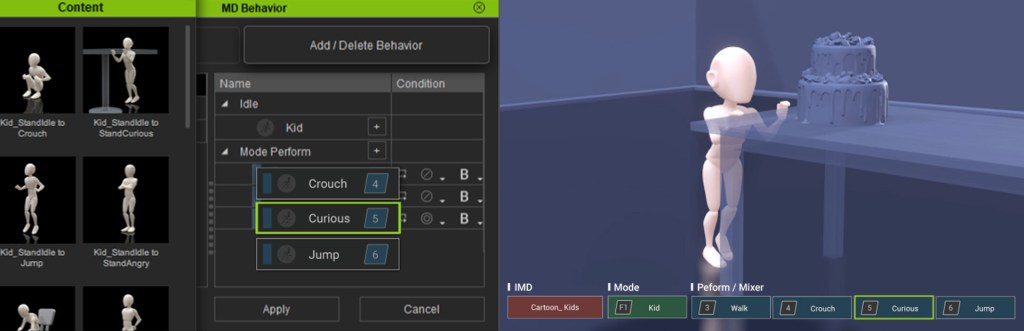
Last but not least, this update introduces the Motion Director (MD) Editor, providing an infinite range of options to customize and interact with MD toolsets. This allows you to precisely steer characters around the scene and trigger motion sequences precisely as desired.
Know more: Motion Director Official Page | MD Editor Tutorials


Feature Highlights
Complete Toolchain
Most existing crowd simulation solutions are composed of plugins for off-the-shelf software such as 3ds Max or Maya. This fragmentation commonly lacks readily available assets for immediate production and is frequently priced beyond the means of smaller studios. In contrast, Reallusion has developed a comprehensive character production and crowd simulation toolchain that is both practical and affordable for real-time simulation.
This toolchain includes a spectrum of tools ranging from 3D character creation (Character Creator) and character animation (iClone) to an extensive library of motion and character assets (Actorcore), complemented by an asset developer ecosystem comprising the Content Store and Marketplace. The integrated suite empowers users to design custom characters tailored to specific thematic needs and seamlessly integrate personalized animations, including complex crowd behavior.

Environment Setup
Designating the traversable area on an imported 3D environment is mostly automatic. Your scene can comprise multiple elevations connected by ramps and stairs. iClone seamlessly detects accessible areas and promptly updates the NavMesh whenever new objects are introduced. It integrates navigable inclines and distinguishes between passable and obstructed zones. Live NavMesh updates can dynamically adjust to changes, such as the movement of automatic sliding doors. Learn more about NavMesh: Tutorial | Manual.

Walkway for Foot Traffic
Establish footpaths with simple mouse clicks, modify road curvature and width by dragging control points, and automatically identify surfaces conducive for movement. Seamlessly close paths to create continuous loops, connect individual paths to craft passages or intersections, and fine-tune the probability of selecting specific routes. Learn more about WalkWay: Tutorial | Manual.

Flexible Character Spawning
Choose the target location for spawning actors, whether it’s a 3D model, a user-defined volume, a walkway, or the entire NavMesh. Have the flexibility to specify the crowd size, formation, density, facing direction, and observe their actions upon placement in the scene. Male, female, elderly, or child actors can automatically adopt appropriate animation styles, with adjustable probability ratios among idle, walking, jogging, and other performances. Learn more about Spawning Actors: Tutorial | Manual.

Smart Avoidance and Flocking
Incorporating natural crowd dynamics, this iClone crowd simulation lets characters maintain distancing and formations while circumnavigating obstacles, irrespective of their movement styles and speeds. Through the use of agent radius, detection times, and wait-and-move cadences, the simulation can minimize backtracking and unravel pedestrian bottlenecks. Learn more about Avoidance Tutorial >


Directable Characters
Easily generate realistic characters with intricate facial expressions, various accessories, and diverse animation styles, ideal for populating crowd scenes at any distance. Users have the flexibility to manage characters collectively or individually, employing keyboards, game controllers, or mouse-click waypoints to direct their locomotion. Learn more about Crowd Generation Tutorial >

Ambient Animation with ActorGroups
ActorGroups are equipped with pre-defined, loopable animations for standing, sitting, and talking, enriched by an array of accessories, facial expressions, and genuine social interactions. They enhance scenes by introducing randomized actors, materials, and motions, or by crafting bespoke ActorGroups, further enlivening the overall experience. Learn more about ActorGroup: Applying Preset Actor Group – Tutorial | Manual. Applying Random Actor Group – Tutorial | Manual.


Alternate Performance and Versatility
Enjoy the flexibility of converting characters into Lite actors when system resources are constrained or when optimizing for heavy crowd simulations. Choose to revert Lite actors back to Edit mode for precise control over their movements using Motion Director along with a diverse range of input controllers.

Motion Director Editor
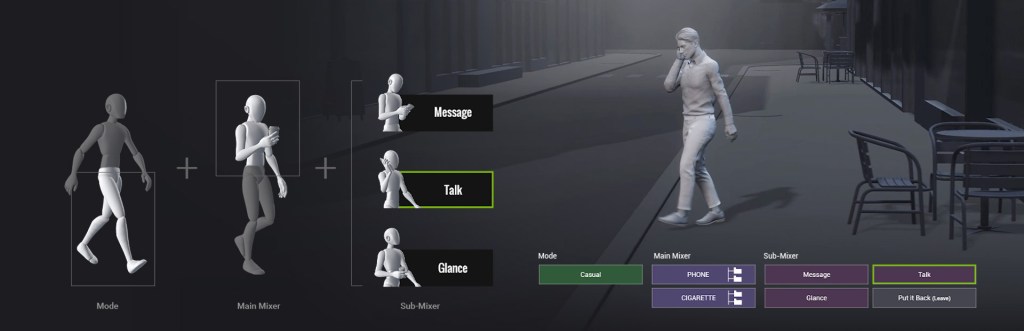
Motion Matching has been integrated for smooth navigation control, enabling easy addition of new idle and perform triggers to Motion Director via drag-and-drop interface. Motion Mixer lets users direct upper-body motions while the legs are controlled by standing, walking, or jogging iMD states. Moreover, the Mixer features specific sub-mixer actions, enabling actors to perform tasks like making a call, sending a message, or simply glancing at a handheld device. Know more about Motion Director Official Page | Tutorial | Manual
Customization and Expansion
Access the ActorCore roster to enlist scanned actors and their matching mocap loops. Use Character Creator to design modular actors, decimate the mesh for massive crowd simulations, or auto-rig with AccuRIG. Spawned crowds can be randomized based on user-defined actor and motion lists that match them with predefined accessories and material options.
Pipeline and Render
Effortlessly export animated characters to your preferred 3D tool or game engine. Native Auto Setup plugins are available at no cost, offering pre-configured model and material setups for Blender, Unreal Engine, and Unity. Moreover, Live Link supports synchronization with the Unreal Engine and NVIDIA Omniverse, enabling a two-way workflow. Upcoming support is also in the works for 3ds Max and Maya.

Startup Assets
iClone includes 8 crowd characters, each featuring 5 texture options. To enhance your crowd simulation experience, consider obtaining the two essential packs for additional crowd extras. For a broader selection of 3D actors offering loopable ambient motions created from authentic mocap data, explore the vast offerings available in ActorCore.

Modern People Sampler
31 scanned actors are available with full-body rigging, encompassing various genders and ages. These individuals offer a rich array of animation possibilities using Crowd Generation and the dynamic spawning features of ActorGroups. Each character is equipped with 5 texture options, allowing for both random and specific visual variations, enhancing the diversity and realism within your animations. Know more about Modern People Sampler >
Social Actions
“Social Actions” is an ambient crowd animation pack designed to utilize the dynamic spawning system for ActorGroups. Effortlessly bring scenes to life with individuals standing, sitting, engaging in conversation, or naturally interacting with close ones. Comprising 90 mocap animation loops for endless background animation, each detailed with authentic facial expressions and digitized in MotionPlus format, this pack is compatible with any project. Know more about Social Actions >