


School of Motion: Elevating the Art of Motion Design


School of Motion has long been a trusted authority in digital creativity, known for transforming how artists learn motion design and animation tools. Founded by Joey Korenman, the platform was created to cut through the noise of YouTube tutorials and bring foundational, career-level training to aspiring and professional creatives alike. From After Effects and Cinema 4D to Photoshop and 3D workflows, School of Motion’s mission is simple: break down the barriers to learning, mastering, and working in motion design.
In a recent Motion Mondays episode, the team gave a first-look reaction to AccuRIG 2, the latest upgrade to Reallusion’s free auto-rigging tool. What caught the attention of School of Motion? A powerful, user-friendly rigging tool that not only rivals Mixamo—but actually surpasses it in key ways.
Let’s unpack what makes AccuRIG 2 a standout option for 3D animators and motion designers.
What Is AccuRIG 2?
AccuRIG 2 is Reallusion’s upgraded character auto-rigging solution designed to provide fast, intuitive rigging for static 3D models. Think of it as a smarter Mixamo alternative—with modern features tailored to today’s animation pipelines.
According to the review, AccuRIG 2 builds upon the core auto-rigging tech of its predecessor, but now integrates deeply with Reallusion’s ActorCore motion library—enabling creators to quickly rig characters and preview animation packs before exporting.

Key Features of AccuRIG 2
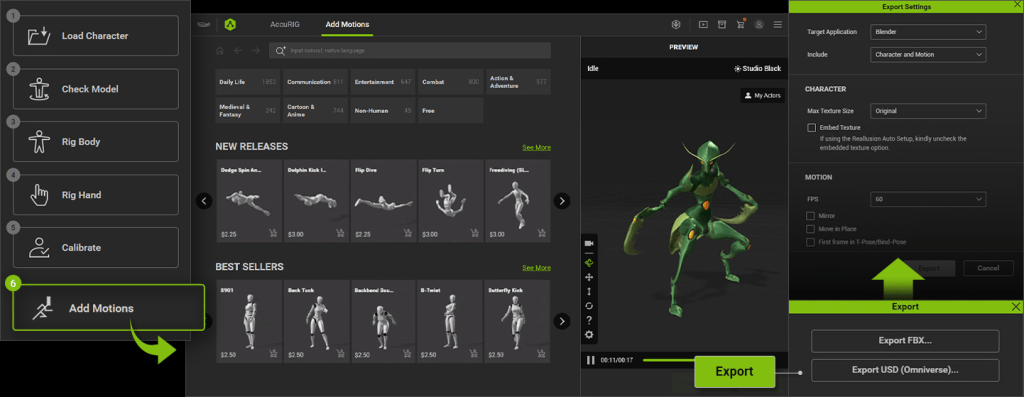
1. ActorCore Motion Integration
One of the headline features is direct integration with Reallusion’s ActorCore, a massive library of professionally captured animations.
“It adds the ability to apply animations from their ActorCore motion library to your rigged characters.”
EJ Hassenfratz | Creative Director @ School of Motion
This allows you to preview, test, and apply motion clips to your characters—no export/import hoops required.

2. Group Motion Support
AccuRIG 2 supports group animations, allowing users to assign synchronized motion clips to multiple characters in the same scene. This is a big win for game developers and filmmakers working with ensemble scenes.
“One thing that AccuRIG 2 adds is group motion support for animations involving multiple characters.”
EJ Hassenfratz | Creative Director @ School of Motion
3. Natural Language Search
Finding the right animation is often a time sink. AccuRIG 2 solves this with natural language search, letting you type “run forward,” “jump and land,” or “angry walk” and immediately find matching clips.
This feature isn’t just convenient—it’s workflow-transforming for teams with tight deadlines.
4. DCC Export Presets
AccuRIG 2 supports custom export presets for nearly every major DCC platform:
- Blender
- Cinema 4D
- Unreal Engine
- Maya
- 3ds Max
- Unity
No more fidgeting with export settings or retargeting rigs post-import. AccuRIG does the work for you.


“Export presets for pretty much every major DCC software like Blender, Cinema 4D, Unreal… you name it.”
EJ Hassenfratz | Creative Director @ School of Motion
Why It Beats Mixamo
While Mixamo has long been a staple for beginner rigging and mocap, its development has stalled, and the toolset hasn’t seen meaningful updates in years.
Here’s how AccuRIG 2 compares:

| Feature | AccuRIG 2 | Mixamo |
|---|---|---|
| ActorCore motion integration | ✅ Yes | ❌ No |
| Group animation support | ✅ Yes | ❌ No |
| Natural language search | ✅ Yes | ❌ No |
| Active development | ✅ Frequent updates | ❌ Rare updates |
| DCC-specific export | ✅ Presets for Blender, UE, etc. | ⚠️ Basic FBX export |
| Price | ✅ Free | ✅ Free |
“It’s definitely worth checking out—especially if you need more power and more recent updates than Mixamo provides.”
EJ Hassenfratz | Creative Director @ School of Motion
Ideal for Indie Filmmakers, Game Devs & Studios
Whether you’re an indie developer working solo or a team of animators building cinematic sequences, AccuRIG 2 offers a significant productivity boost:
- 🚀 Previz Pipelines – Quickly rig characters and test animation packs
- 🎮 Game Development – Use ActorCore motions and group syncing in Unity or Unreal
- 🎥 Virtual Production – Export to DCCs like C4D or Blender for final animation
- 💼 Studios – Integrate seamlessly with production tools via FBX, USD, or native formats
Free to Use, Easy to Learn
One of the most impressive aspects is the pricing: AccuRIG 2 is completely free. You can download it now without any licensing fees. While ActorCore animations come in both free and premium options, the rigging software itself doesn’t cost a thing.

This makes it an ideal choice for:
- Indie studios
- Students
- Freelancers
- Educators
Conclusion: A Smarter Rigging Alternative Is Here
Reallusion’s AccuRIG 2 is more than a Mixamo competitor—it’s a next-gen auto-rigging tool built for today’s fast-paced creative pipelines. With ActorCore integration, natural language search, multi-character animation, and DCC-ready exports, it solves the common pain points 3D artists face when rigging and animating characters.
For 3D animators, game devs, and content creators, this tool isn’t just worth checking out—it’s worth integrating into your daily workflow.
FAQs
Is AccuRIG 2 better than Mixamo?
Yes, AccuRIG 2 offers features Mixamo doesn’t, including ActorCore animation integration, group motion, and native exports for DCC software.
Is AccuRIG 2 free?
Yes, the software is 100% free. You only pay for premium ActorCore animation packs if needed.
Can I use AccuRIG 2 with Blender or Unreal?
Absolutely. AccuRIG 2 includes export presets for Blender, Unreal Engine, Cinema 4D, and more.
Does AccuRIG support mocap animations?
Yes, you can apply mocap-style animations from ActorCore’s motion library directly to your characters.
Who should use AccuRIG 2?
Anyone working in 3D—animators, indie game devs, motion designers, and students—will benefit from AccuRIG 2’s efficiency and features.
Related Posts
- AccuRIG 2 Debuts Direct In-App Access to 4,500+ ActorCore Motions
- Reallusion Releases ActorCore Mobile View & Web Embed for the Best Interactive Online Presentations

