



Aharon Rabinowitz
With over 25 years of experience in filmmaking, animation, VFX, and software design, Aharon Rabinowitz is a respected name in the creative industry.
Through his work he has helped brands bring stories to life using cutting-edge tools. Formerly part of the leadership team at Red Giant/Maxon, Aharon is now the VP of Marketing at School of Motion.
His educational content has empowered thousands of artists worldwide, and in this detailed tutorial, he takes on a common challenge faced by animators and Unreal Engine users: retargeting ActorCore animations to the UE5 mannequin.
Why Use ActorCore for Animation?
ActorCore by Reallusion is known for its high-quality motion capture (mocap) animations, covering a wide range of realistic movements—from idle stances and walks to complex combat and interaction sequences.

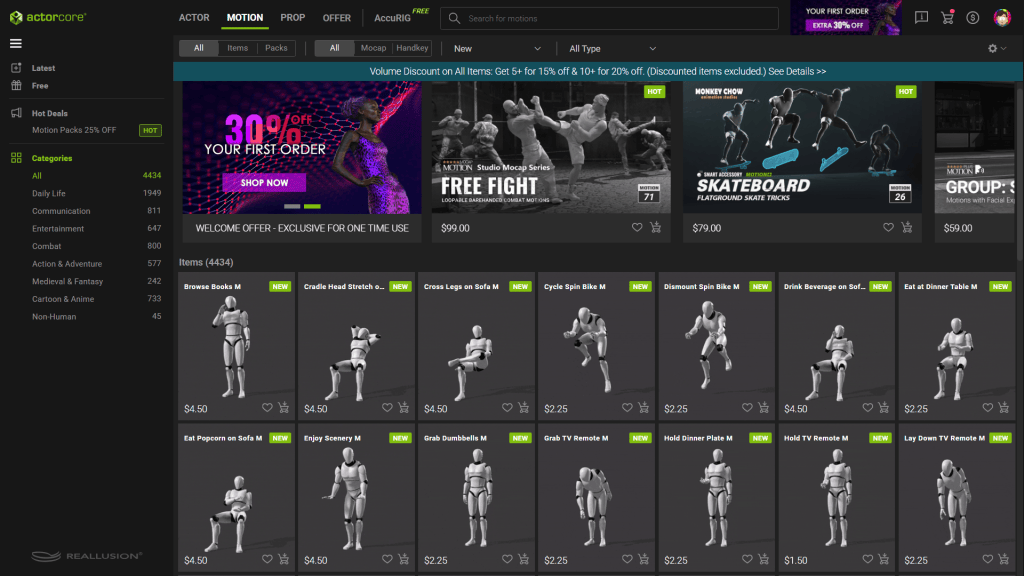
These animations are:
- Professionally captured and cleaned
- Featuring a broad range of motions
- Cost-effective and accessible
- Offering ready-to-use FBX formats
- Compatible with real-time engines like Unreal Engine 5
Despite their quality, retargeting ActorCore motions directly onto UE5’s skeletons can create issues when using the auto-retargeting system in Unreal.


The Challenge: Auto Retargeting Doesn’t Work Perfectly
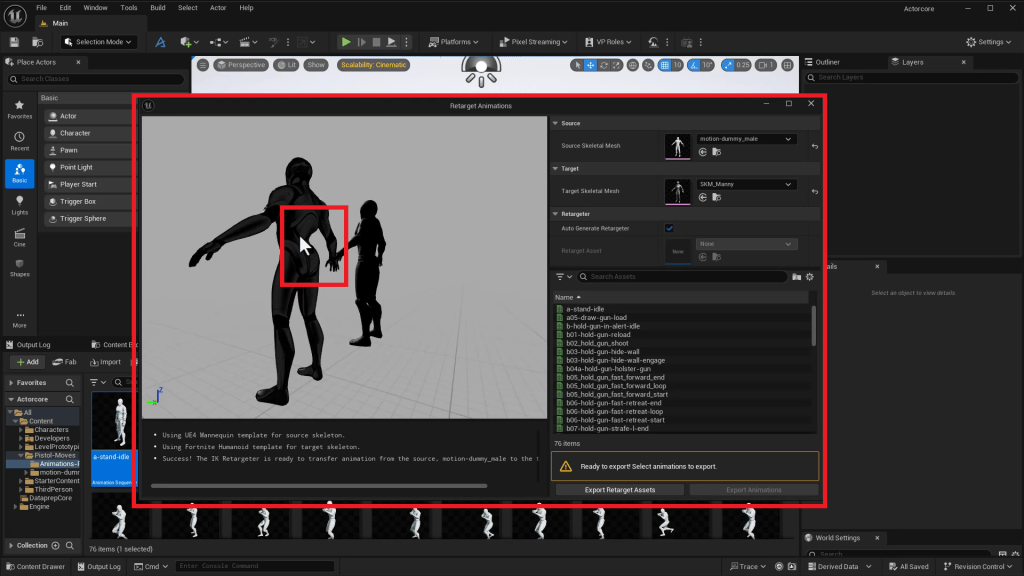
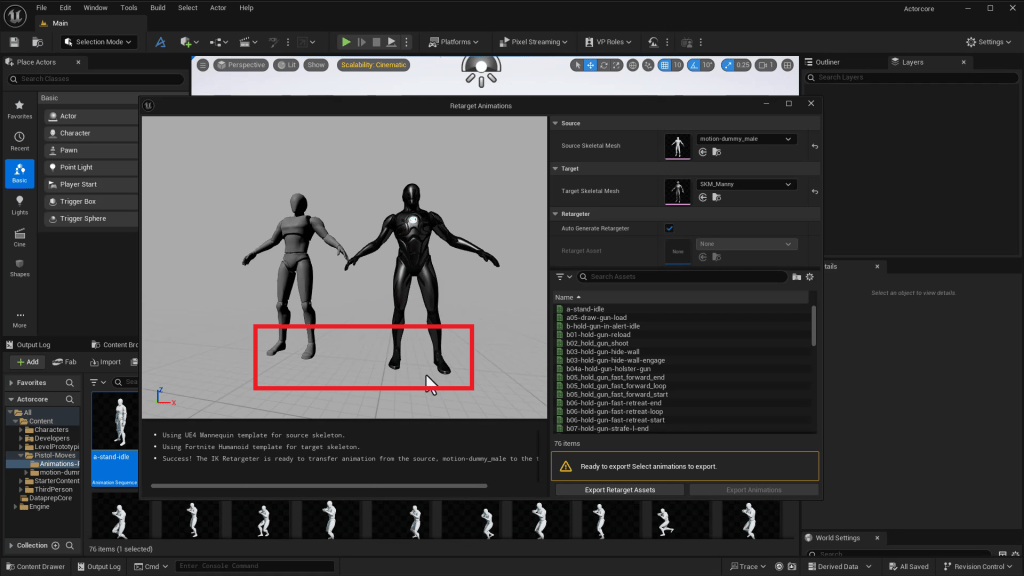
While Unreal Engine 5 features a robust auto-retargeting system, there are incompatibilities between the ActorCore skeleton and UE5’s SK_Manny mannequin. Aharon demonstrates that a simple retarget results in unnatural poses, with issues like:
- Bent spines
- Incorrect foot placement
- Misaligned arms and shoulders
These issues stem from differences in bone hierarchy, particularly in the spine and limbs. So, how do you fix it?
Step-by-Step: Retarget ActorCore Motions to UE5 Mannequin
1. Set Up ActorCore and UE5 Skeletons in Unreal Engine
Import your ActorCore animation library into Unreal Engine 5. Locate your ActorCore skeleton (e.g., MotionDummy_Male) and the UE5 mannequin (SKM_Manny).
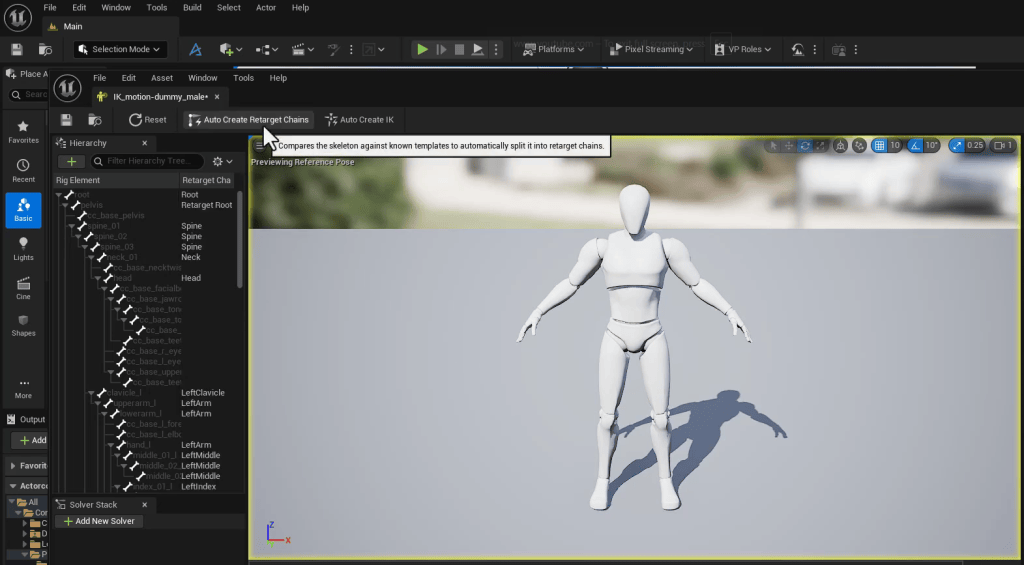
2. Create IK Rigs for Both Skeletons
IK (Inverse Kinematics) rigs allow Unreal to interpret skeleton movement more accurately. Here’s how:
- Right-click on the ActorCore skeleton and select Create > IK Rig
- Inside the rig, use Auto-Create Retarget Chains
- Click Save and exit
Repeat the above steps for the SKM_Manny skeleton.

3. Build a Custom Retargeter
Now that both skeletons have IK rigs:
- Right-click on your animation folder
- Choose Retarget Animations > IK Retargeter
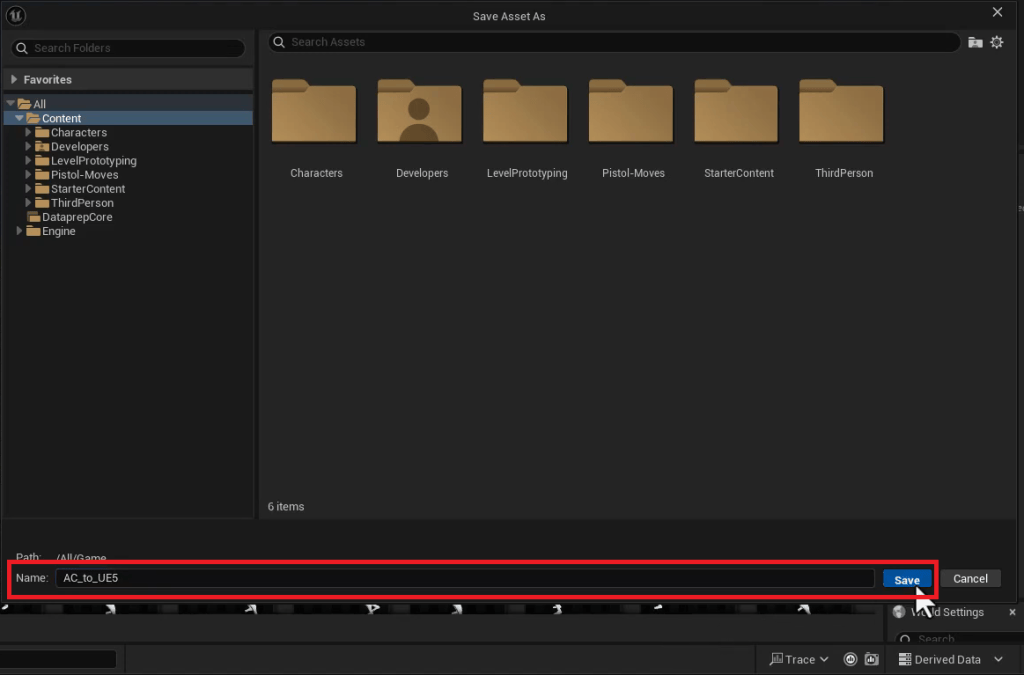
- Save the retargeter at the root level and name it something like
AC_to_UE5

4. Assign Source and Target IK Rigs
Open the new retargeter file and set:
- Source IK Rig to
MotionDummy_Male - Target IK Rig to
SKM_Manny
In the Preview Settings, adjust the Target Mesh Scale (e.g., 1.05) to align the character heights visually.


Manual Corrections to Fix Retargeting Errors
Even with IK retargeting, some bone misalignments can persist. Here’s how Aharon adjusts them:
Adjusting the Legs and Feet
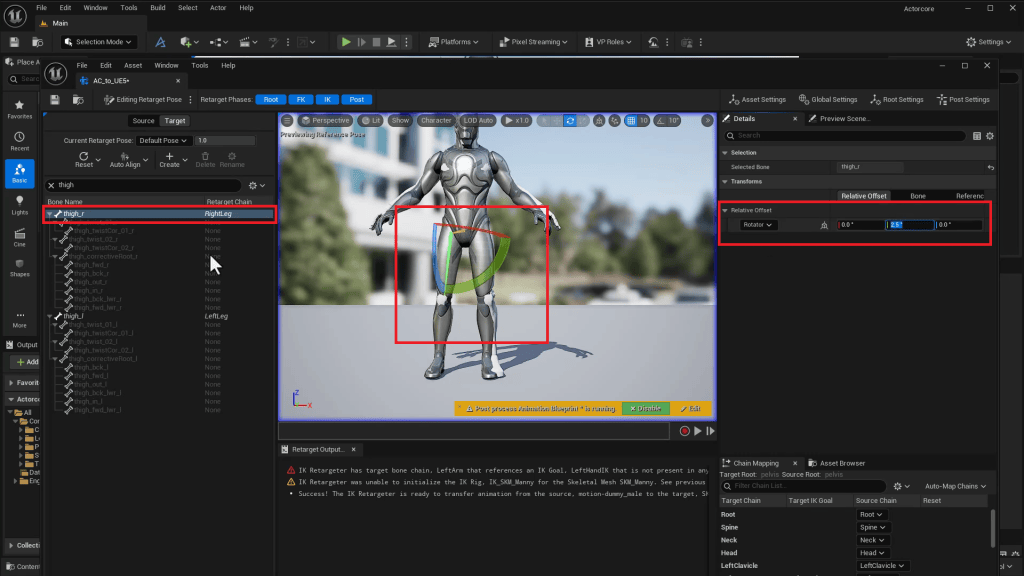
- Select Right Thigh and set rotation offset (e.g.,
2.5°) - Repeat for Left Thigh
- For feet, rotate to a natural standing position (e.g.,
-5°on both)
Adjusting the Arms
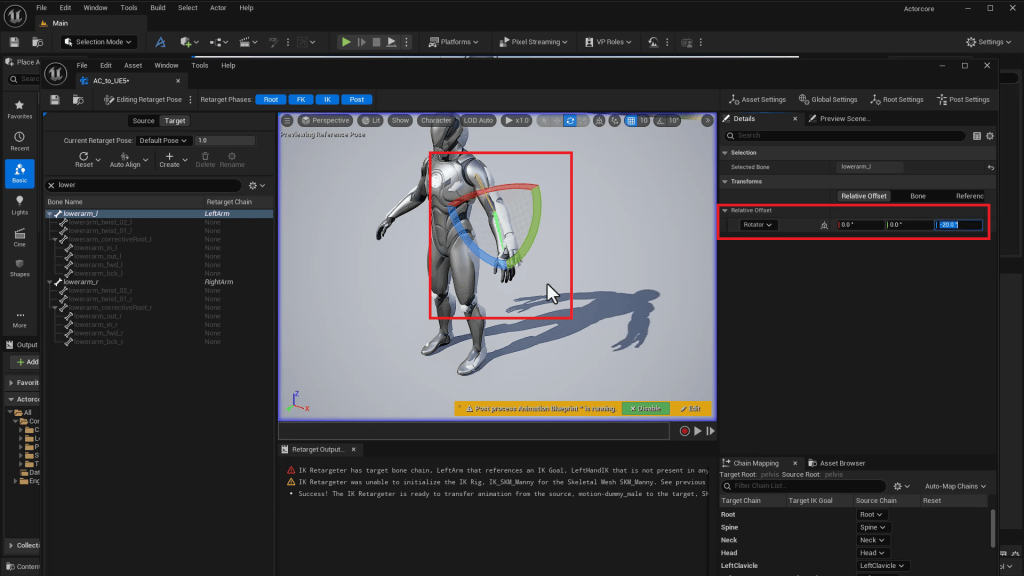
- Lower Arms may require a
-20°rotation to straighten - Upper Arms can be lifted slightly (e.g.,
5°rotation)
These edits are not perfect but produce significantly improved results.
Finalizing and Testing Retargeted Animations
Once your manual tweaks are in place:
- Save your IK retargeter
- Go back to the animation folder
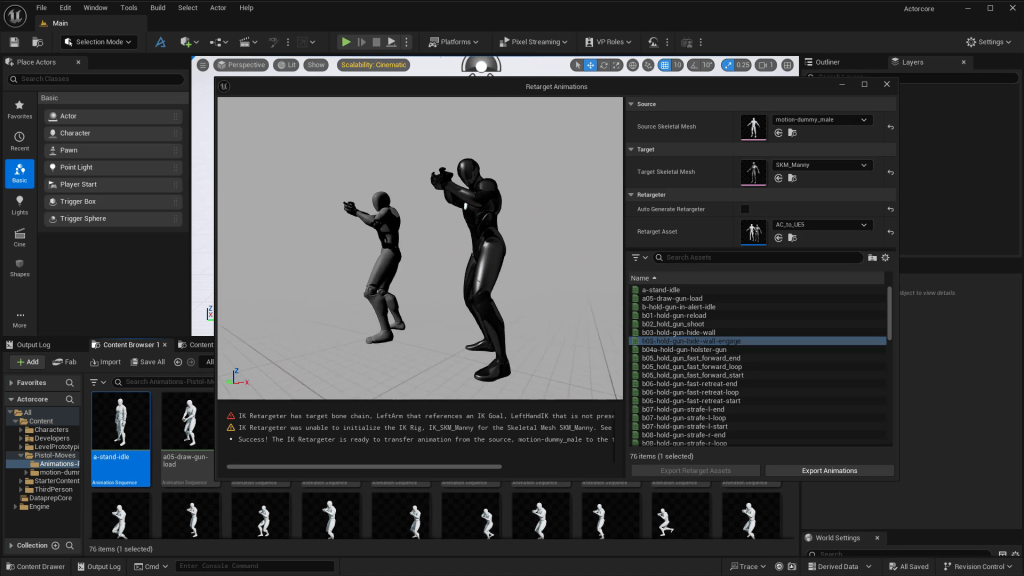
- Right-click > Retarget Animations
- Select SKM_Manny as the target and choose
AC_to_UE5as the retargeter
You’ll see the animation now preserves the original motion with improved posture and realism.
Tips for Finessing Animation Retargets
Aharon recommends the following:
- Compare the Retarget Animation window side by side with the IK Retargeter
- Use mirror rotation settings for symmetrical limbs
- Use small adjustments (e.g.,
-10°,+8°) to fix interpenetration issues (like hand crossover) - Always save your work at each stage
While you won’t get a perfect match every time, you’ll achieve production-ready quality without complex scripting or re-rigging.
Advantages of This Workflow
✅ Professional Mocap Library: ActorCore offers affordable, industry-grade mocap.
✅ Customization Control: Manual retargeting allows for precision edits.
✅ Real-Time Ready: Seamlessly integrates with Unreal Engine 5 for interactive media, games, and virtual production.
✅ Reusable Assets: Create a reusable retargeter for future projects using the same skeletons.
✅ Time Efficiency: IK Rig + Manual Tweaks > Rigging from Scratch
Other Software Mentioned
While the focus is on Reallusion ActorCore and Unreal Engine 5, this pipeline can also integrate with:
- iClone for real-time animation and preview
- Character Creator to generate characters with precise bone structures
- Blender or Maya for additional mesh cleanup
Conclusion
If you’re a 3D animator, game developer, or content creator using Unreal Engine 5, Reallusion’s ActorCore animations are a powerful, professional resource. With Aharon Rabinowitz’s step-by-step process, you can overcome retargeting challenges and bring high-quality motion data into your UE5 projects with ease.
Start building your retargeter today—unlocking more control, better realism, and faster workflows for your animations.
Follow Aharon Rabinowitz
YouTube:
https://www.youtube.com/c/aharonrabinowitz
Instagram:
https://www.instagram.com/aharonrabinowitz/
LinkedIn:
https://www.linkedin.com/in/aharonrabinowitz
IMDb:
https://www.imdb.com/name/nm1176390/
FAQ
What is ActorCore?
ActorCore is a mocap animation platform by Reallusion offering ready-to-use animations compatible with various 3D software.
Why doesn’t Unreal’s auto-retargeter work with ActorCore?
Differences in skeleton hierarchy, especially in spine and limbs, lead to misalignment. Manual IK retargeting fixes these issues.
Can I use this retargeter for future projects?
Yes, once you’ve built a custom IK retargeter for the ActorCore and UE5 skeletons, you can reuse it.
Is this workflow suitable for games?
Absolutely. The final animation is compatible with UE5 and can be used in real-time game environments.
Does ActorCore work with MetaHumans?
Yes, but it may require similar IK retargeting adjustments to align with MetaHuman rigs.
Related Posts
- AccuRIG 2 vs Mixamo: Smarter Auto-Rigging for 3D Animators
- Animate Epic Fight Scenes with ActorCore and MetaHumans
- Animating Commercial Quality Film with CC UE Control Rig

