

Reallusion will soon release Cartoon Animator 4, the next iteration of the easy to learn, professional, 2d animation studio software, CrazyTalk Animator.
To learn more about the new program, the 2D animation specialist David Arandle to talk about some of its new features and how they will benefit his workflow. So without further delay, we’re going to turn things over to Arandle and let him tell you all about Cartoon Animator 4…
Hi everyone! My name is David Arandle. I’ve used CrazyTalk Animator 3 in my animation business, creating low-cost animated explainer videos, taking advantage of the application’s time saving features, intuitive GUI (graphical user interface), and the high-quality content packs available in Reallusion’s Content Store.
However my real passion is character animation, specifically seeing my own cartoon characters come alive. CrazyTalk Animator 3 makes character animation easy with its G3 range of character rigs that can be imported directly from artwork created using Photoshop character templates.
Cartoon Animator 4 will have all of the features of CrazyTalk Animator 3 as well as bringing plenty of new tools that will make classic cartoon style character animation so much easier and even more intuitive. These features will be a real benefit in making the process of character animation much easier.
Smart Inverse Kinematic/Forward Kinematic System
Cartoon Animator 4 includes a new Inverse Kinetic/Forward Kinetic Graphical User Interface that specifically makes it easier to get your characters realistically interacting with their environments. The general process involves locking character limbs such as hands and feet into place, constraining the rest of the character rig to movement based upon which limbs have been locked. It also gives you options to stretch limbs while they are being constrained.
CrazyTalk Animator 3 already has IK constraints in a very limited way (as a single checkbox on the 2d Character Motion Editor), Cartoon Animator expands this into an entire graphical user interface with more constraint options. For my own work this feature alone will make it even easier to create custom cartoon squash-&-stretch style motions, and to properly anchor a character within their environment for more realistic interaction.

Motion Retargeting
One of CrazyTalk Animator’s key time saving features is the ability to create and save motion files for reuse with many different characters. However this doesn’t always produce the desired results when characters are of a different proportion to what a particular motion was designed for. Retargeting allows you to scale the motion so it works as intended for characters of all sizes.
In my own work, I save character motion files all the time and may use them with different characters in multiple projects. Being able to scale a motion file, with Cartoon Animator’s retargeting tool to fit the proportions of any character, simply by adjusting a few sliders, is a huge time saver, doing away with, potentially, hours of key frame adjustments.

Standard and Custom IK Rigs
IK Rigs are the bone structure used to animate 2d characters in Cartoon Animator. In other animation applications you usually build these into each character from scratch. Cartoon Animator saves you time by utilizing standard rigs for the most common character types: human, quadruped, winged, and spines. The rigs can be adjusted to suit characters of different proportions, but otherwise they contain identical structure.
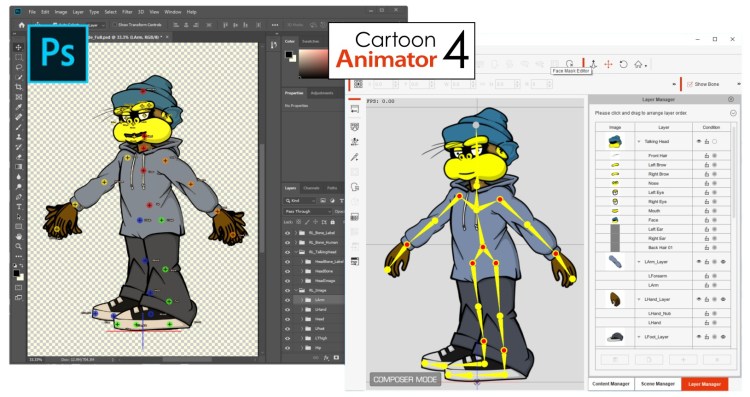
This is why it’s possible to apply the same motion to any character that uses the same standard IK rig. For me it’s a real time saver that allows me to think more about character design and less about bone structure. Standard IK rigs automatically include end effector presets for the smart IK system.
If your work includes a lot of non-standard character types, Cartoon Animator’s G3 Freebone characters allow you to build IK bone rigs from scratch, and include the option of creating custom GUI motion editors so you can animate them as easily as characters which use the standard bone rig templates.

Purchase a CrazyTalk Animator 3 Bundle and Get Cartoon Animator 4 Free
Exciting things are coming with Cartoon Animator 4, and these features are just the beginning. Reallusion will be releasing more work in progress announcements in January 2019 where we may see more detail about features such as their new G4, 360-degree character head creator. Cartoon Animator 4 is expected to officially launch in April 2019.
Reallusion is currently offering special bundle deals which include CrazyTalk Animator 3 along with a selection of bestselling content to get you animating right away. Purchase any of these bundles and you’ll receive a copy of Cartoon Animator 4 for free when it officially launches.




1 comment
CTA4 has all the features of CTA3. Is it correct ?
I am using CTA2. I saw offer of buying CTA3 + Holiday bundle to GET CTA4 free.
But, if CTA4 has all the features of CTA3, then buying CTA3 to get CTA4 free is of no use. Instead, I can buy content to get CTA4 free. Is this correct assumption ?