Hello, my name is Roumen Filipov and for those who don’t know me, I’m a 3D artist / Senior 3D Character artist at Chief Rebel, specializing in creating stylized characters for AAA and mobile games.

Creating a 3D character can be both time and energy-consuming, yet there’s arguably nothing better for presenting all the awesome polygons than making them move and look alive. This is exactly where AccuRIG, the newest auto-rigging tool developed by Reallusion, comes in to save the day.
This free software allows the artist to import any humanoid 3D character and in a matter of minutes, create a body rig with a really high quality of deformation. They can then export the rigged model as standard formats like FBX or even upload it to the ActorCore website and play with a huge variety of mocap animations for their project, all easily compatible with famous platforms to display real-time models like Sketchfab and Marmoset Toolbag.
In this article, I’ll take one of my 3D characters through the entire rigging process in AccuRig and hopefully open the doors for many other artists to improve their workflow with this awesome new tool.
IMPORTING INTO ACCURIG
Importing a model inside AccuRig is as simple as dragging the FBX file straight into the window. It supports characters composed of multiple models, including props and accessories, as well as a variety of bind poses and proportions, symmetrical or not. The software will always calculate a working skeleton for the model even if the structure is not initially the most accurate, which leads to one of the best features of this tool: fine-tuning bone placement by hand.
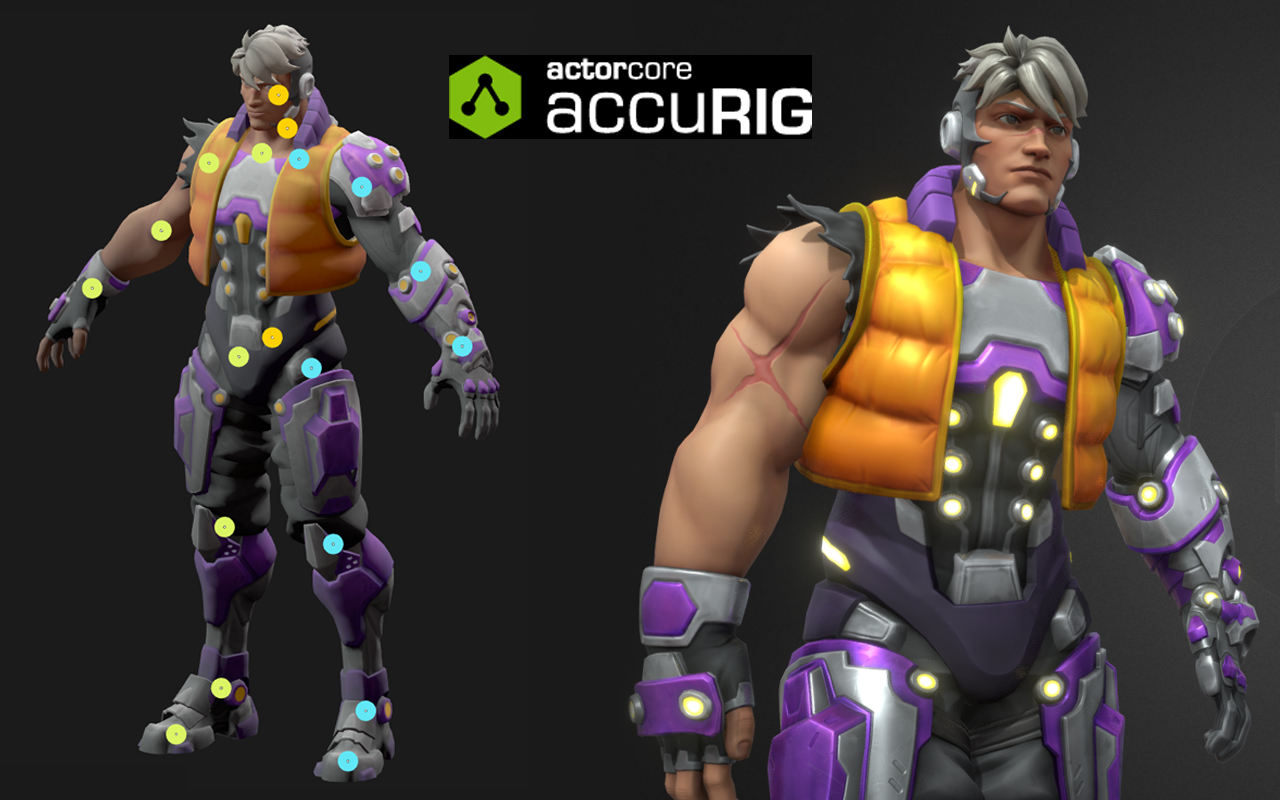
In this example, the character has a fairly good topology and is in an A Pose. Shortly after importing and making sure it’s aligned to the center, the rig is created and then each bone’s position is displayed on top of the model by semi-transparent circles which you can tweak the size and opacity. It’s possible to drag these with your mouse to tweak the placement and activate symmetry to move both sides at the same time. The tool even has placement assistance options to speed up the process and a very handy reference box on the top-right corner of the screen for which bone it’s being selected and where it should be correctly placed on the body. Once you’re happy with the overall body skeleton, the next step is placing the finger bones of the hand for extra precision. This step in particular is a huge improvement over other available tools out there and avoids the usual “soft” and weird bending fingers.

Once happy with the bone placement, all that remains is to click on the Finalize Character button and wait for the calculation to be done in order to see the character finally moving on the screen. From this point on, the artist can check if all deformations are looking good by loading a few animations available on the top right corner of the screen. One of the nice features at this stage is that it’s possible to select each bone of the rig and adjust its offset if the animation has some clipping, or just to enhance the pose overall.

After following these simple steps, the model is pretty much done and ready to be exported to be used in any 3D application.
In the example case, the character was sent directly to ActorCore with just a click of a button and it was ready to retarget any from a huge variety of mocap animations. From that point on, it was very fast and easy to select a walk animation and export it to be used in Sketchfab with some proper lighting and materials

All that can be said about AccuRig is that it’s definitely a game changer and definitely a big upgrade from similar tools like Mixamo. The easy and fast workflow combined with a high-quality result is surely a must for character artists wanting to take their models to the next level.

AccuRig is a standalone free software and can be downloaded directly from https://actorcore.reallusion.com/auto-rig
Follow Roumen:
Sketchfab:
https://sketchfab.com/roumen.filipov
ArtStation:
https://www.artstation.com/roumenfilipov
Facebook:
https://www.facebook.com/roumen.filipov
LinkedIN:
https://www.linkedin.com/in/roumen-filipov-135a8459/
Instagram:
https://www.instagram.com/roumenfilipov/
YouTube:
https://www.youtube.com/channel/UCe07-XLVaXezA7WhL5qfSew