Daniel Pojda
Hi, I’m Daniel hailing from Poland. I’m a designer who dabbles in digital content creation for e-learning, animations, instructional videos, and interactive graphics. No matter what kind of work I do, animation remains my favorite hobby that gives me great satisfaction.
Spaceships and Cosmic Voyages, but Why?
Since childhood, I’ve been fascinated by space travel. I loved watching movies like 2001: A Space Odyssey, Star Wars, and Blade Runner. When I learned about the new features in the Cartoon Animator 5.2 update, I immediately envisioned an animation of a spaceship flying in outer space, with its hull reacting to flight direction and speed.
How to Start Creating 2D Animation
To begin with, I didn’t plan on making an entire animation, instead, I just wanted to create a spaceship in a graphics program. Afterwards, I considered which parts would need to be animated using Spring Bones and which parts would need to use the Sprite Editor.

Thanks to new features like Motion Pilot and Motion Path, my standard animation workflow has improved significantly. Now, I can focus more time on the details, including secondary animations for the rocket’s spinning fan, blinking light, and rocket engine.

Testing the movement of the spaceship with Motion Pilot inspired me to tell a more complex story. Thus, “Paper Dreams” was born, depicting a little boy’s dream of a journey through space and time.
Animating a Story using Motion Pilot and Path Animation
The story is acted out in two settings: the present, depicted as the peaceful life of a little boy in the countryside; and the future, in an imaginary cosmic space. The new animation function in Cartoon Animator 5.2 gave me the ability to fill in many details. For example, the present scene is filled with dozens of animated objects that contribute to the ambiance. By combining Motion Pilot and Spring Bone functionality, I was able to very quickly create animated flowers and grass. The time saved allowed me to add a spinning windmill, a moving tractor on the farm field, farmhands, and even a crowing rooster!

With Motion Path Animation, I quickly animated the paper airplane along a flight path. The ability to use different objects on the same path allowed me to effectively transition from one timeline to another.

Customizing Ready-Made Characters
Considerable thought went into the creation and animation of 2D characters since I needed to portray the same person at different ages. It was important to maintain similar features between the two versions of the same character.

The library of ready-made characters in Cartoon Animator made it easier to alter individual elements on the characters. I could mix and match various visual elements by using whatever was available in the Content Manager or by creating new projects if needed. Because I aimed to display my characters from various angles, I managed to create the front and back sides of my characters by swiftly adjusting the layer order in Composer mode. This feature alone makes Cartoon Animator an exceptional 2D character creation program.
Putting Lip-Sync Animation onto 2D Characters
Utilizing and modifying characters already available in Cartoon Animator 5 has another advantage: they are ready for lip-sync. I simply added a premade sound file to the timeline to perfectly synchronize the character’s lip movements with the voice. This enjoyable process required minimal adjustments

Adjustable Colors for Vector Graphics
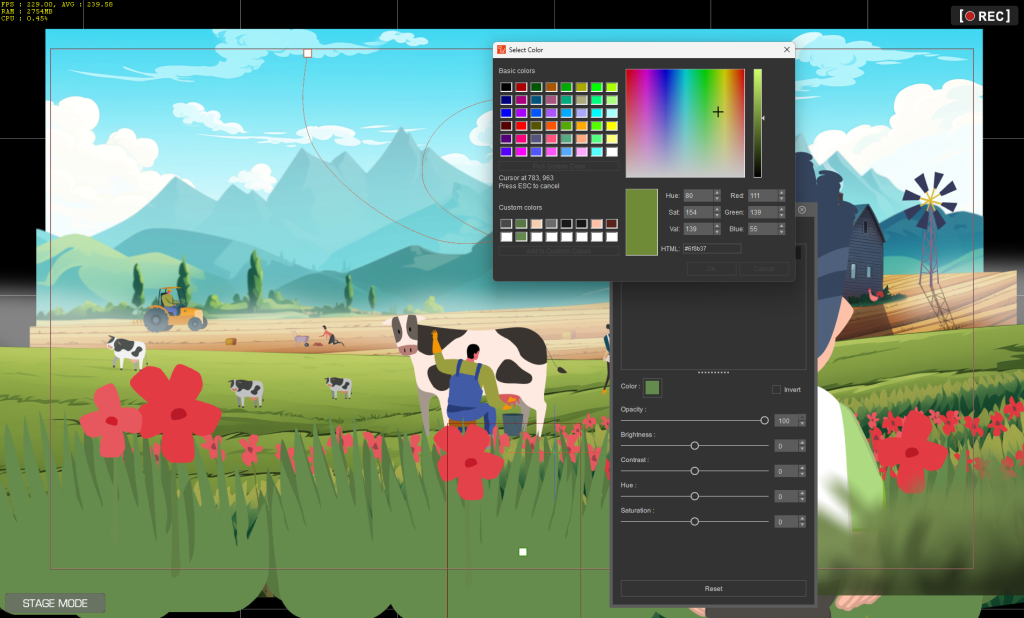
While animating, I always pay attention to consistency, especially when it comes to visuals. By using vector graphics, I was able to add objects and color them in real-time. This way, I could perfectly match the colors of the moving elements like grass or meteors to the backgrounds.
Cartoon Animator Streamlines the Workflow
Cartoon Animator 5 has significantly enhanced my experience and efficiency as an animator. The new intuitive features, such as Motion Pilot and Motion Path, have streamlined my animation process. By reducing the time and effort required for the technical aspects of 2D animation, Cartoon Animator 5 has enabled me to devote more time to creativity, focusing more on the finer details and storytelling.
The software’s versatility in handling various aspects of animation — from creating characters and synchronizing lip movements to editing vector graphics on the fly — allows me to experiment with diverse styles and techniques. This flexibility is invaluable, helping to keep my work fresh and innovative, which is crucial in the rapidly evolving field of digital content creation.
Related Posts
- Vector Graphic Animations For Cartoon Animals
- How to Create Engaging Interactive Learning Materials | Cartoon Animator
———————————————————————————————————————————————————————————————————
The original article is written by Daniel Pojda and also featured on AWN.