TL;DR:
- Alejandro De Pasquale integrates iClone 8 and Character Creator 5 with AI Studio to precisely guide AI video generation.
- The workflow leverages Perception Neuron MOCAP data for realistic character animation, ensuring consistent character identity across AI productions.
- Users can choose between full texture transfer, gray model, or dummy character modes for varying degrees of AI creative freedom.
- iClone PERSONAL is now free, removing barriers for new users to explore AI-guided animation workflows.
Welcome to AI Storytellers, a new series from Reallusion that explores the creative possibilities of AI Studio through the eyes of storytellers. In each episode, we’ll go behind the scenes with creators, filmmakers, artists, and innovators to discover how they’re using AI Studio to develop characters, build worlds, and bring their stories to life.
This article outlines a precise workflow using Reallusion’s iClone 8 and Character Creator 5 (CC) to guide AI-generated videos. It solves challenges of AI hallucination and character inconsistency. By integrating custom motion capture and CC characters with AI Studio, creators like Alejandro De Pasquale maintain complete control over character identity and movements, ensuring consistent, IP-safe digital actors for any production. This method ensures vision accuracy and intellectual property integrity, leveraging AI’s speed.
Why Traditional AI Video Generation Fails Filmmakers?
Traditional AI video generation relies heavily on text prompts, which inherently lack compositional and frame-by-frame structural control. Consequently, these systems often struggle with maintaining consistent character appearances, spatial coherence, and the artist’s original vision. These visual “hallucinations” stem from the probabilistic nature of generative video models. Because artists cannot predictably direct the outcome, they are frequently forced into frustrating cycles of trial and error, constantly regenerating clips, rapidly burning through platform credits, and facing significant cost overruns.
To eliminate this costly guesswork, filmmakers require a reliable method to exert precise, directable control over the generative process. Using a 3D environment as a precision control layer to prevent arbitrary AI interpretations is exactly what the iClone-guided AI Studio workflow is designed to address.
“Generating videos with artificial intelligence has never really caught my attention until now. This is different because what it does is connect all the 3D tools like Character Creator and iClone with AI Studio platform so we can generate videos and images precisely to what we need. Its a different approach to what we could previusly create.”
Alejandro De Pasquale — Unreal Artist, Filmmaker, Animator
How to Guide AI-Generated Videos with Your Own Motion Capture and Character
Creating compelling animated content often involves precise control over character performance and visual style. The challenge with modern AI video generation platforms is maintaining consistency and preventing unwanted AI “hallucinations” that can compromise character identity or narrative integrity.
This workflow demonstrates how to achieve highly orchestrated AI-generated videos by using iClone 8 and custom Character Creator 5 avatars, driven by Motion Capture data, as a foundational guide for AI Studio.
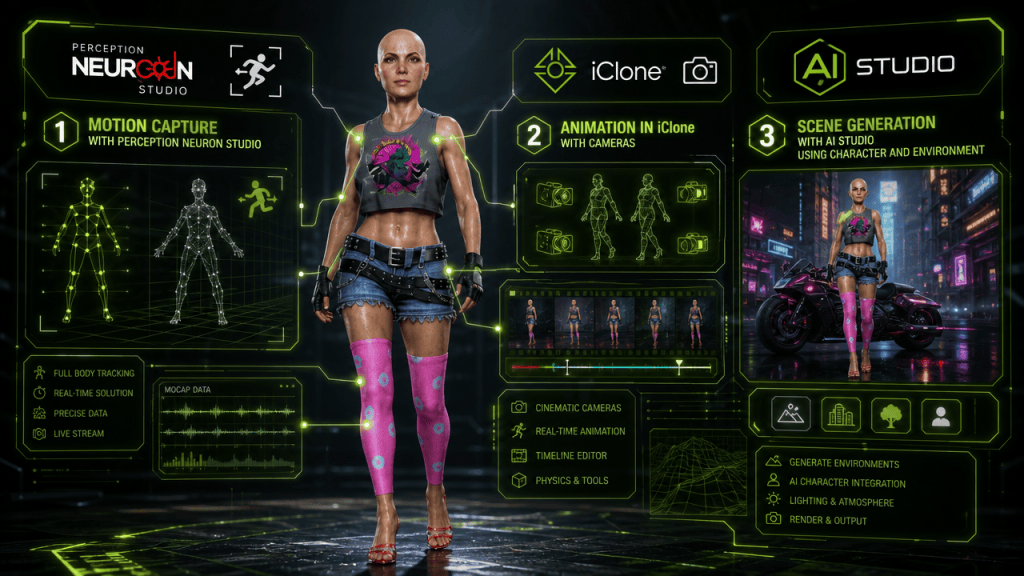
Animating Characters for AI Guidance in iClone
The first step in this pipeline involves bringing your custom 3D character to life within iClone 8. For artists like Alejandro De Pasquale, the preference is often for robust motion capture integration to achieve natural, fluid movements.
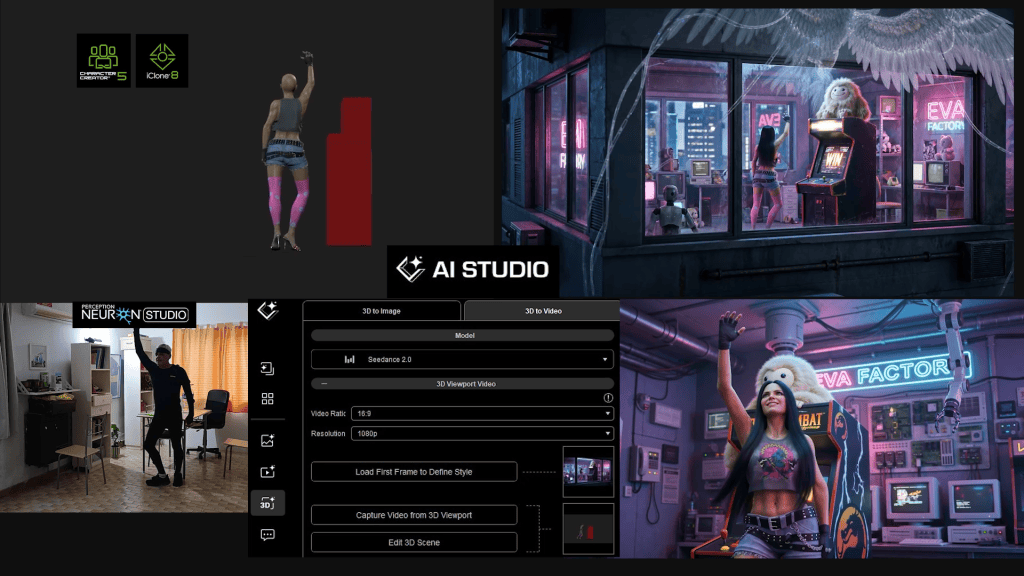
Alejandro utilizes his Perception Neuron MOCAP suit to capture animation data, which is then directly transferred to his Character Creator 5 characters within iClone. This real-time data transfer is facilitated by the iClone Motion LIVE plugin, specifically using the Perception Neuron Profile, which bypasses the need for extensive retargeting.

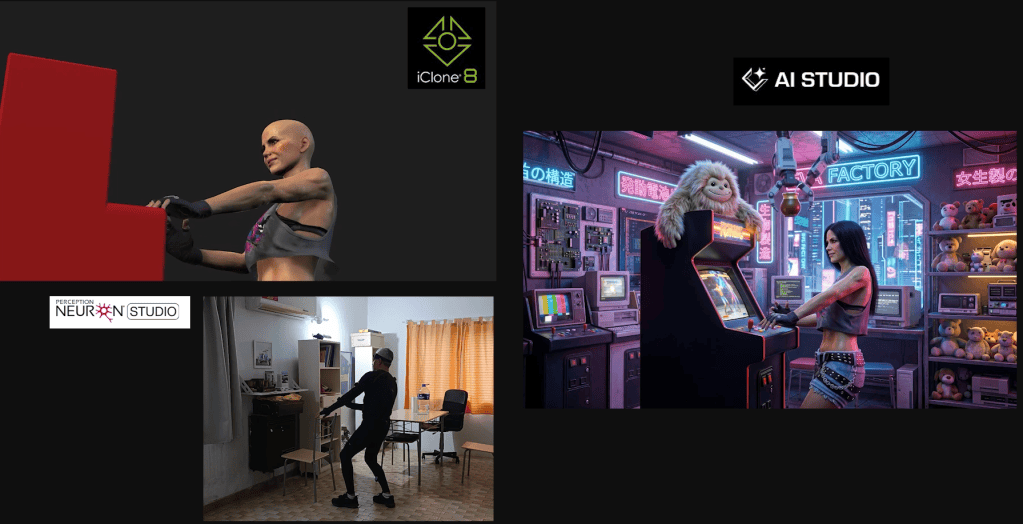
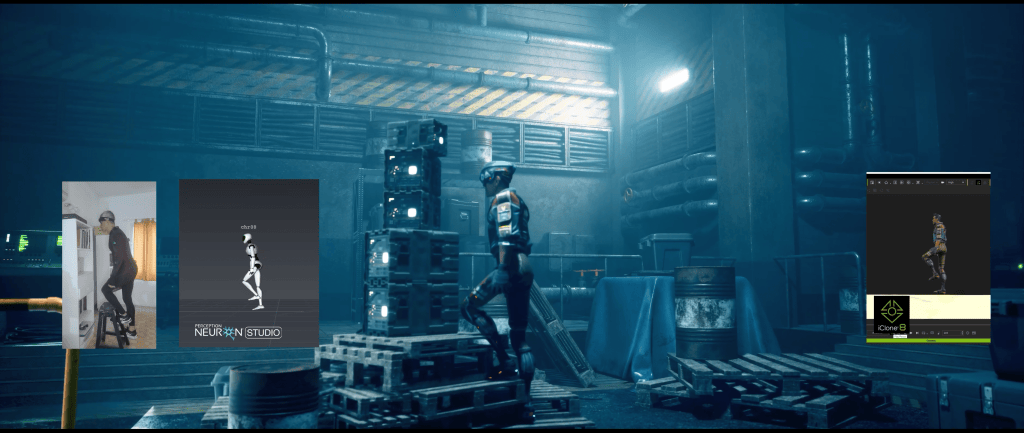
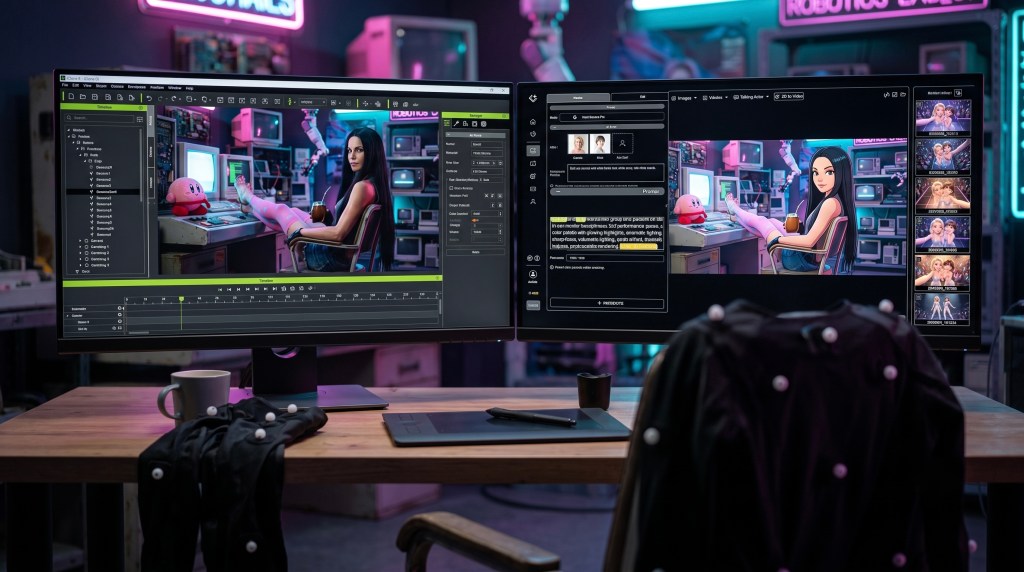
Once the motion capture data is applied, the animation is further refined in iClone 8. Multiple camera angles can be set up to capture different perspectives, establishing the visual guide that will later inform the AI. This detailed 3D animation, complete with intricate character movements and camera work, forms the core input for AI Studio.
Bridging iClone to AI Studio: Consistent AI Actor Creation
The crucial step for maintaining character consistency across AI productions is integrating your Character Creator 5 avatars into AI Studio as “AI Models” or “iModels.” This involves generating various angles and expression images of your iClone character to train and save them as an AI Model within AI Studio. This process allows the platform to recognize and consistently render your specific character, preserving multi-actor identity and IP across all AI productions.
Transferring Animation to AI Studio with Control
AI Studio offers three distinct methods for transferring the animated look of your iClone 8 character, providing varying degrees of creative freedom for the generative AI models:
- Full Texture Transfer: The character is transferred exactly as it appears in iClone, including all textures, clothes, skin, and accessories. This is ideal when maintaining a precise 3D feeling and realistic style, as Alejandro chose for his EVA character.
- Gray Model Transfer: All textures and material maps are removed, presenting the character as a simple gray model. This option provides generative AI models like Seedance 2.0 more freedom to interpret and generate new textures, clothing physics, and even stylistic elements.
- iClone Dummy Character: An iClone dummy character is used as a placeholder, allowing AI Studio to specify an entirely different AI Model Actor later. This offers the most creative freedom, enabling the AI to generate characters with new hair, clothing physics, and even subtle expressive variations, ensuring the output is more fluid and less constrained by the original 3D guide.

Pro-Tip: When you desire the AI to generate dynamic hair or clothing physics with greater creative freedom, intentionally omit these elements from your original iClone character. Instead, describe them directly in your AI Studio prompt. This approach signals to models like Seedance 2.0 that they have more latitude, allowing for fluid, AI-generated styles that would otherwise require complex simulations in 3D software, potentially saving roughly 4-6 hours of manual setup and simulation per character.
Generating the Initial AI Image from iClone
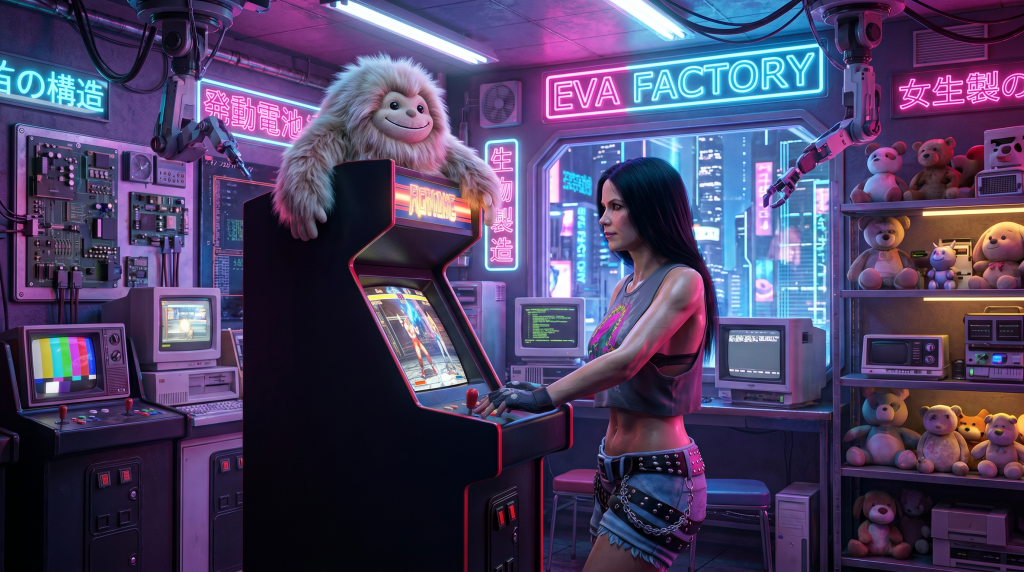
The first step in AI Studio is to generate a foundational image. Alejandro initiates this by capturing the first Start Frame directly from iClone’s 3D viewport using the ‘Capture Image From 3D viewport‘ feature, ensuring precise composition.
Within AI Studio, he selects an image generation model like Nano Banana PRO and then assigns his pre-trained AI Actor (Eva). For multi-character scenes, the ‘Assign Actors’ feature becomes crucial, allowing users to bind box-specific characters and map them to their corresponding AI Models.
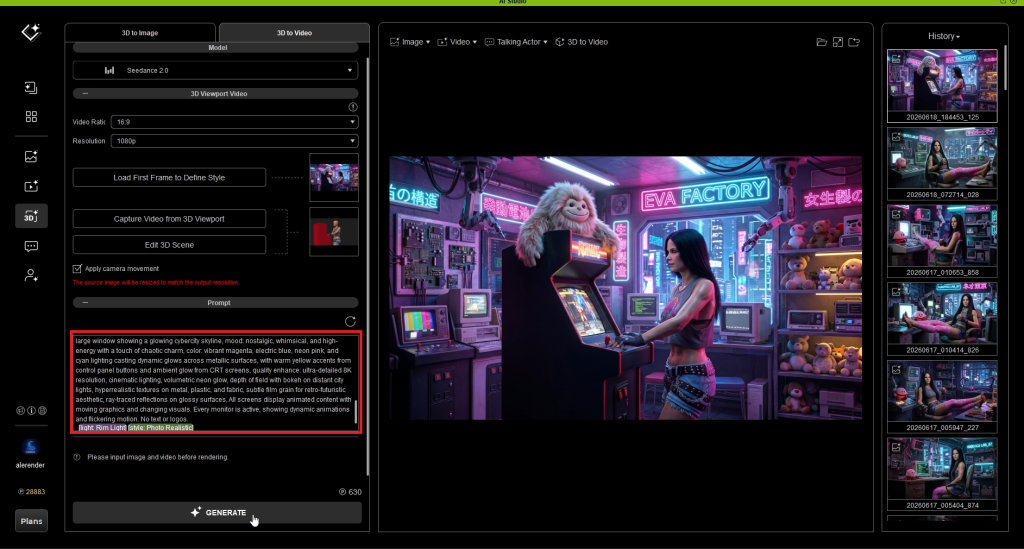
Alejandro meticulously crafts his text prompts, often utilizing external tools like ChatGPT for detailed descriptions, to define elements such as lighting (e.g., Rim Light), render style (photorealistic), and even details like Eva’s hair, which was intentionally omitted from the iClone guide for AI interpretation.

From Static Image to Dynamic AI-Guided Video
With the initial image established, the workflow transitions to video generation within AI Studio’s 3D-to-video section. The previously generated image is automatically assigned as the starting point. Alejandro selects Seedance 2.0 as his AI video generation model, noting its current superiority for photorealistic renders.

The core of the video guide is then imported by `capturing the video from iClone’s 3D viewport`, complete with the meticulously designed 3D camera movements, which are enabled via the ‘apply the camera movements’ checkbox in AI Studio.
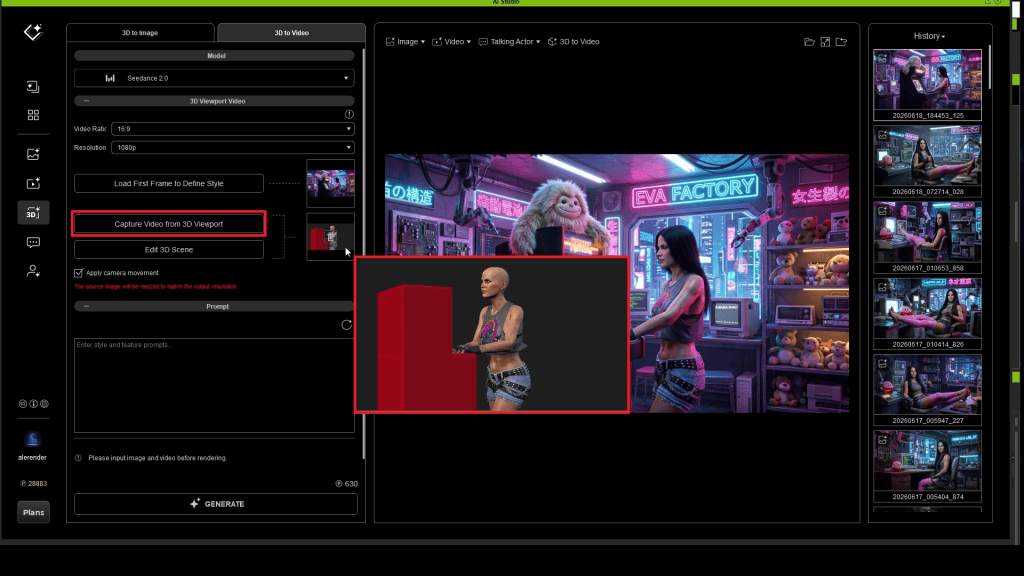
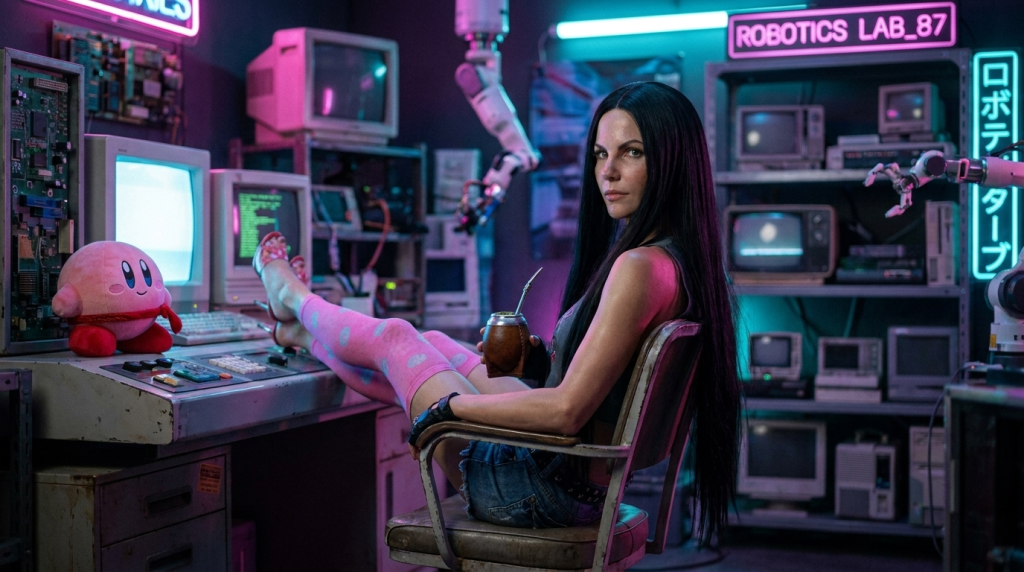
Detailed action descriptions are added to the text prompt, guiding the AI to animate specific events, such as Eva raising her arm to take a mate tea from a robotic arm, ensuring precise execution of the narrative.
Incorporating Dialogue and Lip Sync
For scenes requiring character dialogue, Alejandro explores various approaches to maintain both visual consistency and expressive performance. He often tests different initial image generation methods, comparing fully realistic renders (using Nano Banana PRO directly in AI Studio) against those derived from iClone screenshots, opting for the latter to maintain a cohesive 3D aesthetic when blending with his other AI-generated content.
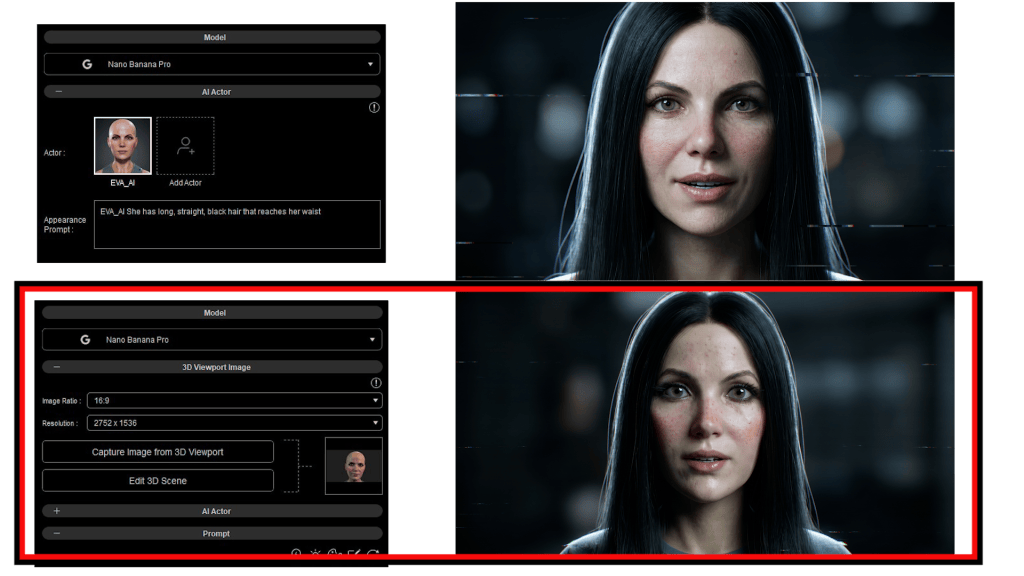
For video generation, he leverages the Kling 3.0 AI model.
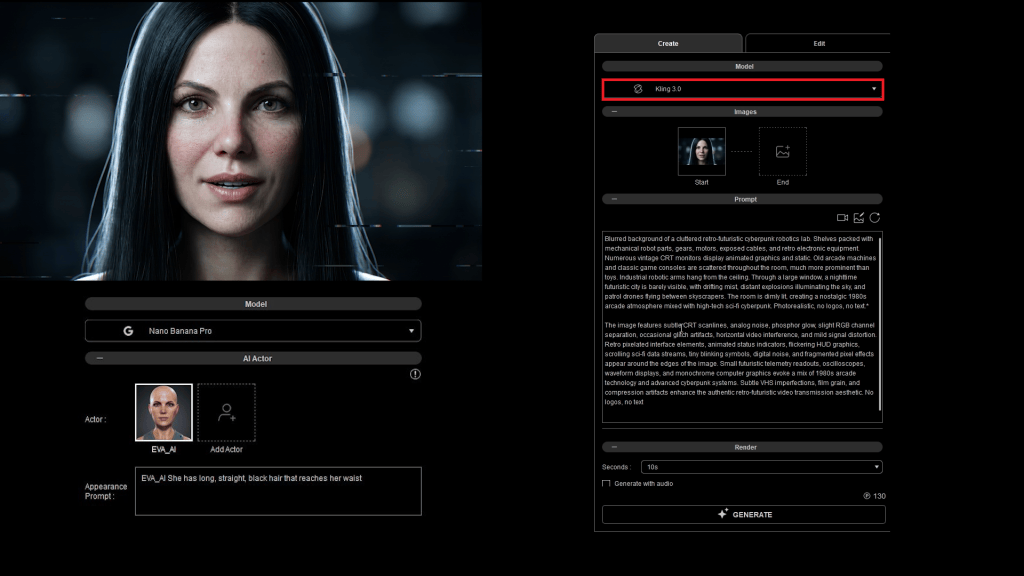
Critically, AI Studio’s ‘Single Talking Actor’ section allows for direct audio input, automatically generating precise lip sync animations that align perfectly with the provided voiceover.
This ensures that character lipsync performances are not only visually guided by iClone data but also acoustically synchronized.
“What the AI video generation model does is directly add the same inputted audio and perform the lip sync in accordance.”
Alejandro De Pasquale — Unreal Artist, Filmmaker, Animator

AI Model Selection Criteria
| Criteria | Seedance 2.0 | Kling 3.0 | Google Veo 3.1 | LTX 2.3 |
|---|---|---|---|---|
| Overall Quality (Motion smoothness, camera control, visual effects, character animation, etc.) | ★★★★★ | ★★★★ | ★★★ | ★★ |
| Character Consistency (e.g., facial features or outfit appearance) | ★★★★★ | ★★★★ | ★★★ | ★★ |
| Style Consistency | ★★★★★ | ★★★★ | ★★★ | ★★ |
| Multi-Shot (Generates multiple scenes in sequence for storyboard creation) | ★★★★★ | ★★★★ | ★★★ | ★ |
| Multi-Dialogue (Generates audio for conversations between multiple characters) | ★★★★★ | ★★★★ | ★★★ | ★★ |
| Output Speed | ★★★★ | ★★★★★ | — | — |
| Celebrity Generation Support | — | V | V | V |
| Reference Support in AI Studio (v1.01) (AI Actor, Image, Video, and Audio Inputs) | V | — | — | — |
- Seedance 2.0: Highest overall quality but does not support celebrity generation.
- LTX 2.3: Fastest model but lowest quality.
- Higher-performance AI video models typically cost more, but they often require fewer attempts to achieve the ideal result.
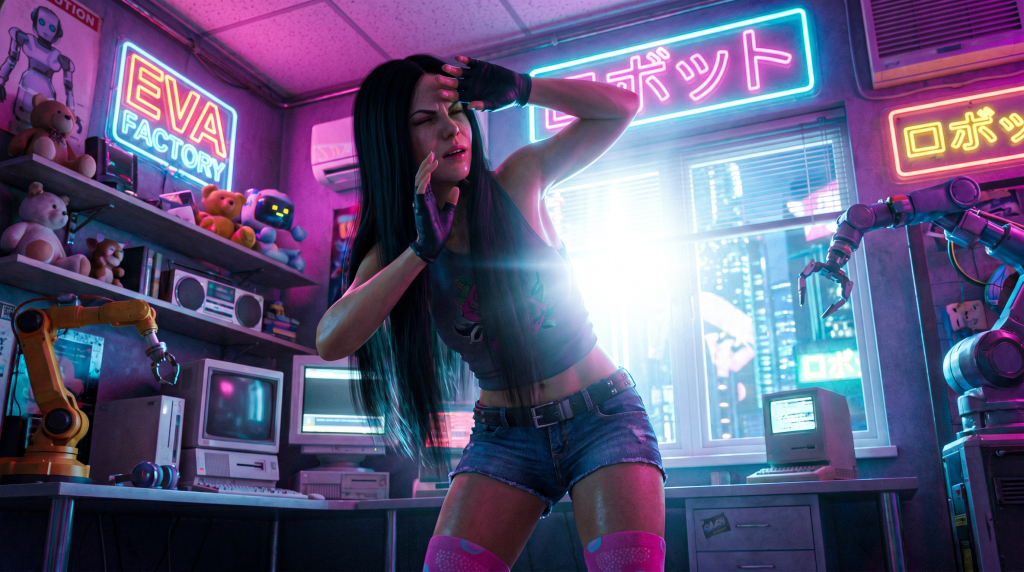

Alejandro De Pasquale
Alejandro De Pasquale, known by his online moniker Alerender, is a storyteller whose creative journey began at the age of nine with rudimentary comics. Over the years, he has mastered diverse tools and skills, evolving from scripting movies and producing motion graphics to specializing in bringing characters and immersive 3D worlds to life. Alejandro’s current focus is the “EVA Project,” an animated series developed using Unreal Engine and Reallusion tools such as ActorCore, iClone 8, and Character Creator 5. The EVA Project chronicles a character’s awakening in a high-security complex with fragmented memories, driven by a quest for answers about a destroyed Earth.
Alejandro’s workflow involves meticulously crafting his EVA character in Character Creator 5 and animating her with his Perception Neuron MOCAP suit via iClone Motion LIVE. He then utilizes these high-fidelity 3D animations as guides within Reallusion’s AI Studio. This methodical approach ensures that the AI-generated visuals for the EVA Project maintain the exact character identity and motion fidelity he envisions, preventing the common pitfalls of AI hallucination and enabling him to produce consistent, high-quality animated content independently.
- Official Website: https://www.alerender.com/
- YouTube Channel: https://www.youtube.com/@AleRender
- LinkedIn Profile: https://www.linkedin.com/in/alejandro-de-pasquale-b86350198/
- ArtStation Portfolio: https://www.artstation.com/alerender
- Instagram: https://www.instagram.com/alerender_ae/
“Honestly, with this is AI Studio workflow I can do everything by myself in my mini studio. I can create precise iClone animations to strictly guide AI in a pretty independent way with all these resources.”
Alejandro De Pasquale — Unreal Artist, Filmmaker, Animator
Conclusion
The integration of iClone 8 and Character Creator 5 with AI Studio, particularly when leveraging precision motion capture data, offers an unparalleled workflow for filmmakers and directors seeking to create high-quality, consistent AI-generated videos without compromising on character identity or artistic vision. This approach empowers creators like Alejandro De Pasquale to master AI production, ensuring their stories are told exactly as intended.
FAQs
How do I export a rigged character from Character Creator 5 to AI Studio?
You first create your character in Character Creator 5, then transfer it to iClone 8 for animation and scene setup. From iClone, you capture either an image of the first frame or the full animation sequence using specific viewport capture features, which then feed directly into AI Studio as a 3D guide. This process trains the character as an AI Model (iModel) within AI Studio, ensuring its consistent appearance across generative video projects.
What is the difference between generating an AI video with a full texture transfer versus a gray model in AI Studio?
When generating an AI video, full texture transfer ensures the AI strictly adheres to your iClone character’s exact appearance, maintaining its original look, clothing, and skin. Conversely, transferring a gray model gives the AI significantly more creative freedom to generate textures, clothing physics, and even new stylistic elements, resulting in a less constrained and potentially more unique AI-generated aesthetic.
Can I use iClone PERSONAL to guide AI Studio videos without any time limitations?
Yes, iClone PERSONAL is a completely free version of iClone that offers all core animation tools and numerous character and motion assets. Unlike previous time-limited trials, you can use iClone PERSONAL indefinitely to create animations and seamlessly connect them with AI Studio for your AI-guided video generation projects, eliminating previous pricing barriers for new users.
* AI point credits required for 3rd-party AI video generation.
Why does Alejandro De Pasquale emphasize assigning specific AI Actors in AI Studio, even with a single character?
Alejandro De Pasquale emphasizes assigning specific AI Actors in AI Studio, even for a single character, because it ensures the generative AI model precisely uses the pre-trained character model. While AI Studio might automatically select the only character present, explicit assignment with the ‘Assign Actors’ feature removes any ambiguity, guaranteeing consistent character identity and appearance, especially crucial when dealing with intellectual property.
Related Posts
- AI Studio Storytellers: HEIST – Previz to Production: The 3D-to-AI Workflow
- AI Studio Storytellers: Space Rocks – Sci-Fi Filmmaking with Consistent AI Actors
- AI Studio Storytellers: Re-inventing Graphic Novels with Hybrid 3D-to-AI Workflows
- Creating Advanced 3D Animations with Perception Neuron Studio