
The article “Using iClone 8 with Vicon to Recreate the Iconic ‘I Am Your Father’ Scene from ‘Empire'” was recently published on the website Befores and Afters.
Luis Cepeda from Quitasueño Studios in Dominican Republic, provides a detailed step-by-step guide on how his studio recreated the iconic “I Am Your Father” scene from the movie “Star Wars: Episode V – The Empire Strikes Back.”


Quitasueño Studios is the first studio specialized in film productions in the Dominican Republic, they offer consulting on everything related to projects (Pre Production, Production and Post Production). The studio has completed over 35 feature films and other different scale productions.


Now Quitasueño Studios opens its brand-new motion capture theatre. A facility with a system that seamlessly integrates in its pipeline iClone 8, Character Creator, Unreal Engine, Vicon, Faceware and Rokoko, as well as many other software allowing Quitasueño Studio to capture +6 actors at the same time, saving time and effort for their clients.


In this showcase they start by introducing iClone 8 and Vicon, two professional animation and motion capture programs. They explain how they combined the two programs to bring the famous scene to life. The article provides a thorough explanation of the various stages involved in creating the scene, including setting up the Vicon system, calibrating the cameras, capturing the motion data, and using iClone 8 to animate the characters.
They break down the technical aspects of the process, explaining them in an easy-to-understand manner. And the accompanying images and videos help to further illustrate the steps involved in creating the scene. The article concludes by showcasing the final product and discussing some of the challenges faced during the creation process.


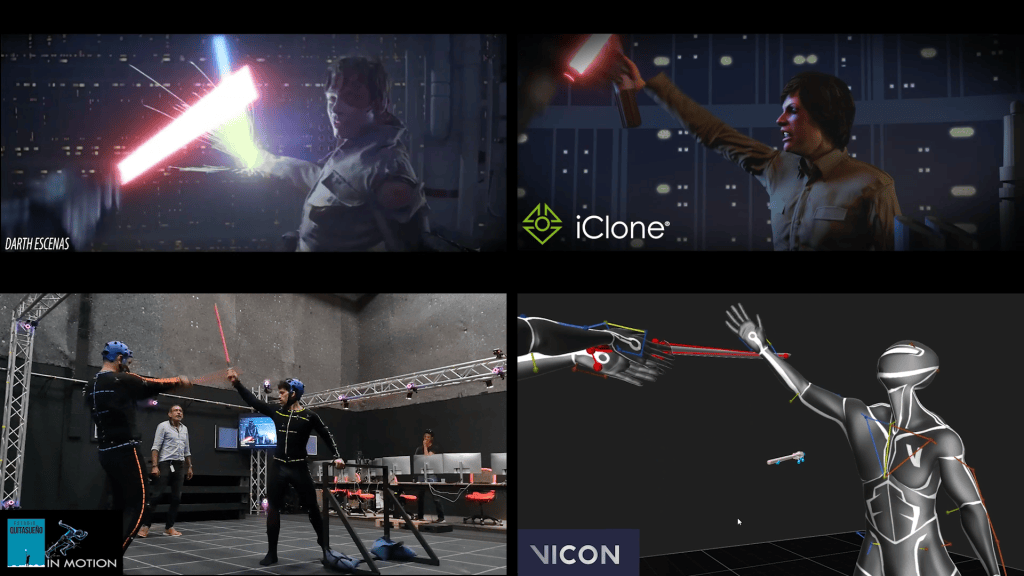

Overall, the showcase provides a comprehensive guide for anyone interested in using iClone 8 and Vicon optical motion capture to create their own professional motion-captured scenes, providing a clear and detailed guide making it easy for directors, cinematographers, animators and CG artists to learn how to create their own motion picture scenes with iClone and Character Creator.

Follow Quitasueño Studios:
https://www.estudioquitasueno.com/





2 comments
Really.
Every time I read you guys, I realize how amazing it is what we can get with computer graphics.
Keep posting!