Physics. A bland subject for a lot of us mere mortals but an exciting addition to 3D animation. If you watch just about any action movie then you’ve seen 3D-based physics at work. Physics provides a simulation of what could happen from toppling skyscrapers in a metro area to huge rockslides and any kind of destruction that would be dangerous or impossible to recreate in live action. Another giveaway is the associated tons of debris that fly everywhere causing even more destruction and debris.
Back in the old days, they used to blow things up when needed and still do in many instances. However, if, like a lot of indie productions there is a tight budget then physics can add that extra punch that is impossible to keyframe on a major scale like a disaster. The first time I saw physics I didn’t realize that was what I was seeing. I was blown away by the incredible animation, the sheer number of moving parts, and how could it have been keyframed manually.

It didn’t take long to discover it was physics. It was new and the first time I saw a sphere bounce like a ball on the floor and do so naturally with no manual keyframing, I was hooked. I’m not saying physics produces a perfect simulation every time. In fact, you may be doing yourself a dis-service if you don’t run several simulations, keeping the versions you liked. Running a simulation is easy, the trick is in setting it up. Getting it to mimic real-life events as closely as possible is the key.
The thing about physics is you don’t have to be an Einstein to use it. You don’t have to know how it works any more than you do your air conditioning or appliances. You can just use it once you understand a few concepts and terms.
3D iClone Physics Basics
Dynamic: Always active. Will drop, roll, bounce, and collide with other physics objects. If you burst through a wall, then the object going through the wall will be dynamic (unless it has transform animation) with Bounding meshes to detect collisions with other physics-enabled objects. These bounding meshes can be simple primitives or complex self-meshes depending on the selection.
Frozen: Objects will remain in place until impacted by a dynamic object.
Kinematic: Animated objects will retain their transform animations during the simulation to allow for things like animating a rock through a window.
Static: Objects will remain in place but will be part of the simulation so that pieces won’t penetrate them during the simulation.
PHYSICS PROPERTIES OF OBJECTS
Mass: The “weight” given to an object to differentiate between an object made of glass versus one made of concrete. While these terms are not used in iClone there is a slider to give or take weight from this attribute.
Friction: Not what you experience with your mother-in-law. That’s tension… which is more associated with a good story instead of physics. Friction in this case is another way of keeping things under control so objects don’t slide around like they are on ice or greased surface. According to the manual, it is “the resistance forces of a surface. An object with higher friction can move slower or a ball can start rolling”.
Damping: Just what it says. It dampens or slows down the simulation to keep things from running away or the simulation being too unrealistic. A little bit of slider goes a long way here.
Elasticity: The bouncing force of an object.
BOUNDING MESHES
Without bounding meshes collision wouldn’t be possible. In early physics, we used simple dummies like a rectangular block attached to a vehicle but invisible to the render. As physics matured, we can now select the object itself as the bounding mesh with a Self-Mesh attribute that mimics the object’s shape. If you experience computational power problems, you can choose a simple bounding mesh like a block from a menu choice or you can always use the old-fashioned dummies which may provide better visual queues in some instances.
Bounding types available are Box, Sphere, Capsule, Convex or Self meshes. Convex is similar to a self-mesh that saves on computational overhead.
CONSTRAINTS
Another must-have tool for certain simulations. They do just as they describe, they constrain or tie two physics-enabled objects together.
All the above are part of Rigid Body simulations versus Softcloth simulations like clothing which we’ll not get into here as that would take an entire article by itself.
BOUNCING BALL
This is sort of the “hello world” equivalent of programming or scripting. It is a simple simulation of bouncing a physics-enabled spherical object on a physics-enabled plane (floor). It’s an effective demonstration of what can be done versus trying to keyframe the same motion. It’s not even a contest at this point. Keyframing is not feasible in this situation or cost-effective versus physics.
FALLING CANS
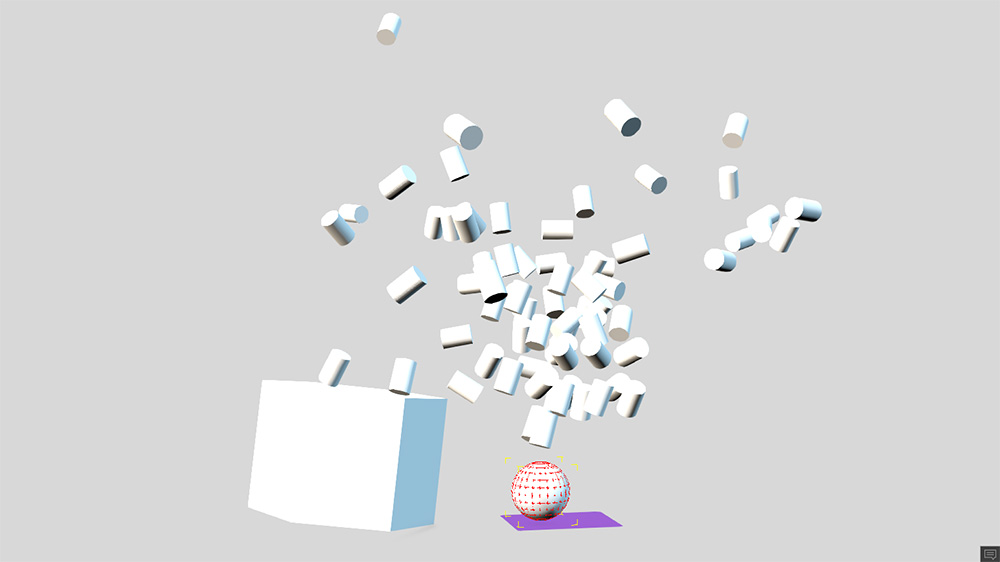
In this example the can props are set to Frozen along with the base prop the cans are sitting on. This will force the items to interact with the physics dummy that will collide with the base triggering the explosion of cans. We can use dampening and differing mass settings to control how the simulation reacts from the explosion of cans to falling in a more controlled manner. The ball dummy had a transform animation that would make it collide with the base the cans sit on. I set this dummy to Kinematic to retain the transform animation while providing physics interaction as a rigid body.
TRUCK CRASHING THROUGH WALL
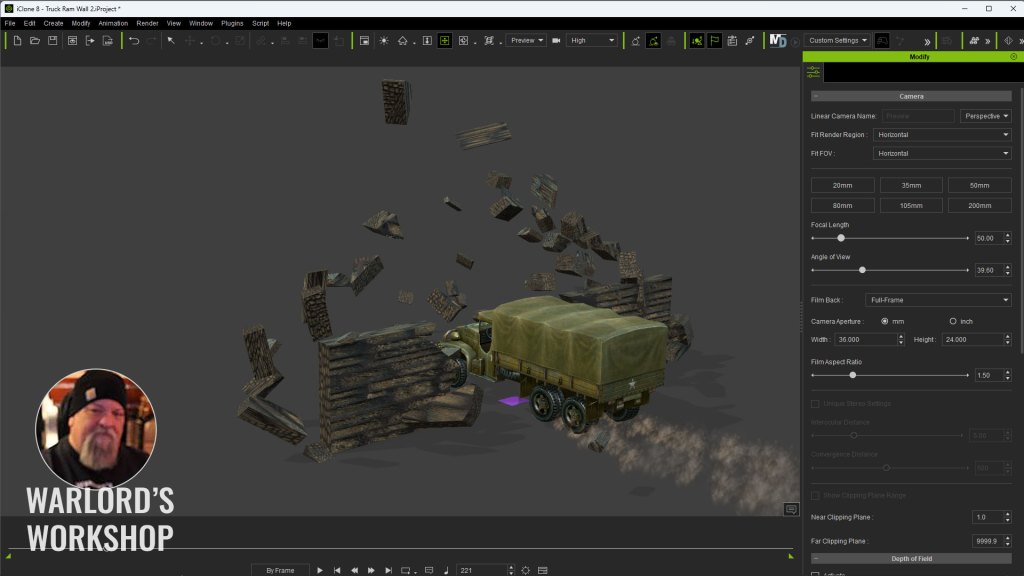
In this demonstration, you can see how the entire wall has been cell fractured but I have only selected some of the pieces in the middle to apply physics too. This is a simple method of controlling the area of interaction without using the static setting on the remaining pieces. This does run the risk of physics-enabled pieces penetrating non-physics pieces.
COLLAPSING ROCK BRIDGE
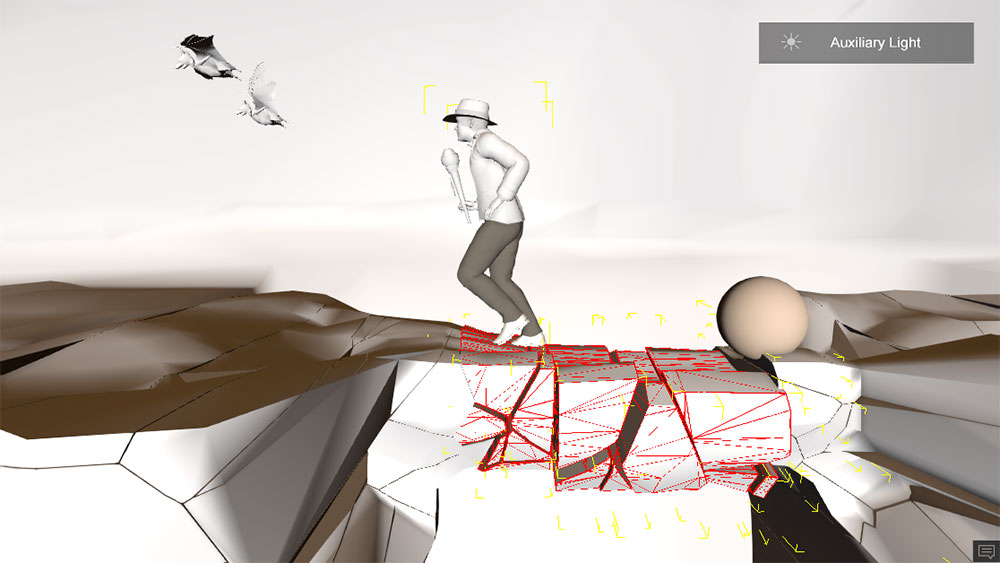
Below only the rock bridge itself is physics-enabled. The rock bridge is also a separate prop from the rest of the cave. I did run into one problem in that as soon as the Character touched the first part of the bridge it all started to collapse and the character was running on air midway across the bridge. To solve this problem I added a physics-enabled ball prop and animated it to move across the bridge and trigger the collapse after the character was partway across the bridge. A little timing work and it looks like the bridge was collapsing from under him.
Below is a look at the physics dummy that triggered the bridge collapse for better timing.
TIP: Be sure to TEXTURE your props BEFORE you fracture them while the prop is in one piece.
BLENDER CELL FRACTURE
This will show you how to fracture if you have never done it before but keep in mind that I am not a Blender expert and I highly recommend this older but to-the-point fracture tutorial from Mr. Cheebs. In my demo above I used subdivision but Mr. Cheebs shows you how to really do some fracturing with all the available techniques including the Annotation Pencil that allows us to draw where we want things to shatter.
A BIT OF DESTRUCTIBLE PROPS HISTORY
Around 14 years ago I introduced destructible props to iClone. At the time I was working with my long-time 3D tool, 3DS Max, in fracturing objects and using the Havoc physics engine to simulate the destruction and dispersal of debris. It became somewhat of an obsession, and I became proficient at 3D physics-based destruction.
iClone didn’t have physics at the time so I never gave much thought to bringing my other 3D work to iClone. After all, it was a 32-bit, low-poly application back then. While working with the Rayfire plugin I noticed something that had escaped me in earlier work and that was when I finished the simulation 3DS Max had created keyframes in the timeline.
If anything generated keyframes there was a chance of getting it into iClone and working with the baked-in physics which did work as expected but it also crashed iClone often. Reallusion saw the demo and reached out to me for a project file. Soon after an update made destructible props run smoother without crashing. That taught me how much Reallusion pays attention to what other users are doing with their software.
CLOSING
For some users Rigid Body physics is not as sexy as Soft Body physics like clothing or hair. It is, however, a powerful animation tool that opens the door to a world of new opportunities to better showcase your work. Rigid body physics is overlooked in iClone as an easy tool to add a touch of eye candy to an animated scene. In the future, there will be more articles and tutorials on using physics in iClone.

MD McCallum – WarLord
Digital Artist MD “Mike” McCallum, aka WarLord, is a longtime iClone user. Having authored free tutorials for iClone in its early years and selected to write the iClone Beginners Guide from Packt Publishing in 2011, he was fortunate enough to meet and exchange tricks and tips with users from all over the world and loves to share this information with other users. He has authored hundreds of articles on iClone and digital art in general while reviewing some of the most popular software and hardware in the world. He has been published in many of the leading 3D online and print magazines while staying true to his biggest passion, 3D animation. For more information click here.