Timecode Sync and Vicon Compatibility Now Available in iClone
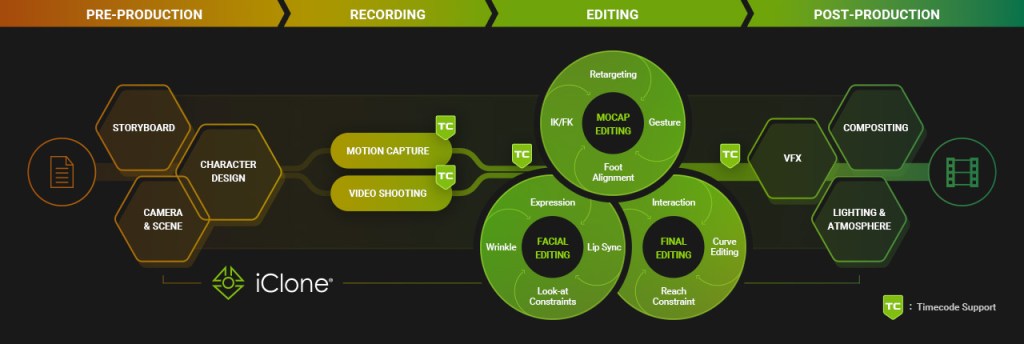
For full-body motion capture or multiple character performances, data drift and synchronization issues are major hurdles. They’re time-consuming and costly and can delay production workflows. That’s why in iClone 8.53, we’ve brought FBX timecode support front and center, introducing powerful new features that automatically sync data from multiple sources with precision. With practical tools designed to simplify your workflow, we’re making sure you spend less time fixing and more time creating — because creativity always comes first.
Key New Features:
- Synchronized Motion Capture
- Powerful Timecode Editing
- Bidirectional Timecode Pipeline
- Coordinate With Burn-In Data
- Vicon Mocap in iClone
Overview of iClone 8.53 New Features
FBX Timecode Synchronization
Animators, filmmakers, and mocap professionals have long battled the headache of managing multi-source animation data. Timecode sync has helped bring order to the madness — but constant file exchanges, software incompatibility, and team misalignment still slow everything down.
It now ends with the new Timecode Plugin — the solution for seamless synchronization across animation, mocap, and real-time production. No more drifting data. No more tedious syncing. No more back-and-forth between pipelines.
Synchronized Motion Capture
Timecode is fully integrated into Motion LIVE(the iClone built-in motion capture feature), embedding sync data directly into live mocap recordings. Capture multiple devices (face, body, hand) and actors at once, with the option to choose your preferred timecode source for accurate, real-time synchronization.

- Multiple Device Capture: Connect and sync various mocap devices — body suits, facial trackers, hand sensors — into one seamless performance pipeline.
- Multiple Actor Capture: Record multiple performers simultaneously, with all data precisely aligned for clean playback and streamlined editing.
- Multiple Media Source: Integrate video, audio, and mocap — all synced to the same timecode for a unified production timeline.
- Director Quad View: View live feeds from multiple perspectives — mocap data, virtual scene, camera angles, and talent — all in real time, all in sync.

Director Quad View lets you view multiple perspectives in real-time, including mocap data, virtual scenes, camera angles, and talent, all in sync for better monitoring and decision-making.

Check out the demo on the product page
Powerful Timecode Editing
The Timecode Plugin makes editing intuitive and effortless, starting with the ability to import FBX, video, and audio with embedded timecode, making timecode visible directly on the timeline. Snap clips to embedded timecode with a single click, ensuring everything stays perfectly in sync. Finally, custom options and Unreal Live Link support allow for exporting files with timecode embedded, providing a seamless workflow from start to finish.

- Import Timecode: Easily bring in timecode data from FBX, video, and audio, ensuring precise synchronization across all media sources.
- Switch to Timecode Mode: Customize time units and match frame rates for accurate, project-wide synchronization in iClone timeline.
- Auto Align to Timecode: Instantly align animation files using embedded timecode or define a custom start frame for precise timing.
- Native Timecode Support in iClone Motion Formats
- iTalk (facial, audio, lip sync)
- iMotion (body)
- iMotionPlus (facial, body, expression, lip sync)
- iProject (characters, motions, lighting, camera, audio)
- Save & Export Timecode(Add timecode to Non-timecoded data): Maintain accurate sync while seamlessly integrating both custom and purchased motion assets across your production pipeline.

Check out the demo on the product page
Bidirectional Timecode Pipeline
Transmit and adapt timecode in both directions for a streamlined workflow. Seamlessly integrate with MotionBuilder, Maya, and Unreal Engine for smooth editing, rendering, and real-time production, enhancing efficiency and collaboration within existing workflows.

Check out the demo on the product page
Coordinate With Burn-In Data
Overlay timecode, take, date, camera, frame, and more — with multiple display and layout options to suit any workflow. Display in the viewport or final render using fully customizable burn-in settings for clear, production-ready visuals.

Check out the demo on the product page
Previz Compositing
Integrate mocap seamlessly into previz using iClone’s lighting and post-effects tools. The Timecode Plug-in enables smooth blending for a more immersive and production-ready preview.

Check out the latest offer for the Timecode Plugin
Perfect Combo for Professional Mocap: iClone and Vicon
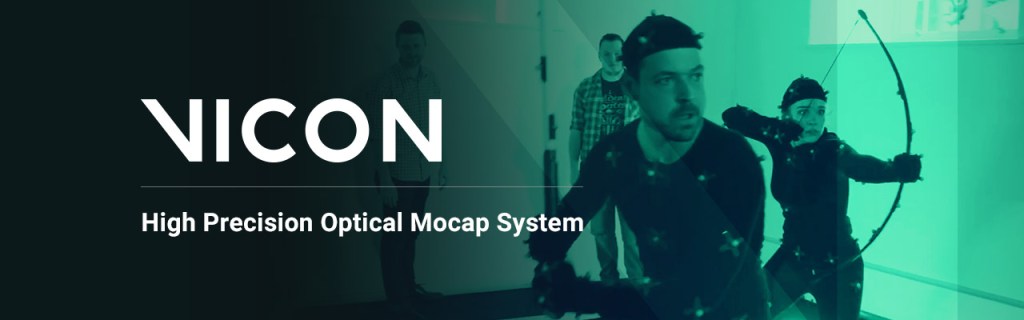
Partnering with Vicon, the new Vicon Profile in Motion LIVE allows seamless connection of Vicon mocap systems to iClone for real-time animation. It offers a unified, high-precision workflow for animating animation-ready characters from Character Creator. More importantly, Vicon can now capture both full-body and facial movements simultaneously through Motion LIVE.

The Vicon integration is fully compatible with iClone’s Timecode, enabling accurate multi-device sync, time-aligned recording, and smooth integration into virtual production pipelines.

With full compatibility, users can leverage both iClone and Shogun’s mocap editing capabilities, combining the strengths of both software for optimal results.

Check out the latest offer for Vicon Profile
Other New Updates
AI Search Premium Motions
Deep Search is an AI-powered tool that simplifies finding digital assets in the Reallusion ecosystem using natural language queries, category filtering, and image uploads. The new Motion Deep Search feature lets users search for ActorCore motion assets in the same intuitive way. Simply describe the motion, and the tool provides relevant results with an option to find similar motions, making it easier to locate the perfect animation for any project.
New Lip-Sync Animation Workflow
The latest update gives users the flexibility to refine lip-sync animations with AccuLIPS without being forced to do so during the initial audio import. This allows for a more streamlined workflow, letting users focus on other aspects before fine-tuning the lip-syncing later.
Related Sources
Learn more about Timecode Plugin features
Learn more about Vicon Profile