AI-generated character and prop meshes are improving, and some are operating on at least their fifth or sixth generation of AI models that drive the mesh creation. As a longtime character and prop creator I have relied heavily on my own creations for personal and professional projects but in the past year and half or so I have added Meshy AI to keep up with the current trend of AI mesh generation. While it has improved, AI-generated characters are not a full replacement for iClone or CC5 characters, but they do have their place.
Right now, that place is not in front of or close to the camera if you are wanting cinematic quality. Props may be a different story, but they too have flaws that need to be dealt with or hidden from camera view.
High Poly Count
As the AI models behind Meshy have evolved so has the poly count. It is not unusual for Meshy 6 to produce character meshes up into the millions of polys. I have seen many characters between three and four million.
This requires the extra step of remeshing and during this process we can convert the model to quads for a bit cleaner topology for animation performance but it’s not the perfect solution. The Meshy AI re-mesh offers general or fixed poly counts from 3K, 10K, 30K and 100K or a custom poly count. This does solve some of the problems but the meshes do lose a little quality after remeshing.
To get a decent character that looks good in front of the camera you still need at least 130K or more in most cases while Character Creator can provide a character with a working mouth, expressions, primed for easy lip-syncing and provide more advanced features like wrinkles and expressions for a lower poly count.
Atrocious UV Maps
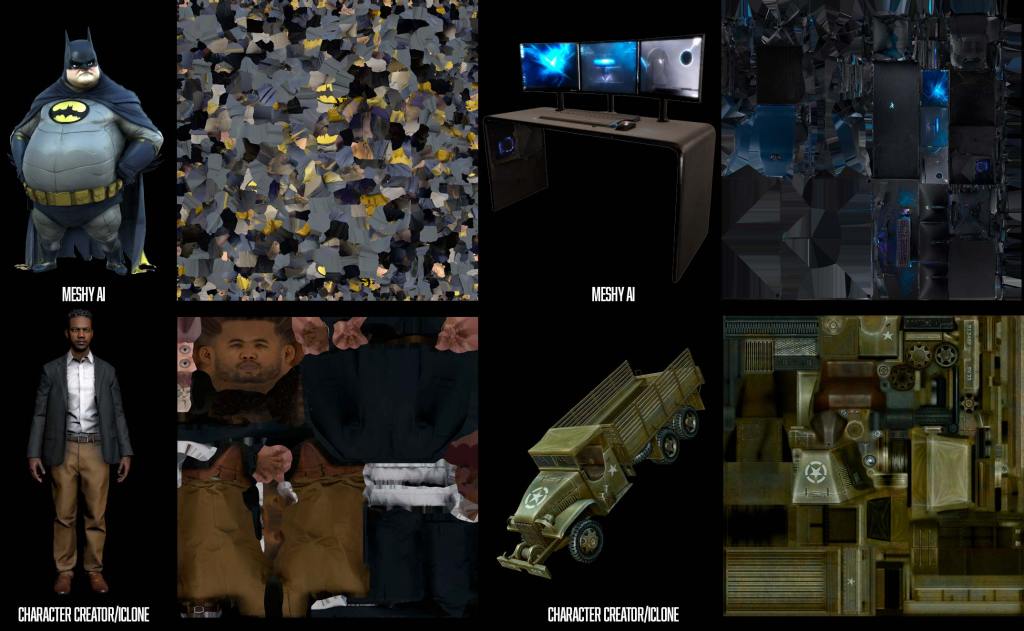
In an iClone Facebook group, one user commented on a Meshy AI-generated UV Diffuse map that it looked like someone “ate the map and threw it up,” and I have no argument with that.
For beginners this is particularly problematic and maybe a showstopper and for pros it’s just a pain in the butt to deal with. It’s frustrating, confusing and so chopped up it looks like it came from an app tripping on mushrooms.
Also, for beginners, being able to use an app like Photoshop to alter or change the clothing and other aspects of a character is a defining moment and necessary milestone to get a unique character just by editing the diffuse map.
Sadly, choosing quads doesn’t solve the UV Map problem in Meshy but it does tame it a bit. The quad UV Map is bit more coherent in that we can more easily recognize certain features, but those features will still be chopped up into multiple pieces most times.
For example, the UV map can and usually does make it almost impossible to locate the face let alone all its scattered parts. With quads there is a better chance of the face being chopped up into far fewer pieces making some alterations possible but still frustratingly limited.
Mesh Binding and Collapsing
In a lot of cases, the generated mesh will be too poly-heavy for use in animation or even a game engine. This requires optimizing the mesh to a lower poly count while retaining as much of the original features as possible. This chops the mesh up into triangles even if it is a quad mesh to start with. This can lead to mesh binding and collapsing in tight joint areas like elbows and knees.
If needed for a crowd or army off in the distance you might get away with flat arms or pinched elbows, but this won’t work for anything closer to the camera. Stylized characters with thin arms and legs are more susceptible to this type of binding or collapse. With iClone and CC5 characters you can optimize character meshes down as low as 800 kb each with just the click of a button even if you don’t know anything about optimizing mesh. This same button can cause binding and collapse when used on some AI-generated meshes though.
Poor Quality Textures
Not only is the UV Mapping horrible so is the diffuse texture map which is the beauty shot of the maps. Just as I was writing this article Meshy announced Meshy 6 Texturing. Up to this point we could make a mesh in Mesh 4, 5 or 6 Preview but the texture was generated with Meshy 5.
Meshy 6 Preview texturing is an improvement but still not as good as Character Creator or most Content Store/Marketplace vendor items.
Quads Improve Mesh Quality Somewhat
In general, Quad meshes use four-sided polygons, while triangle meshes use three-sided. Quads are generally better because they deform more smoothly during animation, are easier to edit, and work best with subdivision tools. Triangles can cause messy deformations and are harder to manage for detailed modeling resulting in many 3D artists preferring quads for character creation in particular.
No Working Mouth
This is arguably one of the biggest drawbacks to using something like Meshy for characters. We can create characters with an open mouth then manually skin that area to the jawbone in CC, but this is an advanced skill generally not available to beginners.
Or we can simply use Character Creator to provide a unique character with all the bells and whistles including AI-assisted lip sync.
No Expressions or Emoting
Applications like Character Creator have spoiled us to great characters within low to reasonable poly counts with expressions. AI-generated characters have the expressions of a rock. Its expression will be whatever comes out of the mesh generation, and we are stuck with it.
On the other hand, iClone and CC5 have dedicated expression and wrinkle systems to improve realism. While it is possible for experienced 3D mesh modelers to create and rig a working jaw/mouth in CC5 even though it is an advanced skill, it is not possible to create a wrinkle system on AI-generated meshes with CC5 Advanced or ActorCore’s free AccuRIG, which leaves these characters rather lifeless compared to iClone/CC5 characters.

Mesh Editing/Clean up
This is annoying… AI-generated characters can be very messy with “blobs” and other detached parts floating around that must be dealt with either in Character Creator or another application. In CC5 we can usually isolate these blobs and hide them but that is not always possible. ZBrush and similar applications can handle the edits, but complicate them.
What You See is Not Always What You Get
If you have used a mesh generator then you have probably experienced some form of this problem. For those of you that haven’t been through this I will try to explain the problems in practical terms.
The untextured preview looks good. The final texture looks even better in the application interface. You download the character only to find a significant number of flaws not visible in the previous stages of generation.
These flaws can include both mesh and UV map problems. What looked like a great face on a character turned out to have another “ghost nose” or bump near the nose area or strange ears or misaligned texture requiring attention from a mesh editing app. This means the user needs to be up to speed on correcting character details like hands with too many fingers or multiple thumbs. Bumps where there shouldn’t be bumps… wrinkles where… well… where it’s just embarrassing and these must be dealt with, or the character is unusable.
Lifeless Eyes
This is a big one in terms of realism and there is no substitute for it. Back in the early days of gaming and animation it was not unusual for a character to be looking through you instead of at you. This defined the experience for the user. The mocap and acting were getting better, but those lifeless eyes would ruin the entire experience by taking focus from the scene. It might have been some great animation and storytelling, but the fixation on those lifeless eyes overshadowed the emotion of the scene.
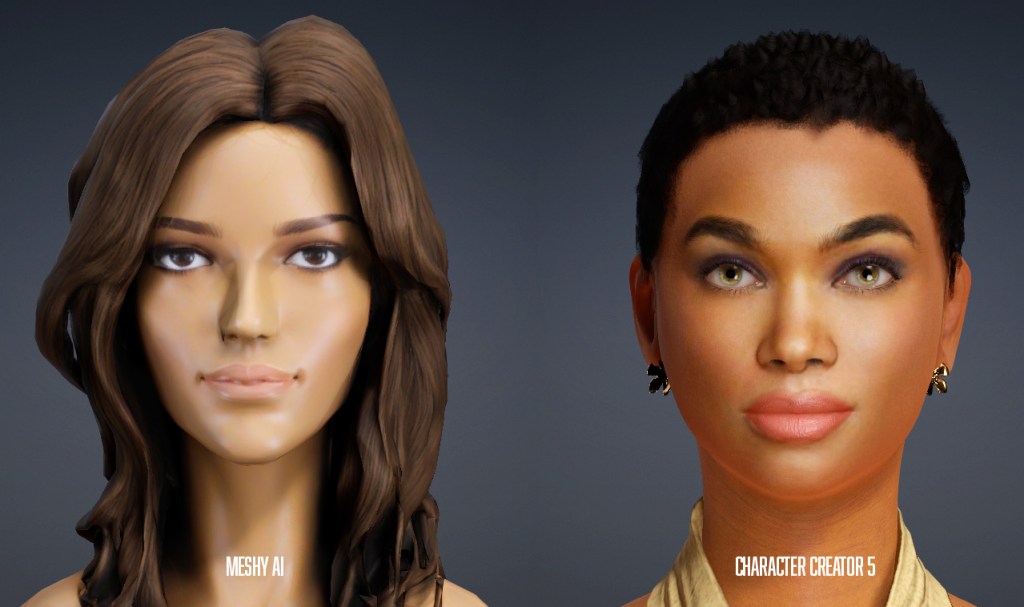
iClone, in particular, Character Creator has gone to great lengths to solve this problem with eye tracking and textural realism. Using partially rigged AI-generated characters takes us back to the early day as they won’t have eyes in most cases… with them being part of the main mesh instead of separate meshes we can control.
What you see below on the left is all you will ever see with that character. The look of the eyes NEVER CHANGES versus the CC5 characters on the right that have layers such as occlusion and tearline for realism. Eyelashes and eyebrows add more realism too.
Now let’s take a look at what AI-Generated characters can be used for.
Crowds
This is an obvious use, but you will have to decimate (optimize) them severely to get a crowd of any size. Depending on the distance from the camera, highly decimated characters will work just fine and should work well with the Crowd system in iClone.
Even with crowds, Character Creator still excels with high-quality optimization that starts with good, solid topography before decimation, which means a smoother character at the end of the process, which translates into smoother animation.
Storyboarding
This is another somewhat obvious use for AI-generated characters as storyboards are usually static and only require posing. Add in AccuPOSE and creating a storyboard is almost child’s play. From simple blocking shots to complicated scenes, iClone can punch out a storyboard very quickly and it can be animated if need be.
This is a great way to develop a shot list by recreating the scene in iClone to whatever level of realism is needed and moving the camera around to get a preview of how the camera shot list should be laid out.
Comic Books, Graphic Novels
Just like the storyboards above, iClone is a natural for comic books and graphic novels whether they are realistic, cartoony or somewhere in between. And just like the storyboards, AccuPOSE makes it so simple you will most likely have time left over to tinker with the project to refine it even more! If you don’t need dialog or expressions, then AI-generated characters can work in that situation.
A great example of this is Antareus Studio’s Operation Cobra: The Burma Incident, a WWII-era graphic novel produced entirely with iClone and Character Creator. Read the full story to see how they did it.
Scene Filler
This is a very important role for AI-generated characters just as I mentioned in the Crowd section and with those caveats. The meshes have to be optimized to lean and mean even if you are only going to use them in small Actor Groups but when these groups are deployed, they can add life to a scene.
A great ready-made solution for this is the Crowd Sim: Social Actions pack from the Content Store, which lets you drop pre-animated groups of characters into any scene with just a few clicks.
Content Store and Marketplace
These are still the best places to find quality characters, props, hair, accessories and other 3D assets for iClone and Character Creator 5 that will perform as expected. The Content Store is Reallusion’s curated, professional-grade market — every asset is held to a high standard, making it a reliable source for production-ready content. The Marketplace, on the other hand, is a more community-driven platform where independent creators share a wide and ever-growing variety of assets. Assets from both will look great in front of the camara, including close-up shots to intermediate crowds. The superior mesh topography, UV mapping and mesh density from these Reallusion and vendor products will work for most situations while making your production look as good as possible. With all the promotional events, sales and discounts available we can build a great library of 3D assets just from these two stores.
Summary
I did notice while writing this article that I use Meshy AI almost exclusively for non-standard, one-off characters and anthropomorphic creatures as I had a hard time finding a standard human Meshy AI character to use as a demo next to a standard CC5 character like Aaron.
The one thing that concerns me with AI-generated characters is the fact that they are not fully functional, and in some cases, the mesh is bad enough that the hands or fingers are not functional either. They have to be rigged as a 2-finger mitten to keep them from being stiff.
We sacrifice a lot of features with AI-generated characters that Character Creator has spoiled us to over the years. If you are an expert at sculpting and rigging you can do your own mods but it’s still a time-consuming and at times a tedious task.
AI-generated characters certainly have their place but at the present time they are rather limited in scope in terms of cinematic quality.

MD McCallum – WarLord
Digital Artist MD “Mike” McCallum, aka WarLord, is a longtime iClone user. Having authored free tutorials for iClone in its early years and selected to write the iClone Beginners Guide from Packt Publishing in 2011, he was fortunate enough to meet and exchange tricks and tips with users from all over the world and loves to share this information with other users. He has authored hundreds of articles on iClone and digital art in general while reviewing some of the most popular software and hardware in the world. He has been published in many of the leading 3D online and print magazines while staying true to his biggest passion, 3D animation. For more information click here.
Related Posts
- Exploring 3D Mesh, High-Density Characters & Realism for Beginners
- Level Up with AI-Generated Animated Backgrounds in iClone
- Storyboarding with iClone