Reallusion released Headshot 3.1, a major update that brings comprehensive texture editing and painting directly inside Headshot. You can now paint, refine, and perfect your character textures without ever leaving the application, making your 3D character workflow in Character Creator faster and more seamless than ever before.
Paint Your Textures Directly Inside Headshot 3
Say goodbye to tedious round-trips to external image editors! Headshot 3.1 introduces a comprehensive, brush-based painting system explicitly designed for high-end facial texturing, keeping your focus entirely within the 3D viewport:
- Diffuse Map Editing: Enjoy full brush capabilities to sketch, blend, and paint directly onto your 3D mesh.
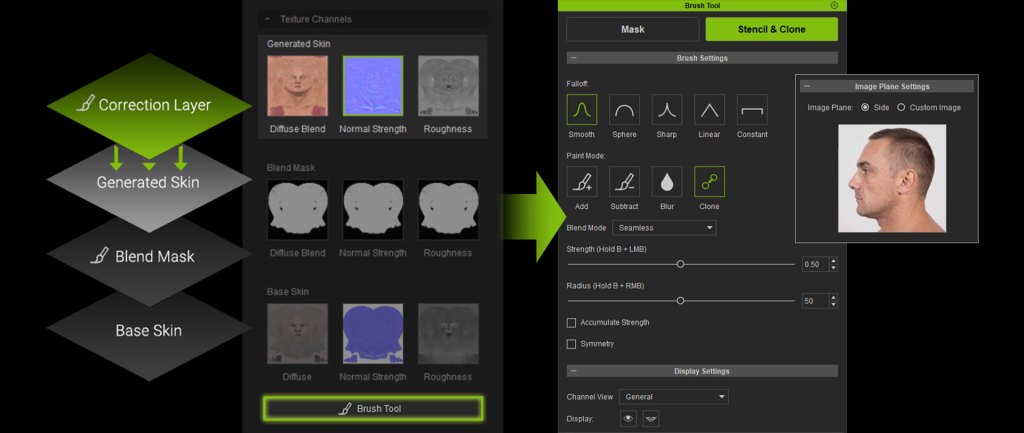
- Stencil Brush Mode: Project and paint textures directly onto the 3D view using profile images or any custom photo for instant, real-world detailing.
- Clone Brush: Sample a specific source area and clone visible textures to precisely eliminate blemishes or blend complex skin patterns.
- Correction Layers: A brand-new, non-destructive layer system that allows you to experiment and iterate without damaging your base texture.
- Industry-Standard Blend Modes: Fully supports classic modes like Normal, Darken, and Multiply to seamlessly fit your painting habits.
- Dedicated Seamless Brush: Masterfully tailored to eliminate harsh facial texture seams and blend edges flawlessly with a single stroke.
- Flexible Texture Workflow Management: Users can choose to keep the source front and side images for further editing, or merge them into diffuse channels to save space.

4K Profile AI Image Gen for Stencil Painting
While front-face generation is already highly optimized, Headshot 3.1 brings massive upgrades specifically to profile (side-face) AI image generation, ensuring your side-view inputs deliver the same high-fidelity quality:
- 4K Ultra-HD AI Generation for Profiles: AI image generation for profile views now officially supports crisp 4K resolution, capturing pore-level skin details from the side.
- Smart Hair-Removal for Profile Images: New dedicated options for side-face images efficiently remove obstructing hair strands, ensuring an uninterrupted view of the skin and facial contours for a much cleaner texture bake.

Faster, More Accurate Model Matching
We’ve overhauled the alignment process to make it faster and foolproof for both beginners and industry pros. Achieving a perfect fit is now easier than ever:
- New Flip Function: Instantly mirror overlays during the profile alignment step for faster, more intuitive point matching.
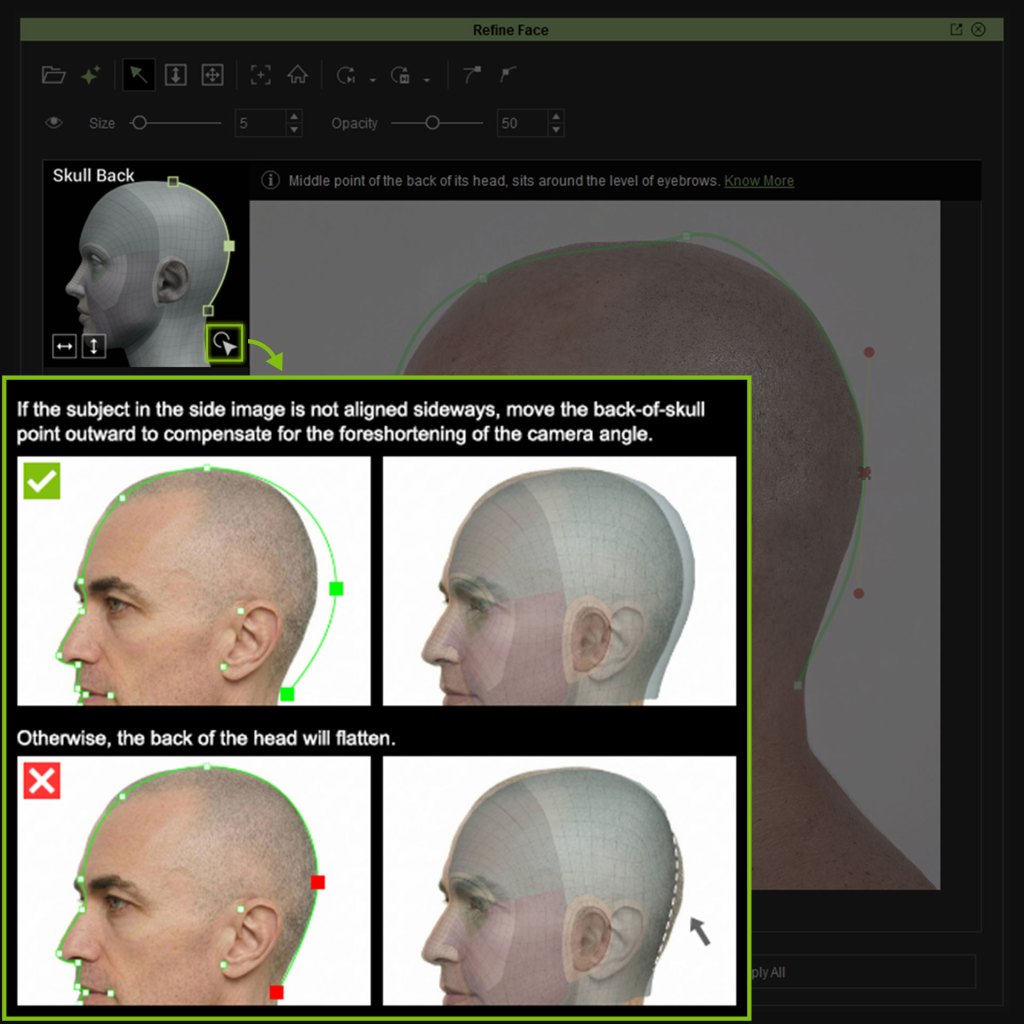
- New Point Placement Guidance: High-quality visual legends highlight critical tracking points, complete with clear “good vs. bad” reference diagrams to eliminate guesswork.
Rock-Solid Core Fixes & Optimizations
We’ve also resolved several critical pipeline bugs to ensure a perfectly stable environment. Headshot 3.1 successfully maintains full fidelity for LOD 1 and 2 after ZBrush edits, prevents mesh distortion when using Refine Face after changing head scales, ensures body color consistency during texture replacement, and fully supports Windows usernames containing non-English characters.
Related Articles
- Reallusion Redefines Digital Double Creation with the Launch of Headshot 3 for Character Creator 5
- Headshot 3 Stylized Image to 3D: Building a Bodybuilder Caricature in CC5 and Blender
- The Ultimate Guide to 3D Game Development in 2026