
TL;DR:
- iClone 8 and AI Studio combine for a powerful 3D-guided AI video generation pipeline, ensuring consistent characters and animations across diverse artistic styles.
- Award-winning animator Benjamin Sokomba Dazhi (Benny Dee) demonstrates how to leverage iClone’s precise scene and camera control to prevent AI hallucinations and maintain IP.
- The workflow involves preparing characters in Character Creator 5, animating in iClone 8, then using AI Studio’s “3D To Image” and “3D To Video” functions for multi-style rendering.
- Users gain full creative control and IP ownership over their AI-generated content, crucial for filmmakers, marketing agencies, and game developers.
This AI Studio Storytellers article by Benjamin Sokomba Dazhi (Benny Dee), an award-winning Nigerian animator, details a cutting-edge workflow using iClone 8 and AI Studio to generate diverse AI video render styles from precise 3D animation. It addresses the critical need for consistency, control, and IP ownership in AI-generated content, enabling 3D filmmakers, game developers, and marketing agencies to achieve stunning visual variety without sacrificing creative integrity.
“Reallusion’s AI Studio expands your creativity while preserving asset consistency and IP ownership. It combines iClone, Character Creator, and AI-generated video without sacrificing control over your 3D characters, scenes, animation, or lighting.”
BENJAMIN SOKOMBA DAZHI — Renowned 3D Animator, Director, Musician, Cinematographer

What is 3D-Guided AI Video Generation?
3D-guided AI video generation represents a paradigm shift in digital content creation, offering artists unparalleled control over AI-driven outputs. This approach leverages established 3D animation software like Reallusion’s iClone 8, Reallusion’s flagship real-time animation suite, to serve as the foundational blueprint for AI models.
By providing a fully animated 3D scene – complete with characters, environments, lighting, and camera movements, users dictate the precise motion and composition, which AI Studio then interprets and renders in various artistic styles. This method fundamentally solves the common challenges of AI video generation, such as maintaining character consistency across frames and preventing visual hallucinations, by grounding the AI in accurate 3D data.
Bridging iClone 8 and AI Studio for Consistent Creativity
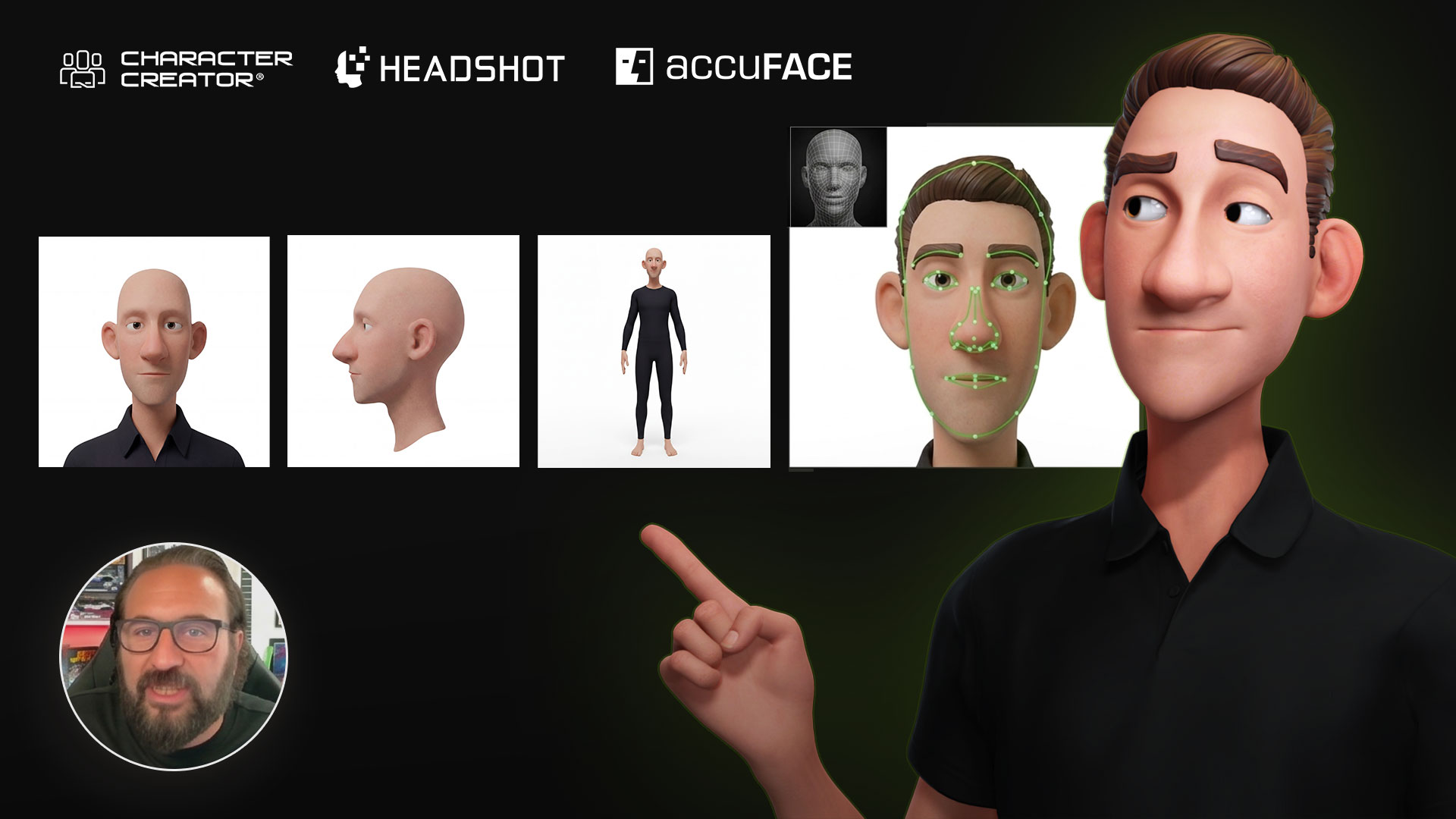
The workflow begins in the familiar environment of iClone 8 and Character Creator 5, Reallusion’s comprehensive character design tool. Artists first create or import their 3D characters, often leveraging tools like the Headshot 3 plugin for rapid, photorealistic head generation. The animated character and scene are meticulously prepared in iClone, with careful attention to lighting and camera work.
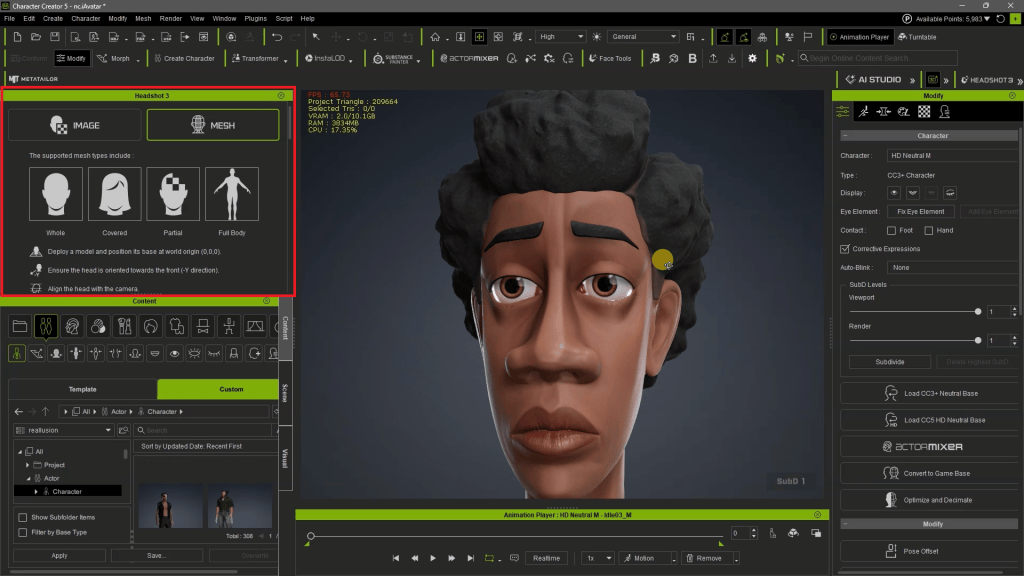
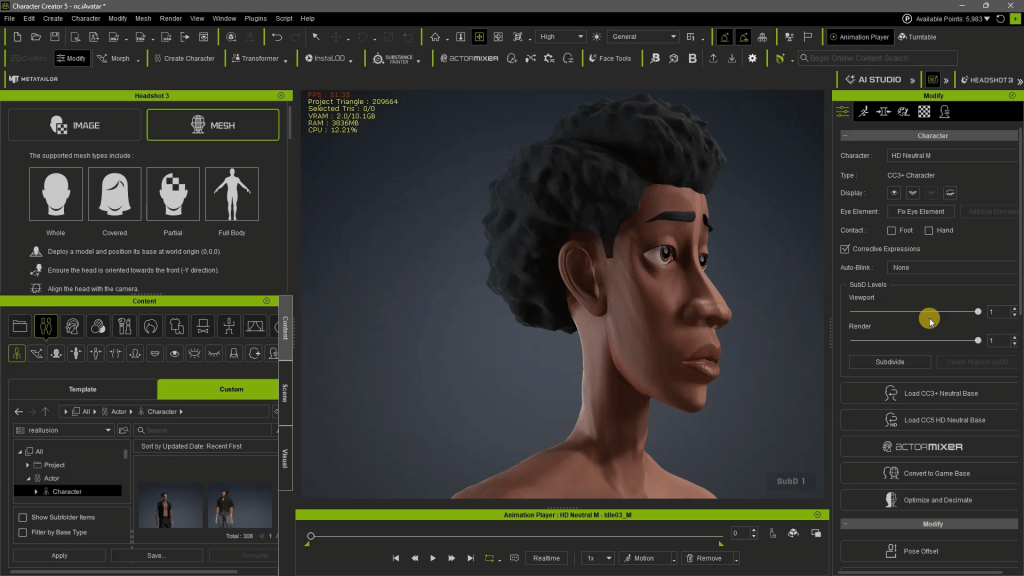
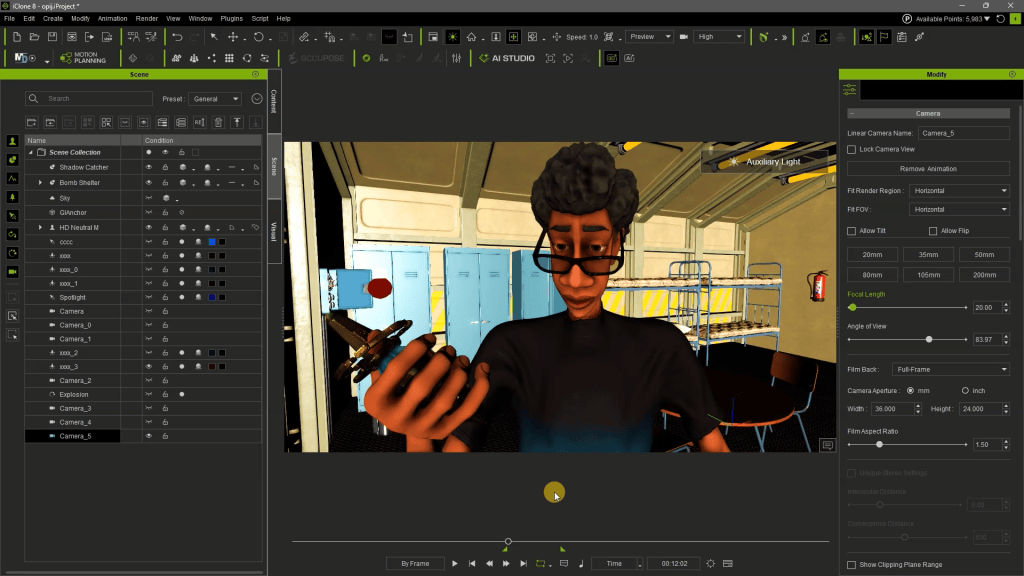
According to Benjamin Sokomba Dazhi, “The first thing I did was to animate my Character Creator generated avatar in iClone and prepare my scene in iClone.” This initial preparation includes setting up the scene, lights (Benny Dee often uses simple two-color lighting like red and blue for cinematic effect), and intricate camera movements. Crucially, the iClone PopCornFX plugin can be used for dynamic particle effects, adding another layer of visual complexity to the 3D guidance.

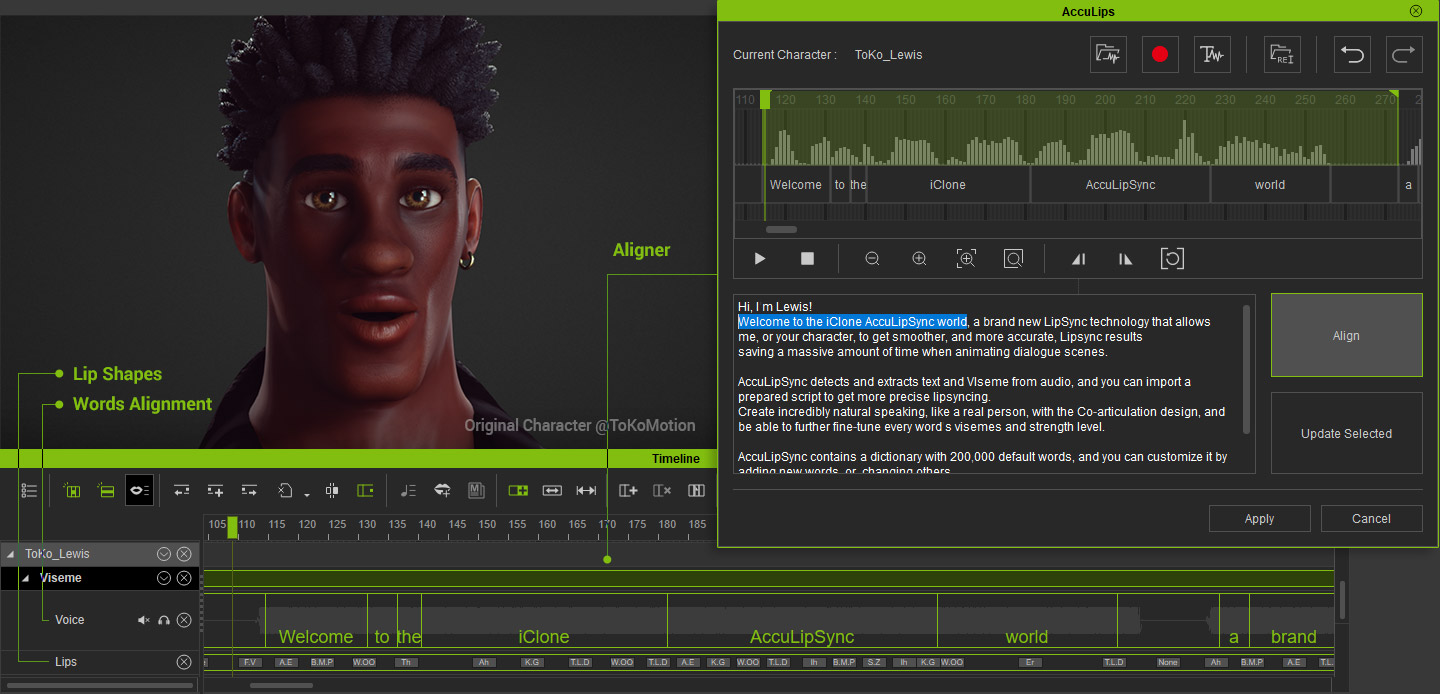
Voiceovers can be generated using iClone’s text-to-speech combined with external AI tools like ElevenLabs, then perfectly lip-synced to the character using iClone AccuLIPS, ensuring narrative cohesion. This comprehensive 3D data then becomes the robust input for AI Studio.
Featured Artist Spotlight: Benjamin Sokomba Dazhi (Benny Dee)

Benjamin Sokomba Dazhi, widely known as Benny Dee, is an award-winning Nigerian animator, film producer, and creative storyteller renowned for his distinctive visual style and technical prowess. Hailing from Niger State, Benny Dee’s career bridges animation, filmmaking, music, and emerging technologies, establishing him as one of Africa’s leading digital artists. His collaboration with Cartoon Network for the CN Dance Challenge showcased his ability to blend vibrant African culture with energetic animation on a global stage.
Benny Dee is an internationally respected expert in Reallusion’s iClone and Character Creator ecosystem, particularly noted for his mastery of real-time lighting, cinematic rendering, and virtual production techniques. He also leverages NVIDIA Omniverse for advanced rendering and collaborative workflows, pushing the boundaries of digital filmmaking. His methodology for integrating iClone’s precise 3D guidance with AI Studio exemplifies his innovative approach to animation and storytelling, ensuring consistent, high-quality results across diverse AI render styles.
Benny Dee’s Multi-Dimensional AI Workflow
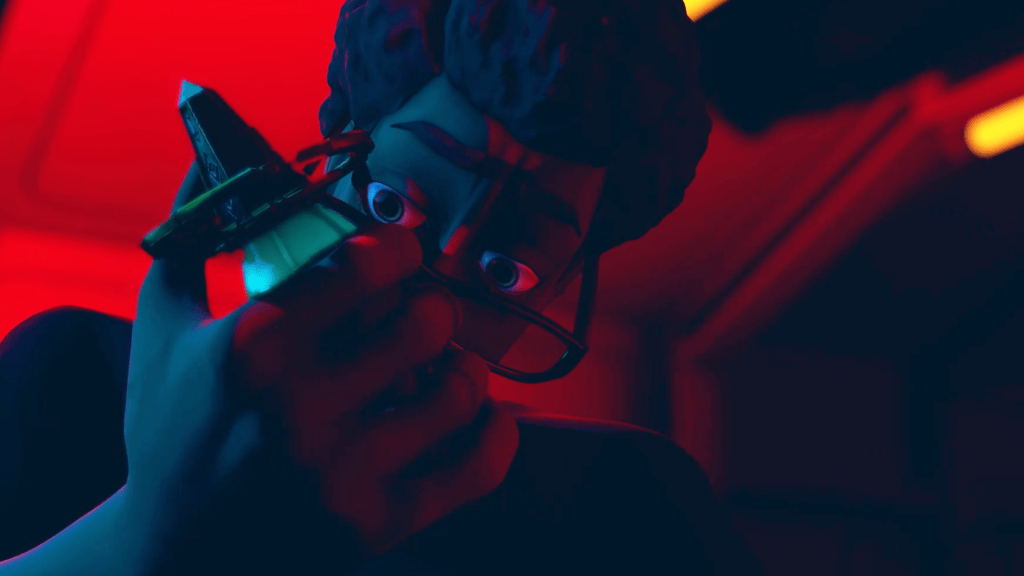
Benny Dee’s workflow for creating multi-style AI renders centers on a narrative concept where a character, Liam, travels through different “dimensions” or rendering styles. He meticulously prepares Liam’s character in Character Creator 5 using the Headshot 3 plugin, then imports Liam into iClone 8. Here, he animates Liam, designs the lab environment, and sets up dramatic lighting using just two colors, often blue and red, to achieve a cinematic look. Different camera angles and switches are choreographed in iClone to emphasize transitions between dimensions.
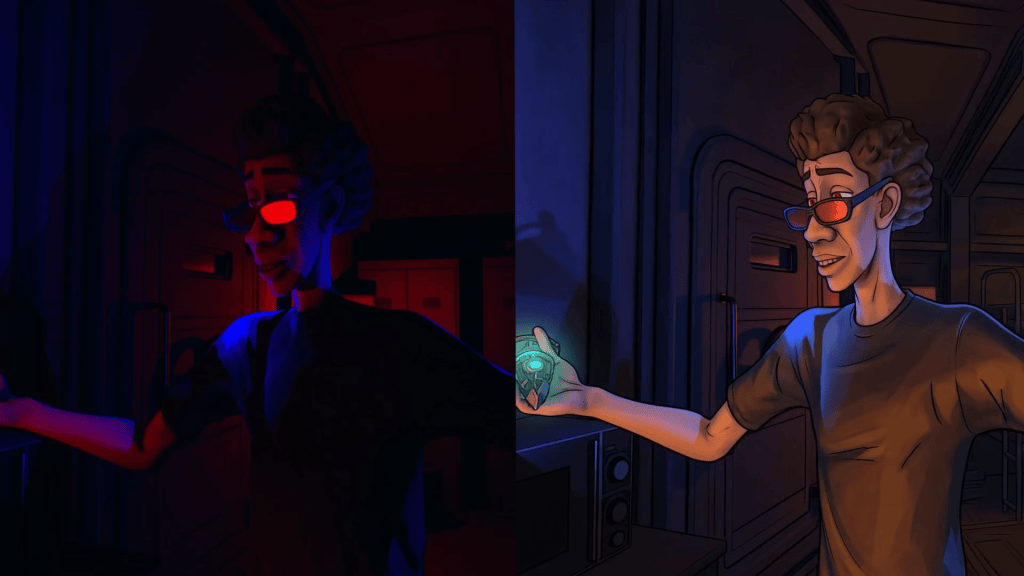
By capturing specific frames and video segments from iClone, Benny Dee guides AI Studio to render these segments in a multitude of artistic styles—from 2D Anime to Origami Art—while ensuring Liam’s appearance and actions remain consistent across all transformations. This control is paramount for storytelling where character identity must be preserved despite radical stylistic shifts.
- iClone Courses: https://courses.reallusion.com/master-class/instructors/3d/benny-dee
- YouTube Channel: https://www.youtube.com/@justartanimationstudios810
- Instagram: https://www.instagram.com/therealbennydee
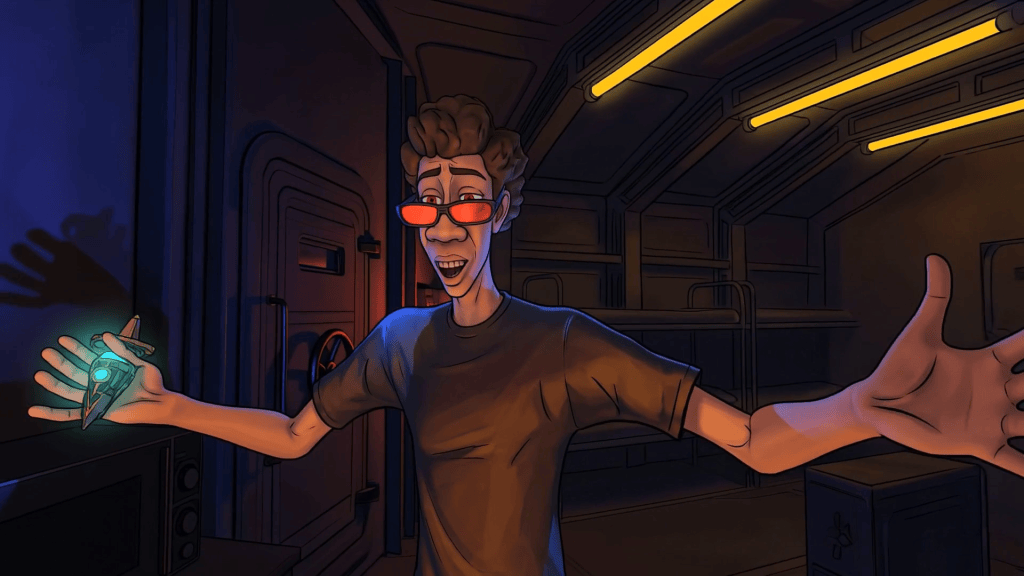
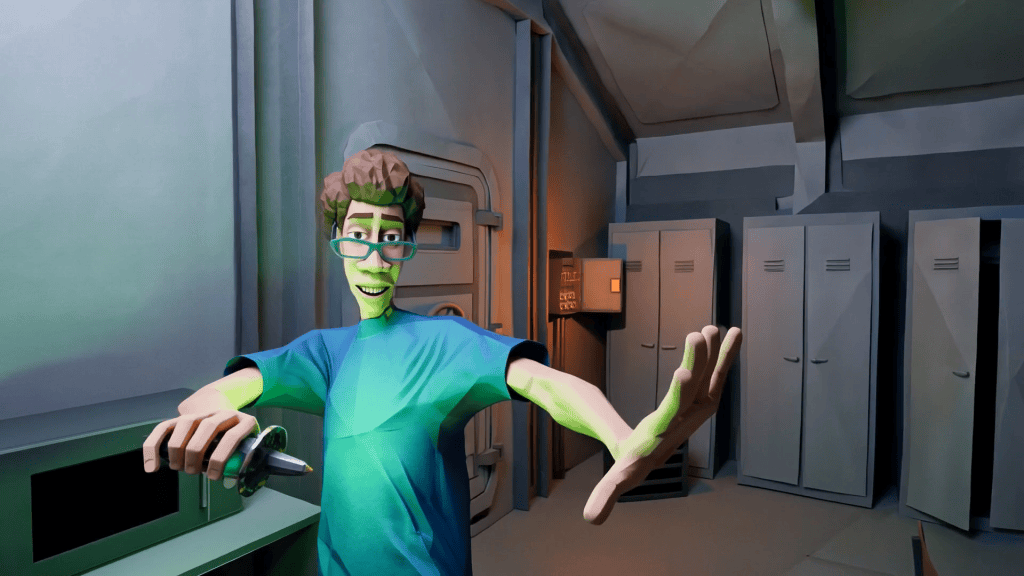

Mastering Multi-Style AI Rendering with AI Studio
AI Studio empowers artists to transcend traditional rendering limitations by offering a robust platform for 3D-guided AI creation. It is powered by advanced models like Seedance 2.0, Veo 3, KlingAI, and Flux, providing 3D-guided scene layout and absolute motion control. This process transforms original 3D characters into consistent AI Actors (iModels), allowing for unprecedented creative versatility.
Step-by-Step AI Image Style Generation
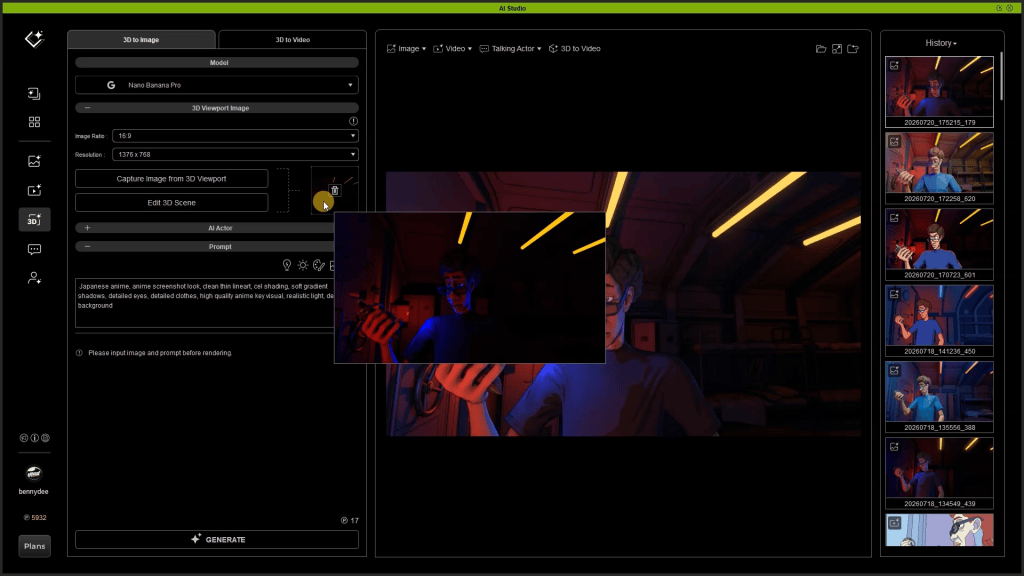
To begin, users switch to the AI Studio Workspace directly from the iClone dashboard. Within the “3D Guided Gen” tab, the “3D To Image” section is used to define the desired artistic style for a single frame.
- Capture Image: Click “Capture Image from 3D Viewport” to import the current iClone frame into AI Studio.
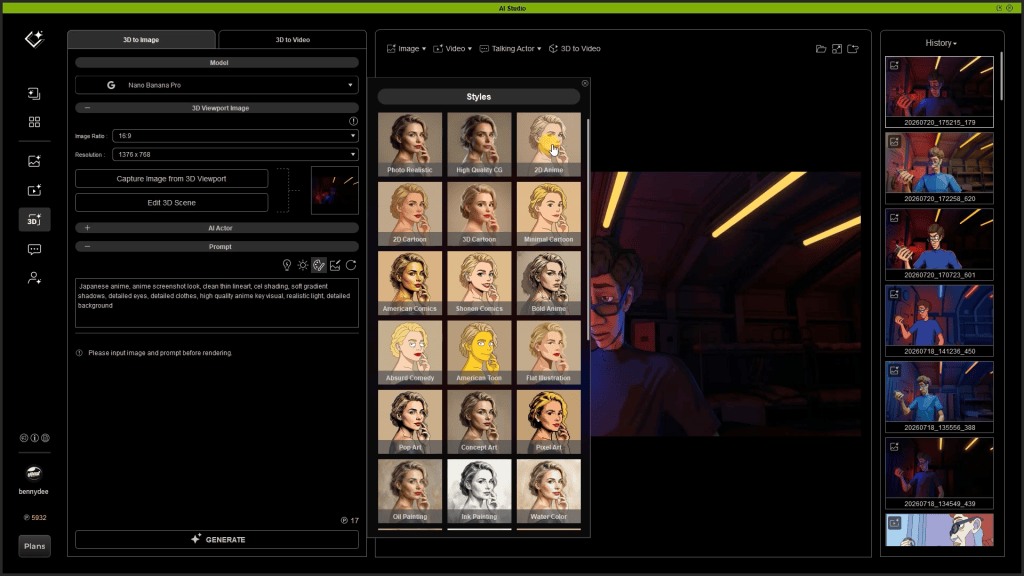
- Select Style: Navigate to the “Styles MENU” in the PROMPT area. Here, you can choose from over 33 render styles such as “2D Anime,” “Photorealistic,” or “Origami Art.” Each style comes with a preset prompt description.
- Refine Prompt: Users can expand the collapsed style prompt to view its full description and add their own specific details or modifications. This allows for fine-tuning the AI’s interpretation of the chosen style.
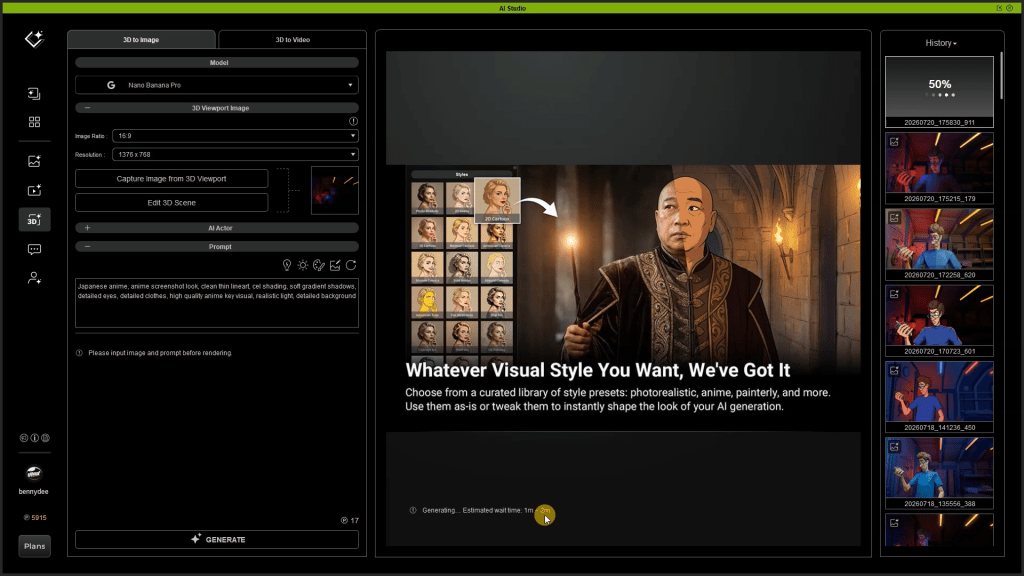
- Generate First Frame: Click “GENERATE” to send the image and prompt to the AI model servers. This typically takes a minute or two and consumes a small number of AI point credits (e.g., 17 AI point credits, approximately USD 0.15).
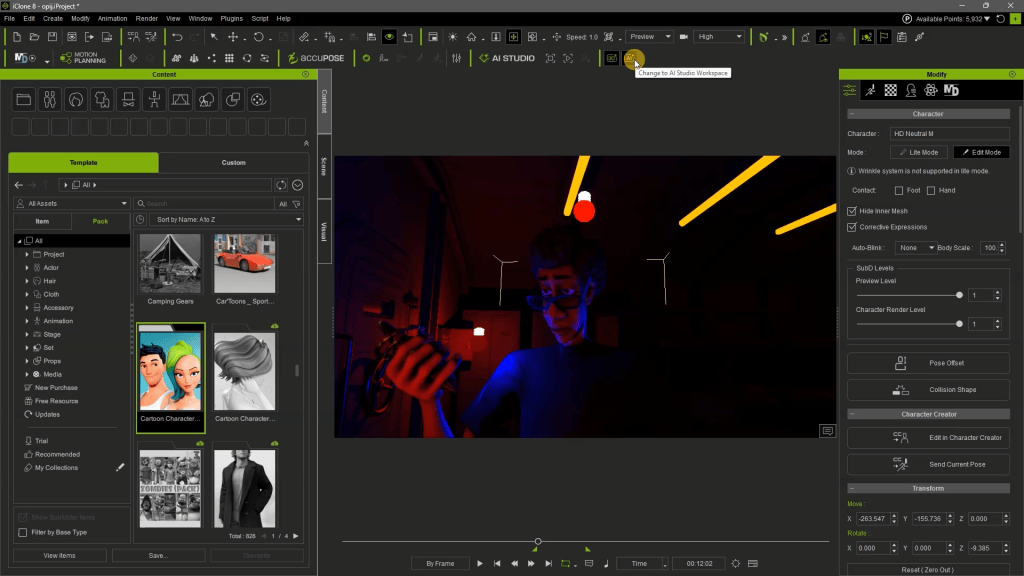
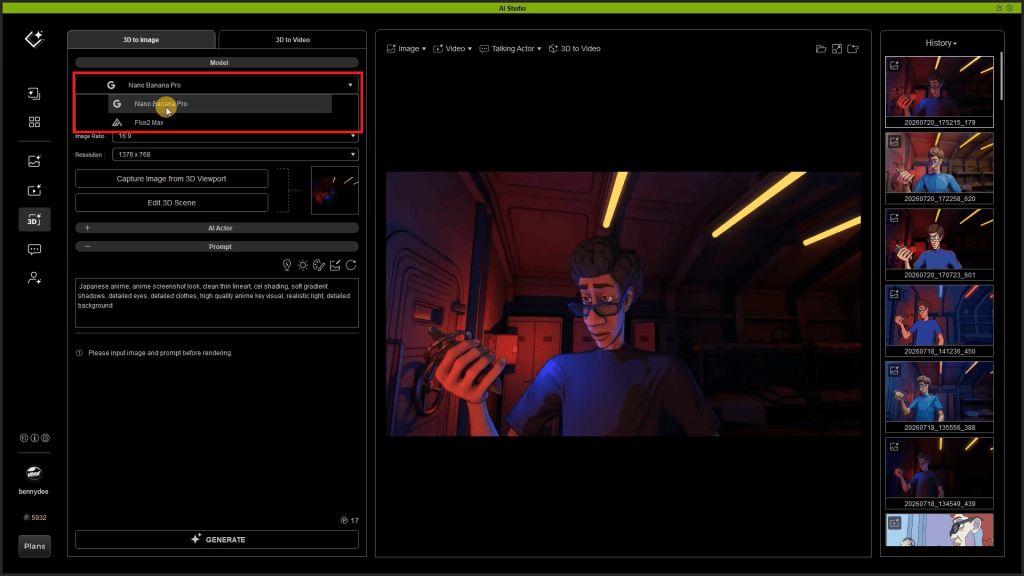

Converting Styled Images to AI Video
Once the initial styled image is generated, it loads into the “First Frame to Define Style” slot, acting as a crucial guide for the subsequent video generation.
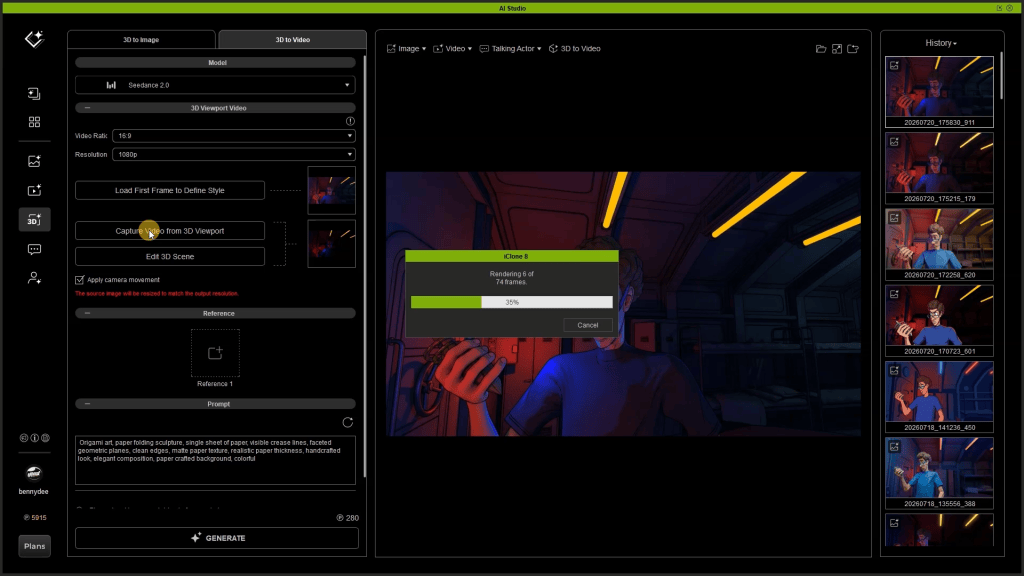
- Switch to “3D To Video”: Move to this section, where various AI video generation models like LTX, Wan, and Seedance 2.0 are available. Benny Dee opts for Seedance 2.0 for its capabilities.
- Capture iClone Video: Ensure the full animated sequence from the iClone 3D viewport has been captured and imported into AI Studio.
- Apply Camera Movement: It is critical to tick the “apply camera movement” box. This ensures the AI video generator respects the exact camera directions and movements orchestrated in iClone, preventing visual drift or inconsistencies.
- Manage Prompts: Copy the expanded style prompt from the “3D To Image” section and paste it into the “3D to Video” prompt panel. Always ensure previous style prompts are cleared or updated to avoid contradictions, as Benjamin Sokomba Dazhi emphasizes: “You can delete the previous Style text prompts to ensure no contradictions from the previous style descriptions.”
- Generate Video: Click “GENERATE.” This process integrates the selected style, the 3D-guided animation, and camera movements to produce a consistent AI-rendered video. The generated video appears in the History panel for review and playback. This iterative process is repeated for each “dimension” or style required for the animation.


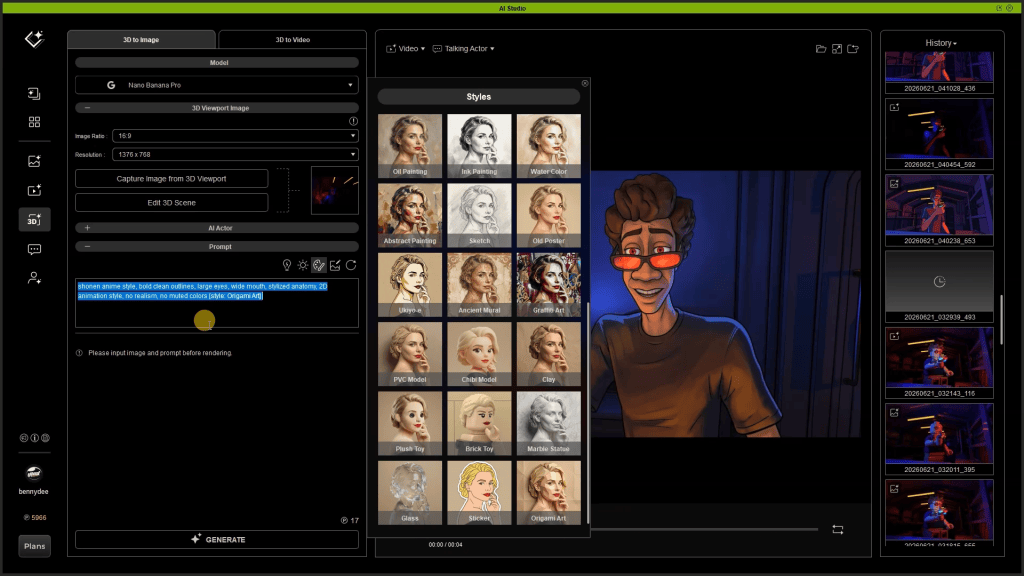

Pro-Tip: To quickly generate diverse visual narratives for a single animation, capture your iClone 3D viewport video once and reuse it across multiple AI Studio render style experiments. By only changing the style preset and prompt, you can generate numerous visual interpretations (e.g., 2D Anime, Origami Art, Minimal Cartoon) from the same core animation, saving roughly 2-3 hours of scene setup and animation iteration per style.
AI Studio: Technical Capabilities
| Feature Category | Detail | Benefit for Users |
|---|---|---|
| 3D Guidance & Control | Uses iClone 8 animation, lighting, camera moves as strict input for AI. | Prevents AI hallucinations, ensures character/scene consistency, maintains artistic intent. |
| AI Models Supported | Seedance 2.0, Veo 3, KlingAI, Flux (for video); Nano Banana Pro (for image). | Access to diverse generation capabilities, allowing varied stylistic outcomes. |
| Render Styles | 33+ preset styles (e.g., 2D Anime, Photorealistic, Origami Art, Minimal Cartoon). | Rapid stylistic exploration, highly customizable through prompt expansion. |
| Resolution Support | 1080p, 720p, various aspect ratios. | Professional output quality suitable for film, games, and marketing. |
| Cost Efficiency | AI point credit system (e.g., 17 credits for ~$0.15 per image). | Pay-as-you-go model, cost-effective for experimentation and production compared to traditional rendering farms. |
| IP Ownership | Generated from original user-owned 3D assets. | Full ownership and control over content, crucial for commercial projects. |
Why 3D-Guided AI Is the Future of Consistent Cinematic Production
While AI video generators unlock remarkable creative possibilities, they often struggle to maintain consistent character appearance, motion, and camera perspective across shots. These inconsistencies, commonly referred to as hallucinations or visual drift, can make it difficult to produce professional-quality animations or preserve a recognizable character throughout a project.
This is where the combination of Character Creator 5, iClone 8, and AI Studio provides a significant advantage. Benny Dee’s workflow begins with creating production-ready digital actors in Character Creator 5 before assembling the complete animation, camera work, lighting, and scene composition inside iClone 8. Instead of relying on AI to invent content from scratch, AI Studio uses this fully animated 3D scene as the foundation for rendering in virtually any artistic style.
This 3D-guided AI workflow allows creators to transform the same animation into dramatically different visual aesthetics—from 2D Anime and Minimal Cartoon to Origami Art—while preserving character identity, animation fidelity, camera movement, and storytelling continuity. The result is the creative freedom of generative AI without sacrificing production consistency or artistic intent.
Equally important, this approach gives artists complete ownership and control over their intellectual property. Because the original characters, animations, and environments are created within Character Creator and iClone, the underlying assets remain entirely yours. AI Studio functions as an alternative rendering engine rather than a content generator, enabling filmmakers, studios, and content creators to explore multiple visual styles while protecting their original work.
Whether producing proof-of-concepts, marketing content, animated shorts, or full cinematic productions, a 3D-guided AI pipeline offers the best of both worlds: the speed and stylistic flexibility of AI rendering combined with the precision, consistency, and creative control of a professional 3D animation workflow.
“AI Studio is a new rendering alternative to iClone’s real-time DirectX renderer. Using the same iClone animation, you can generate multiple visual styles, experiment with different camera angles, or even transform an entire animated scene into completely new creative looks.”
BENJAMIN SOKOMBA DAZHI — Renowned 3D Animator, Director, Musician, Cinematographer
Conclusion: Unlock Infinite Render Styles with iClone and AI Studio
Integrating iClone 8’s robust real-time animation capabilities with AI Studio’s diverse AI rendering options empowers creators to explore a spectrum of visual styles with unprecedented control and efficiency. This workflow, expertly demonstrated by Benjamin Sokomba Dazhi, ensures consistent character presentation and strict adherence to creative direction, transforming the landscape of AI video generation. Artists can now achieve distinct artistic visions, maintain full IP ownership, and drastically accelerate their production pipelines, ushering in a new era of creative freedom in 3D filmmaking and animation.
iClone Personal is a permanently free, time-unlimited edition of Reallusion’s real-time 3D animation software. It provides full access to core animation tools and unlimited video rendering, but limits external 3D file exports to 30 lifetime uses.
Claim your exclusive Reallusion AI Studio offer here
Frequently Asked Questions
Q: How do I ensure my AI-generated character looks consistent across different render styles?
A: Consistency is achieved by providing precise 3D guidance from iClone 8. By defining your character, animation, lighting, and camera movements exactly within iClone, AI Studio uses this accurate 3D data as its foundation. This structured input prevents AI “hallucinations” and ensures your character’s appearance and actions remain faithful to the original 3D model, regardless of the chosen render style.
Q: What is the difference between rendering in iClone 8 real-time and using AI Studio?
A: iClone 8 provides high-quality real-time DirectX rendering, ideal for interactive previews and quick outputs. AI Studio, conversely, acts as an alternative render engine that uses AI models to generate videos in diverse stylistic formats (e.g., 2D Anime, Photorealistic). While iClone handles the 3D animation and scene setup, AI Studio interprets that 3D guidance to produce entirely new aesthetic renderings, expanding creative possibilities beyond traditional real-time visuals.
Q: Can I use my own custom prompts in AI Studio, or am I limited to preset styles?
A: You have significant creative freedom within AI Studio’s prompt system. While it offers over 33 preset render styles, each with its own descriptive prompt, you can expand these presets to view their full details and then modify them. Additionally, you can input entirely custom prompts to guide the AI model towards a very specific stylistic vision, allowing for fine-tuned control over the final render.
Q: How does AI Studio ensure I retain ownership of my generated content?
A: AI Studio protects your content ownership by basing all AI video generation on your original 3D assets created in Character Creator 5 and iClone 8. Since the foundational characters, animations, and scene layouts are your proprietary creations, the AI-generated outputs, strictly guided by your 3D data, remain tied to your intellectual property. This model supports creators by giving them full control and ownership over their unique visual styles.
Read Next:
- AI Studio Storytellers: Building a Connected World with Consistent AI Characters
- AI Studio Storytellers: Building a Brand Marketing Campaign
- AI Studio Storytellers: Motion Capture to AI Video Generation
- AI Studio Storytellers: HEIST – Previz to Production: The 3D-to-AI Workflow




1 comment
Using iClone’s scene and camera control to prevent hallucinations is the most convincing argument for 3D-guided AI video. When animation, lighting and characters are fixed first, the AI render becomes a style layer, which also makes IP ownership much clearer.