首頁 » Page 69

ActorCore’s Next Generation Characters Revive Business Simulations

Lightweight actors with facial, body and lip-sync animations for crowd rendering sets a new standard for 3D people

ActorCore provides a premium selection of 3D motions and characters.

Reallusion, the developer of Character Creator and iClone real-time animation software, has launched a major upgrade for its browser-based 3D content platform, ActorCore

Currently being integrated with NVIDIA Omniverse™ platform on digital twins projects including drive scene simulation and BMW’s manufacturing visualization, and adopted by professional animators for 3D archviz applications, ActorCore has brought to the market a new standard of 3D people for crowd scene usage. These lightweight characters are fully-rigged for facial, body, and lip-sync animations, suitable from long to middle camera ranges. Along with an extensive library of 3D motions, and FBX file export formats compatible with all major 3D tools, ActorCore is the best 3D content marketplace for real-time animation and business simulations.

“At Reallusion we continue to raise the standard for character creation and animation,” said Charles Chen, CEO, Reallusion, Inc. “We have developed the next generation of 3D character systems, offering highly interactive, AI controllable characters that respond to the huge demand for business visualization, particularly archviz and digital twins. We strive to provide not only variety and quality but also advanced solutions that definitely go beyond expectations for real-time simulation.” 

Interactive 3D Actors Ready for Crowd Scene Animations

In contrast to commonly used 3D human models with no natural movements and expressions, ActorCore actors come with vivid facial and body mocap animations designed for the different camera (long to the middle) ranges ideal for crowd scenes. 

Different Styles for Any Production Demands

From photorealistic scanned people to sci-fi, fantasy, historical, and toon figures created with Character Creator, a variety of characters are now available on ActorCore. Simply import these animation-ready characters, with application-specific download formats, to get an optimal rendering quality.

ActorCore provides a variety of characters from stylized to realistic.

Industry-First: Optimized Topology and Character Rigs in 3D People

A complete character rig with eyes, jaw, shoulders, fingers, and toe articulations; ensures the most realistic animations through AAA mocap data.  All ActorCore characters come with the same facial topology for consistent expression editing and lip-sync control. PBR Materials are also merged for best crowd rendering performance.

ActorCore characters come readily optimized and rigged.

Natural Facial and Body Mocap Animation for Low Poly Characters

With 60 facial blendshapes, all ActorCore characters support natural expressions and talking animations. Besides animating with ActorCore motions, all characters are fully controllable inside iClone and other 3D animation tools.

ActorCore supports natural facial and body animations for low-poly characters.

actorSCAN vs actorBUILD: Choices That Fit All Scenarios

ActorCore offers two character types – actorSCAN and actorBUILD, which are created through different pipelines while being fully-rigged, facial animation-ready, and lightweight.

actorSCAN characters are designed to enliven business simulations with the most realistic, fully controllable photogrammetry scanned humans.

  •  Fully-rigged, realistic 3D people made through professional 3D scans
  • 60 blendshapes for facial expression and lip-sync animation
  • Eyes, jaw, shoulders, fingers, and toes rigged for true-to-life animation controls
  • Exceptional visual details suitable for most camera ranges
  • Optimized data performance for real-time 3D crowd rendering
ActorScan party people pack volume one and volume two.

actorBUILD offers multiple character forms tailored through Character Creator, with a wide variety of body shapes, outfits, accessories, and hairstyles for games, film, and interactive projects.

  • Discover various 3D characters including historical, sci-fi, fantasy, realistic or stylized
  • Includes different hairs, body shapes, facial appearances, outfits, and accessories compatible in Character Creator
  • Optimized through merged materials and polygon reduction for crowd rendering
  • Fully rigged characters for body and facial animation
ActorBuild Toon Figures Volume One and Historical Figures Volume One.

High Quality Motions for Popular Demands

ActorCore characters are 100% compatible with ActorCore motions, allowing one rigged character with multiple gestures for multiple uses. To meet mocap animation demands from different industries, ActorCore offers thousands of motions in well-planned themes designed for game, film, interactive projects, archviz, training, simulation, digital twins, and more.

ActorCore characters and motions are suitable for games, films, business & training, and arch viz.

AAA Production with Seamless Motion Transitions

Each ActorCore motion pack is professionally produced to ensure the best motion quality and practicality.  A specially designed motion system ensures smooth transitions between primary and secondary stance modes. This system offers high flexibility for professional animation production and interactive game character controls.

ActorCore offers triple-A production quality seamless motion transitions.

Quick Search for Content and Easy Export to Multiple Platforms

Users can access ActorCore’s 3D library through a web browser or a mobile device. Exceptional performance optimizations give users the best interactive 3D viewing experience on selected characters and motions. Users can also quickly search and explore thousands of related content through categories and keywords.  

All ActorCore content is compatible with major 3D programs including Unreal Engine, Unity, Maya, MotionBuilder, Blender, 3ds Max, Cinema4D, and iClone. Step-by-step guides and tutorials are provided for each program, along with optimized Auto Setup plugins, and Import Presets to ease workflow.

ActorCore's 3D library is compatible with multiple platforms and software, including Unreal Engine, Unity, Maya, MotionBuilder, Blender, 3ds Max, Cinema4D, and iClone.

Be Part of the Best 3D Asset Community

Whether through 3D scans or custom-made, 3D production makers can choose to apply ready animation, or they can customize and create their own through Reallusion software technology.  Reallusion provides a professional, well-designed character creation and animation pipeline to empower all levels of animators. To rapidly expand ActorCore content libraries, Reallusion is currently inviting 3D scanning services, motion capture studios, 2D animators, and 3D character artists to bring their expertise and creations to ActorCore.  Simply contact marketing@reallusion.com for more information on how to join the ActorCore content partner program.

FREE! Member Exclusive – Characters and Motions

To allow users to have a full experience on high-quality 3D content, ActorCore provides free content including motions and characters for download. Simply become a Reallusion member to access these amazing contents for your next project.  Sign up now! 

ActorCore free motions and characters exclusive for members.

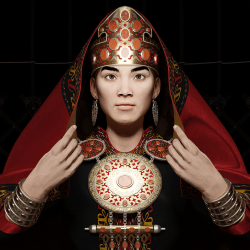
Turkologist raises awareness of Turkic culture with Character Creator, iClone and Blender

Turkologist raises awareness of Turkic culture with Character Creator, iClone, and Blender.
Tanir-Vefa Avci is a Turkologist and 3D Character Artist.
Tanir-Vefa Avci – 3D Character Artist

Tanir-Vefa Avci

Tanir-Vefa Avci was originally a political science and accounting major. He decided to pursue his passion in Turkology after graduating from college. Below he shares why he chose to use Character Creator and iClone:

Most people are acquainted with the Turks from Turkey but tend to scratch their heads when they hear about the groups further East. 

My goal is ultimately to raise awareness of Turkic culture. I want to inspire other Turks, wherever they may be from, to learn about their own cultures and the cultures of other Turks, and to use their knowledge in fun and creative ways. One of my favorite ways to encourage engagement is through 3D art. I love recreating Turkic material culture, whether it be as simple as a bead or as complex as a headdress. I also plan on animating a series of Turkic myths and legends, which I will return to later on.

I love using Character Creator for my models and I love using Blender to create their accessories. The two work together very well.

Tanir-Vefa Avci – 3D Character Artist

Speed and Power: Blender Artist Creates Incredible Business Commercials on Tight Deadline with iClone

This story is featured in CG Society.
See the article: https://cgsociety.org/news/article/5188/speed-and-power-blender-artist-creates-incredible-business-commercials-on-tight-deadline-with-iclone

Animator Chuck DeGroot explains how he created a compelling web commercial with the use of Blender and the Reallusion assets and mocap pipeline while under a strict deadline.

With little time, and numerous other projects, Chuck utilizes Reallusion’s suite of assets and its intuitive connection with other programs to create a stunning CG commercial.

A long-time lover of 3D character animation, Chuck DeGroot has been a prominent freelance animator since 2009. Having been inspired like many of us by the works of Pixar and Dreamworks, Chuck has been working extensively with commercial animations since his graduation from the Art Institute of Pittsburgh. And with an emphasis on 3D character animation in his recent works, Chuck gives us insight into his use of Reallusion’s tools to complete a commercial project on a tight schedule.

Project Overview 

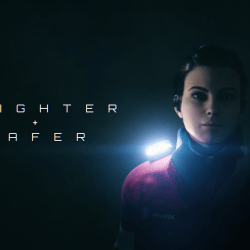
Approached by Clum Creative, a creative agency based in Cleveland, OH, the goal was to complete a promo video for Guardian Angel’s “Elite” line of safety lights. This project was a little tricky because it entailed creating a highway accident scene, which would make it inherently expensive and complicated to shut down a highway section for real-life filming. For this, he had to choose CG animation to simulate the scene. Additionally, the deadline was tight, just under a month while juggling multiple other projects, but with the power of Reallusion’s tools, Chuck was able to deliver the 60-second promo, featuring 4 unique characters while displaying a real functioning device, on time and on-budget.

Check out Guardian Angel Devices – “Brighter + Safer” project: https://chuckdegroot.com/guardian-angel-devices-brighter-safer

Hitting the Ground Running with Content Store Assets


With the script in hand, the project kicked off in Character Creator 3 (CC3) where I generated the character models and textured them with the amazing SkinGen plugin. Given the limited production time, I was lucky enough to be able to purchase many stock assets from the Reallusion store in order to accelerate the character design process (Professional OutfitsPoliceman Uniforms & GearsAmbulances & Paramedic). It allowed me to purchase a diverse set of clothing assets that worked for each of the characters’ roles.

The CC3 characters were then exported via FBX to Blender, where I could set up the texture/shader nodes, and fine-tune weights and deformations, making render-ready character rigs. The CC3 Tools add-on automates texture and shader setup, and includes many other extremely useful tools.

Quick and Effective Mocap Animation Workflow

Besides character and scene build, I simultaneously sent the characters from CC3 to iClone for animation. I was able to automatically generate a high-quality control rig in Blender using Autorig Pro Quick Rig (this would allow me the option to further customize my character animations later in the process).

Mocap animation data was then recorded and cleaned up in Rokoko Studio, and applied to the iClone characters via 3DXchange. At this point, I was able to fine-tune and customize the recorded Mocap data in iClone, as well as add subtle facial animation using iClone LIVE FACE profile and my iPhone. 

With the motion editing tools in iClone, I was able to customize, combine and fine-tune the Rokoko Mocap data in extremely flexible ways. The iClone LIVE FACE iPhone facial mocap system also gave me an easy way to add subtle facial animation to the characters, which transferred effortlessly to Blender via shape keys in the FBX export files. When the animations were finished in iClone, I exported them via FBX to Blender, where I transferred the actions (both bone animation and facial shape key data) to the final render-ready character model. The scenes were rendered with Eevee, and finished with color grading and post FX in After Effects.

The flexibility of Reallusion’s import/export options in CC3, iClone and 3DXchange allowed me to painlessly move data between those applications, and ultimately get it all into Blender, where the environments were built, the scenes were lit, and the shots were rendered. Pulling off a 3D character animation of this scope in a few weeks as a freelancer would have been nearly impossible just a few short years ago. Reallusion’s tools not only allowed me to pull it off, but they made the whole production process straightforward and FUN!

The Key to the Project

As a freelancer, Reallusion’s tools have become invaluable to me when tackling 3D character animation. With Character Creator 3, iClone and 3DXchange, a great deal of the process is streamlined and simplified. This allows me to work quickly, and forget a lot of the technical hurdles inherent to character animation, and instead focus on the more artistic aspects. Reallusion has done a fantastic job of creating software that makes it possible for solo freelancers like me to produce quality 3D character animation quickly, and I’m excited to see how the tools continue to evolve from here.

Pitch & Produce | EVERY SINGLE NIGHT: The Making of Vicky Rai’s Music Video with Real-time Software

This story is featured in Creativebloq.
See the article: https://www.creativebloq.com/features/real-world-solutions-reallusion

Michael T Morrow – Director / Documentary Filmmaker

Michael T Morrow

Michael T Morrow is an award-winning television director, camera man and editor with over 22 years of experience in Documentaries and Series Television, Music Videos and Commercials.

After graduating from OCAD’s Integrated Media Program, MTMorrow spent his first few years directing television commercials, music videos and corporate films before self-financing his first documentary feature film, “Hot Rod, The Movie” about small-town demolition derby drivers. The film played in festivals worldwide, before airing on OLN and IFC. Morrow worked with Summerhill Entertainment to extend the concept into a half-hour series redubbed “Crash Addicts” for OLN. Morrow directed and story produced each of the 26 episodes.

Morrow has become a sought-after director, cameraman and editor of factual television with larger-than-life people living on the social fringe. Notable directing work includes the Gemini award-winning “Fire Jammers” Discovery Channels “License to Drill:, “Cold Water Cowboys”, “Nerve Center”, and “Mighty Planes”, History Channel’s “Ice Road Truckers” and second unit directing and editing four seasons of “Political Blind Date” for TVO.

Morrow’s first attempt at 3D/virtual production, came with the music video – “Every Single Night” for Canadian artist Vicky Rai who enjoyed international recognition, winning Best Pop Music Video –  Munich Music Video Awards, Best Music Video – Madras Independent Film Festival,  Best VFX – International Music Video Awards, Best Music Video Finalist – Kosice International Film Festival, Best Music Video Finalist 4th Dimension Independent Film Festival, and Official Selection – High Tatras Film and Video Festival. In this music video project he extensible utilized Reallusion’s Character Animation suite with Character Creator 3, iClone 7, and ActorCore, with final render in Unreal Engine.

Morrow aspires to make a meaningful contribution to Canadian culture by continuing to work with top production houses and networks on programs that educate, inspire and entertain a broad audience.

“Reallusion’s one-two punch of Character Creator 3 and iClone 7 are a powerful suite of digital human creation, rigging, and animation tools. I found them intuitive to use, massively scalable, and I was able to generate very high-quality digital assets with little time and effort.”

Michael T Morrow – Director / Documentary Filmmaker

Creating Believable Talking Animations for Your 3D Characters with AI Voice

This story and the author Tobias Kolodziey are being featured in 80 level. See the interview article: https://80.lv/articles/replica-creating-talking-animations-for-3d-characters-with-ai-voice/

A NEW AVENUE FOR LIP-SYNC ANIMATION: INTRODUCTION TO FAST TRACKING

AI VOICE LIBRARY INTO FACIAL ANIMATION

I’m a Character Artist and Content Developer for Reallusion’s Character Creator for over 5 years now and I was always looking for an easy way to breathe life into my creations. As I had worked in the CGI and animation movie industry for a couple of years before, I know how time-consuming and cost-intensive character voice casting can be. You would need to hire a voice actor, do the sound recording, edit the voice, import into your software, then (frame by frame) edit your character’s talking and facial performance. Voice acting and editing is one job, animation is another job. That could mean weeks of work, and thousands of dollars for the project—which is not something that every creator can afford.

I was lucky enough to test out the new collaborative solution provided by Reallusion and Replica. Replica is a company that specializes in providing AI voice libraries.  Thanks to Replica, I now have a huge library of natural-sounding voices—always at my fingertips. Then I found out that the AI Voice Actors Plugin for iClone is opening a whole new avenue for animators: You simply just type the text for your avatar, one-click send to iClone, then your avatar will be animated with automated lip-syncing.

Having given it a deeper review, I decided to write this article to show other creators how this solution is a real game-changer. I hope all of you will find this useful and perhaps change your viewpoints of how to create lip-sync animation forever.

Tobias Kolodziey (TokoMotion) 

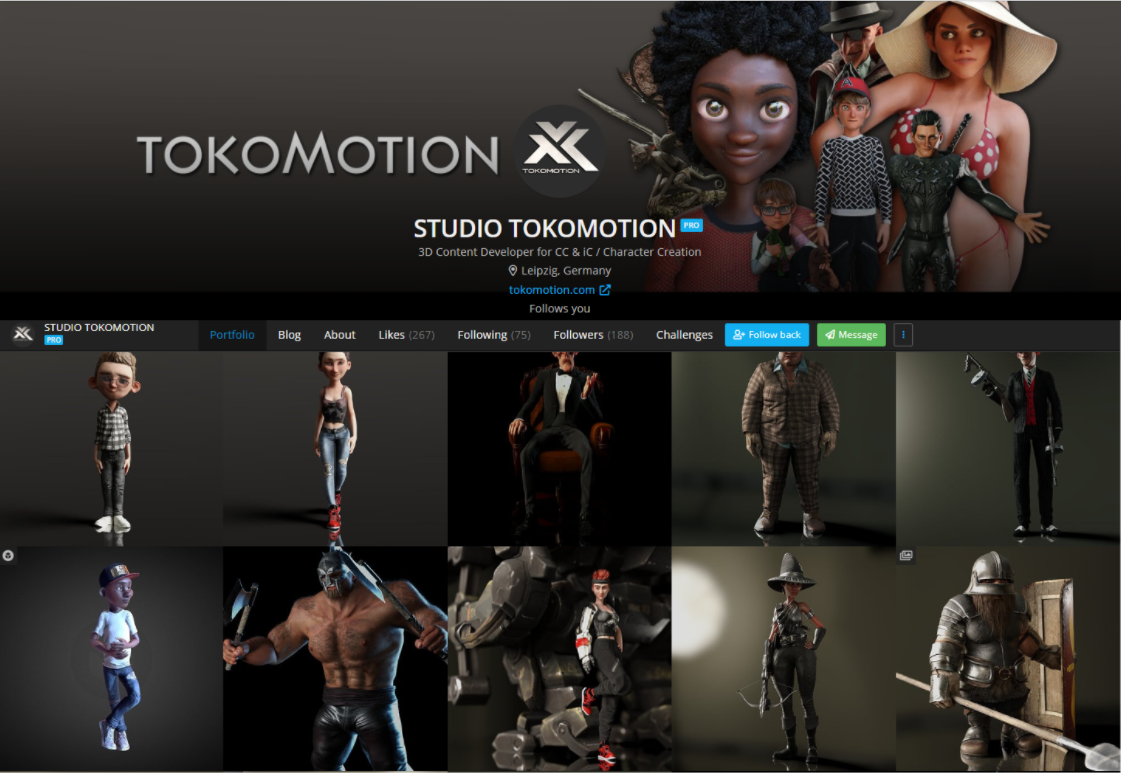
My name is Tobias Kolodziey and I’ve been working in the animation & CGI industry for several years now. As a character artist, I started Studio ToKoMotion in 2011 to develop and produce my own ideas. Since then I also had the opportunity to work with clients on some small but interesting projects, especially in the field of edutainment. You can see more of my works in Artstation https://www.artstation.com/tokomotion

In this behind-the-scenes article, I will give you a quick overview of how the new Replica plug-in for iClone will help you to bring your characters to life in just a few clicks. Please make sure you have the (free) Replica plug-In installed onto your iClone software. For more information about the plug-In installation, and other helpful hints and tricks, please visit the official Reallusion product page at: https://www.reallusion.com/iclone/ai-voice-replica

You will also need to have the Replica Studio software installed on your computer in order to connect iClone via Replica Link. Please visit https://replicastudios.com to create a (free) account and download the software.

Check out the following tutorial video, and learn the workflow:

LET’S START ICLONE

But now let’s start and see what Replica for iClone has to offer. To open the plug-in in iClone, go to MainMenu > Plugins > Replica Studios > Replica Link. Now you can select the character in your scene via the Replica Link and it is ready to receive the voice from Replica Studio.

IN REPLICA STUDIO

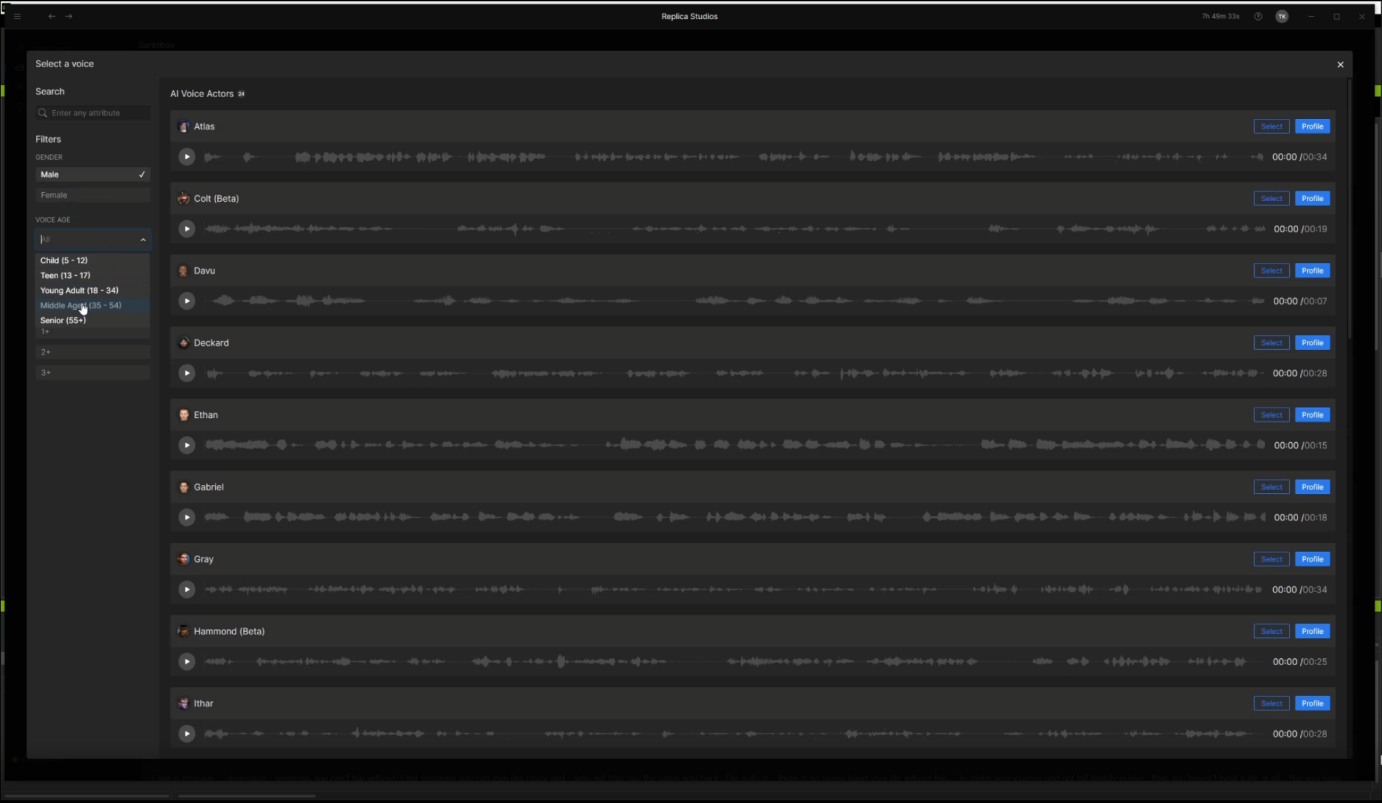
So just switch over to Replica Studio Sandbox and type in some lines of dialogue, then click Select a voice… to choose a voice from the Replica voice library.

 You can scroll through the library and preview the voices or use the provided filters to search for specific features of the voice. A total of more than 45 voices can be found here.

After you’ve selected the proper voice you just need to press Play to let Replica Studio generate the voice for your character’s dialogue.  This provides a quick way for you to review different voices.

Try to play with the “Style“,  “Speech Rate“ or “Pitch“ to further adjust the voice to your liking and save the take to export it to iClone.

AUTO-GENERATE FACIAL ANIMATION STYLES

After you’ve clicked Export to iClone in Replica Studio, iClone will ask you to select an Animation Style and Strength Level that will be applied with the generated voice to your character. There are a bunch of animation styles for different moods from ”Anger“ to ”Surprise“ available for your character’s facial animation. Click Apply and let iClone do the rest.

When finished, your character will have a cool-sounding voice, great lip-sync, and a base facial animation. Here you can already see your character talk with a basic facial animation matching your selected talking style.

 If you are not satisfied with the animation style or strength level you can always change it using the Expression Loop presets that can be found under Content > Animation Template > Face > Expression_Loop. Needless to say, you can create your own facial expression clips, but this library gives you another level of automated preset motions.

FINE-TUNING WITH ICLONE’S BUILT-IN ANIMATION TOOLS

Please also make sure to check out iClone’s built-in animation tools, Face Puppet, and Face Key to finetune your character’s facial animation afterward. It’s easy to add some more facial expressions for the whole face or just certain areas like eyes, brows, or mouth/lips with these tools. 

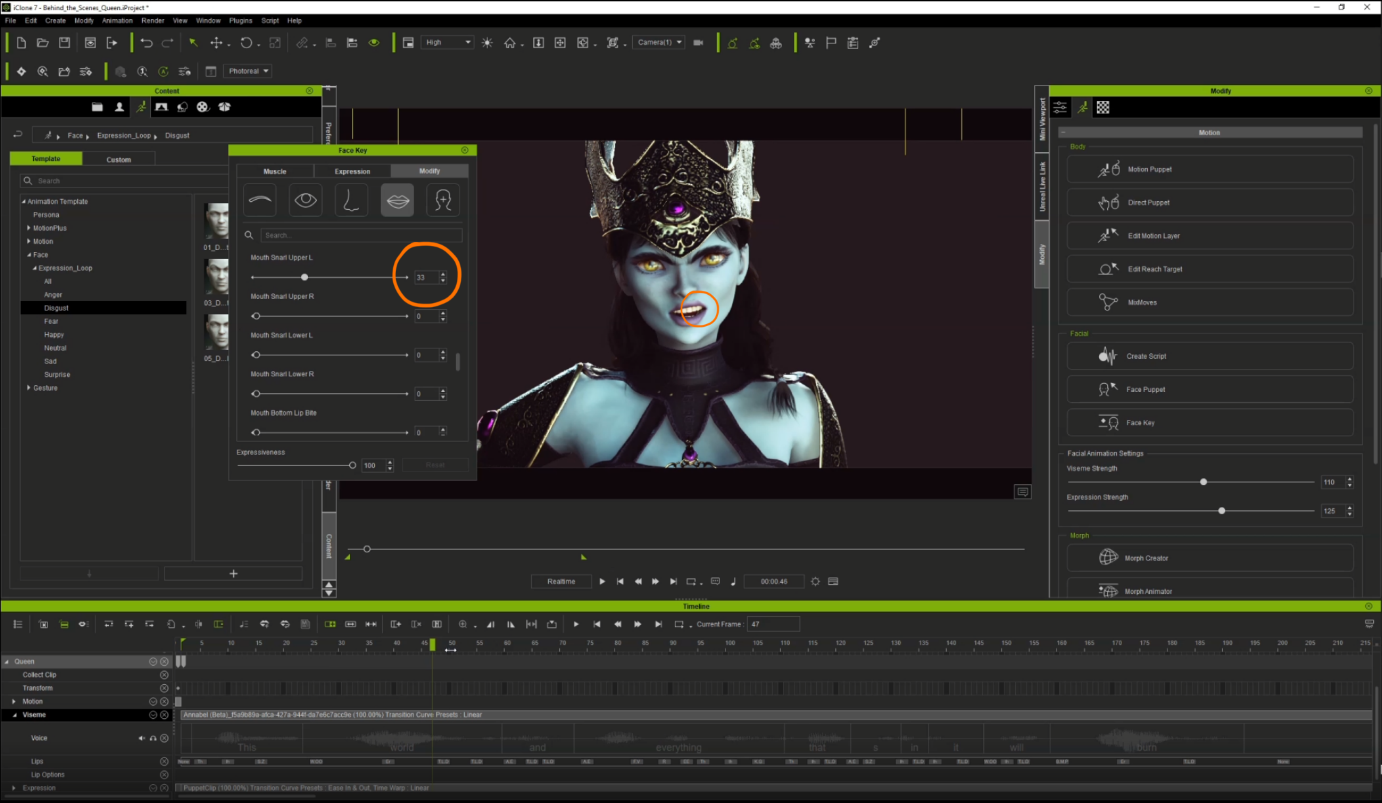
Face Key is the perfect tool to create individual mouth/lip shapes for certain letters/words of your character’s dialogue to make it look unique. 

Use the Muscle, Expression, and Modify sliders to create special morphs and to emphasize certain letters or words. Additionally, you can manually adjust the auto-generated visemes of the voice track to acquire the perfect lip sync.

Finally, create somebody animations for your character, add props and effects to your scene to bring your character to life—it has never been quicker and easier!

This workflow turned out to be way easier than expected. I highly encourage you to give it a try. Have fun and happy creating!  

Fresh & Fast Blender Facial Animation Workflow

This story is featured at ArtStation magazine

See the article: https://magazine.artstation.com/2021/07/fresh-fast-blender-facial-animation-workflow/

Free Blender AutoSetup Plugin Instantly Sets Up Characters from Character Creator to Blender

Martin Klekner has always dreamed of creating animations for believable CG characters from captured actor performances. He got a taste of such technologies while working on cinematics for Kingdom Come Deliverance by Warhorse Studios. However, he was still left wondering whether talking animations could be done by one person at home using affordable software.

Martin found his answer in the new Blender Character pipeline, which combines the power of BlenderCharacter Creator, and iClone for the characters.

Martin Klekner is a freelance director and CG artist from Prague, Czech Republic. He specializes in Blender and is an instructor on CGBoost.com

Complementary workflow between Blender, iClone, and Character Creator

Next-Gen Character Creation and Animation

Martin was very interested in iClone’s capabilities, including animating faces with LIVE FACE tool, generating lip-sync with the new AccuLips, and sending everything to Blender with just a few clicks.

The first step was creating the human base meshes in Character Creator. The new CC3+ character base capabilities allow for more realistic eyes and have a new realtime hair collection. Also, using the options provided by the SkinGen texturing tool was a must; layering great-looking skin details onto the base texture. The simplicity and automation of the process were the key for Martin to make everything in a matter of mere hours.

“Reallusion tools are allowing me to not only create great-looking human meshes, but also to immensely speed up the entire workflow. With the new Skingen and Hair capabilities, CC3+ models now meet (and exceed) all my quality requirements!”

– Martin Klekner

Easily generating believable, fully-rigged characters
One-click transfer from Character Creator to iClone animation 

Once the character’s look was final, the next step was the seamless export to iClone. The fully-rigged character was now ready to be animated using both mocap data and facial animation from the LIVE FACE app. The new step Martin tried was using the AccuLips option, generating automated lip movement based on a single voice clip. It provided a base for the rest of the facial animation.

“Lipsync, something I’ve always dreaded, has become a simple and enjoyable task for me with AccuLips and LIVE FACE.”

– Martin Klekner

Martin recorded his own facial performance using the iPhone LIVE FACE app. He layered animation tracks for eyes, brows, mouth, and head movements, blending everything together and letting iClone automatically smooth the tracks with the new Smooth option. This removed the jerky facial movements one usually gets. Finally, the extensive ActorCore library was a great source for choosing a body animation for the final animated result.

Precise auto lip-sync animation directly from voice input.
Best of breed multi-pass iPhone facial motion capture

AutoSetup to Blender

With the animation done, it was time to export everything to Blender. The format he used was the FBX with Blender preset set. Importing to the 3D tool was as easy as using the freely available CC3 add-on. With a single click, the FBX was automatically set up in Blender, ready to use both in Cycles and the realtime renderer Eevee, with fully editable materials.

Adjustable digital human shader for Blender Eevee render

Eevee was used to render out the final shot, which meant realtime preview and thus, speeding up the workflow.  Thanks to the automated tools by Reallusion, Martin was able to make this shot in a single day.

Download a Free Trial

Learn more about Character Creator to Blender design, and download a free trial of Character Creator and iClone to create your own cinematic films.

Game Changer: Universalizing 3D Facial and lip-sync Animation

Create true-to-life facial animations with a game-changing workflow that includes accurate lip-syncing, emotive expressions, muscle-based key editing, and a best-of-breed iPhone facial capture. Furthermore, a new set of scan-based ExPlus blend-shapes for iClone 7.9, gives unmatched, comprehensive facial performances.

Powerful Tools Come to the Aid

Whether humanizing realistic digital doubles or dramatizing stylized characters, iClone provides time-saving tools that can help anyone direct their 3D actors’ facial performances to maximize productivity. These tools and features come in the form of AccuLips, Face Puppet, ExpressionPlus (in combination with expression preset), Face Key Editor, and ARKit.

Automatic lip-syncing, which is provided by AccuLips, gives the most intuitive and effective way to generate procedural, editable talking animations, by allowing all types of users to easily create accurate, natural, and smooth-talking performances. Face Puppet lets you easily start with 23 predefined facial animation profiles that cover diverse personalities and emotions, with the addition of 7 ExpressionPlus profiles for subtle performances over eyes and mouth movements. All of these profiles allow an artist to animate facial parts like never before! In addition, one can effectively tone down the animation strength for realistic humans, or increase the strength for exaggerated stylized character expressions. It’s also possible to humanize characters with advanced facial behaviors like rolling the eyeballs while the eyes are closed, sucking in the lips, biting the lips, chewing with jaw movements, opening the jaw with lips sealed, poking the tongue in the mouth, licking the lips, and even simulating silent talking.

Once facial expressions are created through lip-syncing, facial mo-capping or puppeteering, one can fine-tune facial features by using the Face Key Editor. These facial keys will be overlaid and blended with existing expressions and stored in the Timeline track for further editing. Three types of expression adjustment are provided: Muscle panel, Expression presets, and morphs sliders. Within the Muscle panel, one or several effective regions can be selected and the user can mouse drag to drive the corresponding muscle movement along eyelids, eyes, brows, cheeks, mouth, lips, and nasal area. Muscle panel includes options for symmetry, head rotations, and adjustable sensitivity to accommodate subtle to drastic movements. Muscle panel also supports both Standard Mode and ExPlus mode (new in v7.9). Expression presets allow for quick jumping between different emotional presets, or access to ExPlus for 4 additional ARKit expression sets, including tongue movements, along with adjustable strength levels to match production requirements. 60 Standard and 63 (52+11) ExPlus blend-shapes can be directly accessed via morph sliders, which not only gives complete control over expression details but also allows for input of extrapolated strength values (+/- 200 ). This makes it easy to observe what blend-shapes are being triggered with expression presets and through the Muscle panel. Furthermore, blend-shape names and values can be inspected when exporting to external 3D tools.

iClone provides the most intuitive way to generate procedural, editable lip-syncing animations, allowing all types of effortlessly created, accurate, natural, and smooth-talking performances. The highly expressive, scan-based ExPlus blend-shapes are now one-to-one mapped to iPhone ARKit signals, making the data ready for post-layer editing via the iClone Face Puppet and Face Key Editor.

Lip-syncing that Works

AccuLips is a brand new lip-sync technology that allows characters to achieve smoother and accurate lip-sync results. This technology can save a massive amount of time when animating dialogue scenes, because AccuLips detects and extracts text and viseme from audio, or can be made to import prepared scripts for precise lip-syncing. Natural speak is achieved with the co-articulation design, and with further fine-tuning of every word’s viseme and strength level. AccuLips contains an English dictionary with 200,000 default words, that are easily customized by adding new words, or making changes to the existing entries.

iClone AccuLips provides lip sync animations with timeline editing

The new iClone AccuLips system can automatically generate accurate text data and correct viseme timing from an imported voice. This new design gives users a highly manageable approach to professional lip-sync animation. This new method lets you generate text from audio, while automatically aligning words to their corresponding voice sections. If the system is further aided with a text script, then one can get a more accurate text-to-voice alignment.

With enhanced mouth shape for each viseme, the lip-sync result is more precise and natural for both realistic and stylized characters because AccuLips is designed to simulate real human speech behavior. For true-to-life talking animations, each mouth shape takes on the qualities of other mouth shapes that precede or follow them. i.e., articulators either anticipate the next sound or carryover qualities from the prior sound. “Schwa(/ə/)” is the weak vowel sound in some syllables that is not emphasized in words. AccuLips also include slightly opened mouth shapes when there’s a break between words and sentences and mouth movements are governed by pairing 8 lip/dental shapes, 7 tongue positions, and mouth widths; all blended with varied time curves to represent more natural transitions between a total of 240 possible phoneme combinations. When we pronounce words, the preceding phoneme will be affected by the following phoneme, therefore the viseme of the preceding phoneme may be different, like “key”, “cool” and “car”. The same treatment is applied to succeeding phonemes where they are also affected by the preceding phonemes, like “chips”, “kick” and “lick”.

Although it’s good to see all the detected visemes correctly align to each word, highly frequent lips and jaw movements can cause unwanted mechanical behavior. The smart down-sampling tool can effectively alleviate the judders by reducing less prominent lip keys, just like how humans tend to slur in a effortless manner. Phoneme pair design is the foundation of iClone’s lip-sync system, and the 7.9 update takes out abrupt transitions between certain viseme pairings, and optimizes transition curves for smoother lips blends, especially when talking fast. The strength of lips and jaw movement varies due to when and how people speak. It can be influenced by speed or situation like whispering is different from yelling, and mumbling is different from enunciating. The Talking Style presets give you the quick setup over lips, jaw, and viseme strengths optimized for different talking occasions. iClone lip-sync technology realizes the character lip-sync animation with an easy and intuitive process. The system will align the visemes of phonemes to what the character says, and allow users to further fine-tune.

There are several flexible ways to import voice for characters, and they include the following:

  • Record the voice directly in iClone, so that the voice clip will immediately show.
  • Use text-to-speech to have the voice generated according to what is typed.
  • Import an audio file, so that the system can generate their corresponding visemes in the timeline.

When importing voice files, the system will automatically generate a voice track with corresponding timeline visemes, and with AccuLips there will also be a text track. Users can intuitively adjust the voice and animation, and the selected viseme with the Lips Editor. Use Lip Options to adjust the Smooth Options and Clip Strength of a selected clip. One can also separately fine-tune smooth level for lips, tongue, and jaw.

iPhone Face Mo-cap

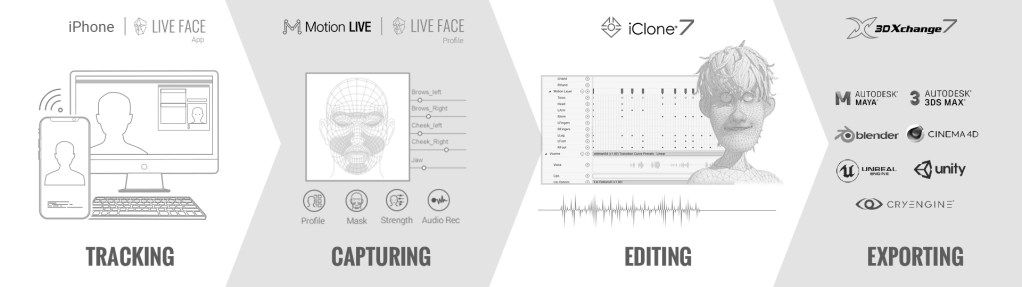
iPhone’s facial motion capture works with iClone Motion LIVE by using the exclusive TrueDepth camera system powered by sophisticated high-res sensors. The iPhone tracks face with a depth map and analyze subtle muscle movements for live character animation. The Reallusion LIVE FACE app enables the iPhone to live-stream captured facial mo-cap data directly to a PC or Mac, transforming the iPhone into a powerful 3D bio-metric mo-cap camera.

iPhone facial mo-cap facial capabilities

The TrueDepth Camera projects and analyzes more than 30,000 invisible dots to create a precise depth map of the face, and analyzes more than 50 different muscle movements to mirror expressions. Furthermore, it is highly sensitive to details, like rotating eyeballs and tongues; works with different skin colors and extreme light conditions. Runtime calibration offers on-the-fly calibration without pausing the face tracking process, with support for WiFi, USB, and Ethernet connection. Users are recommended to use an Ethernet connection in order to eliminate all potential lag for the optimal facial mo-cap performance.

Designed by animators, for animators – Reallusion’s latest facial mo-cap tools go further, addressing core issues in the facial mo-cap pipeline to produce better animation. Starting from all new ARKit expressions, to easily adjusting raw mo-cap data as well as re-targeting, to multi-pass facial recording and essential mo-cap cleanup – we’re covering all the bases to provide users with the most powerful, flexible, and user-friendly facial mo-cap approach yet. The biggest issue with all live mo-cap is that it’s noisy, twitchy, and difficult to work with, so smoothing the live data in real-time is a big necessity; because if the mocap data isn’t right, or the model’s expressions aren’t what you want, and the current mo-cap recording isn’t quite accurate then you need to have access to the back-end tools to make adjustments. Finally, while you can smooth the data in real-time from the start, you can also clean up existing recorded clips using proven smoothing methods which can be applied at the push of a button.

Educating and Entertaining Children with Cartoon Animator

Markus Sosnowski – 2D Animator / Content Developer

Markus Sosnowski

Finding popularity for his first original nursery rhyme written for his young daughter, Markus Sosnowski made the decision to create a music video for YouTube with the help of Cartoon Animator, which he now has a loyal following for his collection of children’s music videos. 

In his interview with Reallusion, Markus tells how Cartoon Animator, along with his passion for music and illustration, helped him realize his dream of becoming a successful story teller for children.

“I would never have dreamed that I would be able to produce such good quality videos without having any drawing skills myself. As a beginner with Cartoon Animator, you can start animating right away.. I can make cartoon videos in this quality without ever having studied animation or art and without a large team behind me.”

Markus Sosnowski – 2D Animator / Content Developer

Experienced Cinematographer returns to Passion Project thanks to Realtime tools

Matt Hickinbottom – Owner of Musical Music Pictures

Matt Hickinbottom

Matt started in film and television at the age of 12 as a child actor on children’s television. Being a musician, he soon landed a freelance job writing regular music and jingles for children’s television and Disney across Europe. Wanting to develop his skills further, he learned how to shoot and edit and has become a sought-after producer, director & director of photography. Up until recently, he shot regular promos for SONY pictures with some of his work winning Promax awards.

In his film work he has worked all over the world from Canada and the US, across Europe and as far east as Kazakhstan. He has also created numerous cinema adverts for companies such as Merlin Entertainments, across their LEGO Discovery Centres, Sea Life Centres and Warwick Castle attractions.

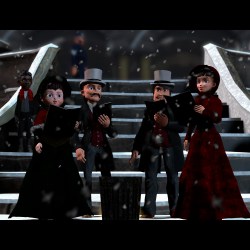
‘Emily, the little match girl’ started over 25 years ago when Matt started to write a stage musical based on the Hans Christian Andersen fairy tale, ‘The little match girl’. This current production is aiming for a Christmas 2021 release and stars the voices of Bafta, Laurence Olivier and Annie Award winner ‘David Bradley’ (best known for playing Argus Filtch in all the Harry Potter films & Walder Frey in Game of thrones) as well as Olivier Award nominated ‘Lesley Joseph’ and many more.

Matt started working with Reallusion’s iClone in 2020, as the pandemic made it one of his main tools for creating animated content, where he employed everything from iClone animations to Character Creator, and Perception Neuron motion capture.

“Reallusion’s tools have been the key to unlocking my imagination, allowing me to show everyone else what’s been inside my head for so long. With the lockdowns, it’s also been the one set of tools that’s allowed me to keep working and creating without limitations.”

Matt Hickinbottom – Owner of Musical Music Pictures