Unleashing the Power of Real-Time Character Animation
Antony Evans from Digital Puppets UK
My name is Antony Evans. I am the Co-founder of Digital Puppets. It is a UK-based animation studio specializing in character design, animation, and virtual avatars. In this exclusive series, we’ll take you behind the scenes of our latest project—bringing the likeness of Jack Black to life.
Across three parts, we’ll explore how we utilized the innovative ZBrush Face Tools for Character Creator 4 (CC4). We used them to enhance facial expressions. We also tweaked wrinkle maps and finally animated the face using the iClone AccuFACE plugin for facial motion capture.
“The ZBrush Face Tools for Character Creator is a powerful addition to the Character Creator and iClone ecosystem. It enables faster and more efficient character development and animation.”
Antony Evans | Co-Founder of Digital Puppets UK
Crafting the Jack Black Avatar
In the first part of our series, we delve into the process of using the new CC ZBrush Face Tools features. We explore how to use these tools. These features help prepare a character model for animation with the AccuFACE plugin for iClone. We’ve previously covered model building in other videos. This time, our focus is on how the CC ZBrush Face Tools accelerates the refinement of facial morph expressions.
To create our Jack Black avatar, we started with our standard technique. We used the Character Creator Headshot plugin. We began with a photo of Jack Black to sculpt a likeness in a realistic style.
From there, we gradually transitioned into a stylized, cartoon version. A common challenge in character creation is extensive sculpting. After extensive sculpting, the facial morphs often fail to move correctly. This occurs especially when the model deviates from standard human proportions.
This is where the CC ZBrush Face Tools prove invaluable, streamlining the adjustment process and ensuring that our expressions stay true to the design

Understanding ZBrush Face Tools for Character Creator
The ZBrush Face Tools for Character Creator features allow animators to work directly with the base mesh. The base mesh includes pre-set facial expressions and lip-sync capabilities. However, when you alter the base mesh, especially for more stylized characters, expressions can become distorted.
Previously, fixing this required the Face Profile Editor and extensive back-and-forth between Character Creator and ZBrush. The CC ZBrush Face Tools simplifies this by sending all blendshapes to ZBrush at once, allowing you to adjust essential expressions like jaw movement, brow position, and more, in one go
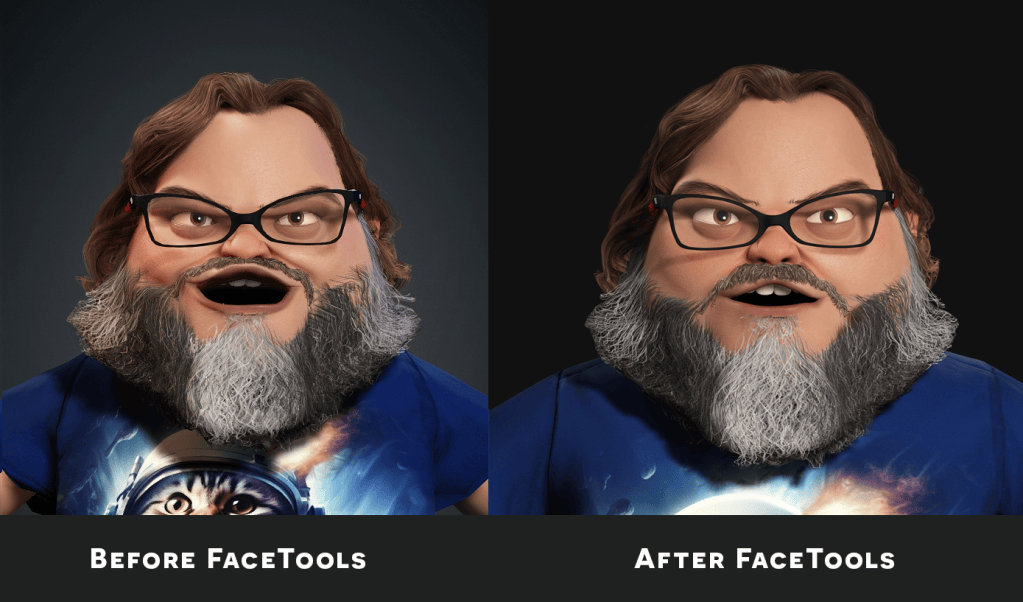
In our video, you’ll see how we used the CC ZBrush Face Tools to refine expressions. These expressions were for our Jack Black avatar.
Although we needed to make some additional tweaks using the facial profile tool due to the character’s unique proportions, the Face Tools significantly reduced our workload, enabling us to create a more polished final product
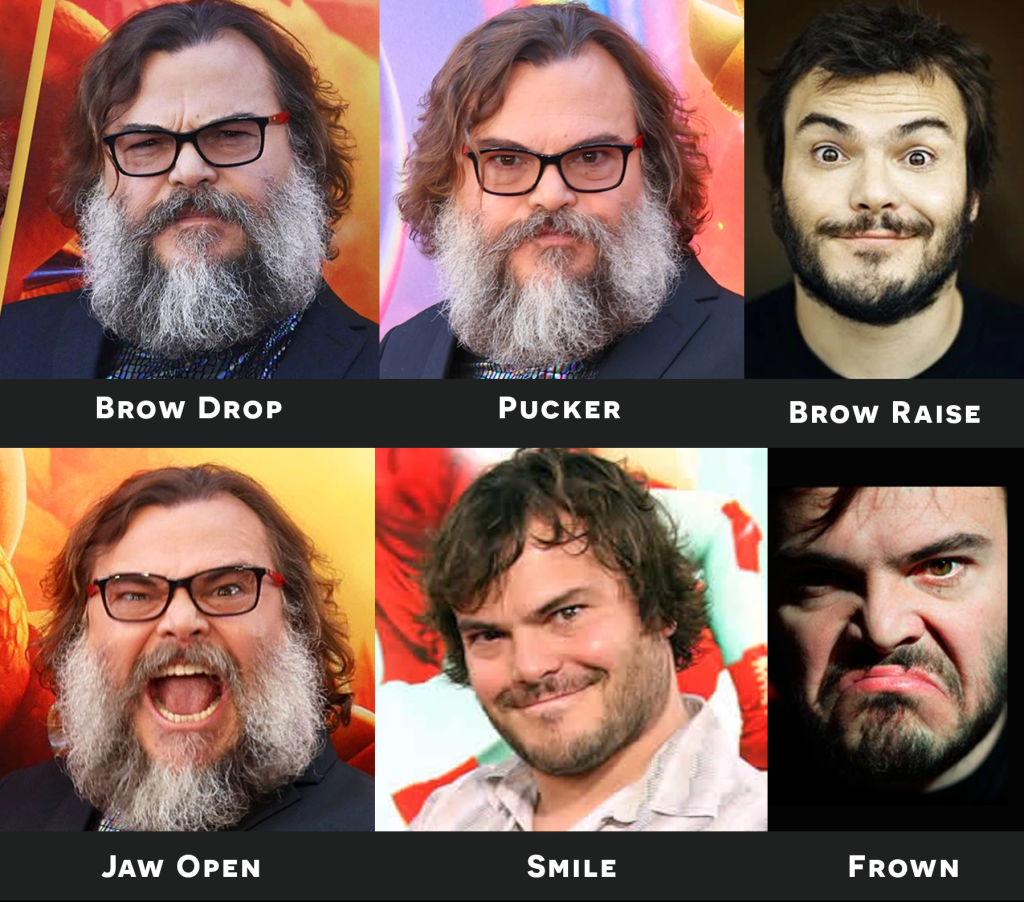
We utilized online reference images of Jack Black to guide the creation of his various facial expressions. Our goal was an accurate match.
It’s possible to create these expression shapes without references. However, having them on hand is invaluable. This is especially true when striving to capture someone’s likeness authentically.
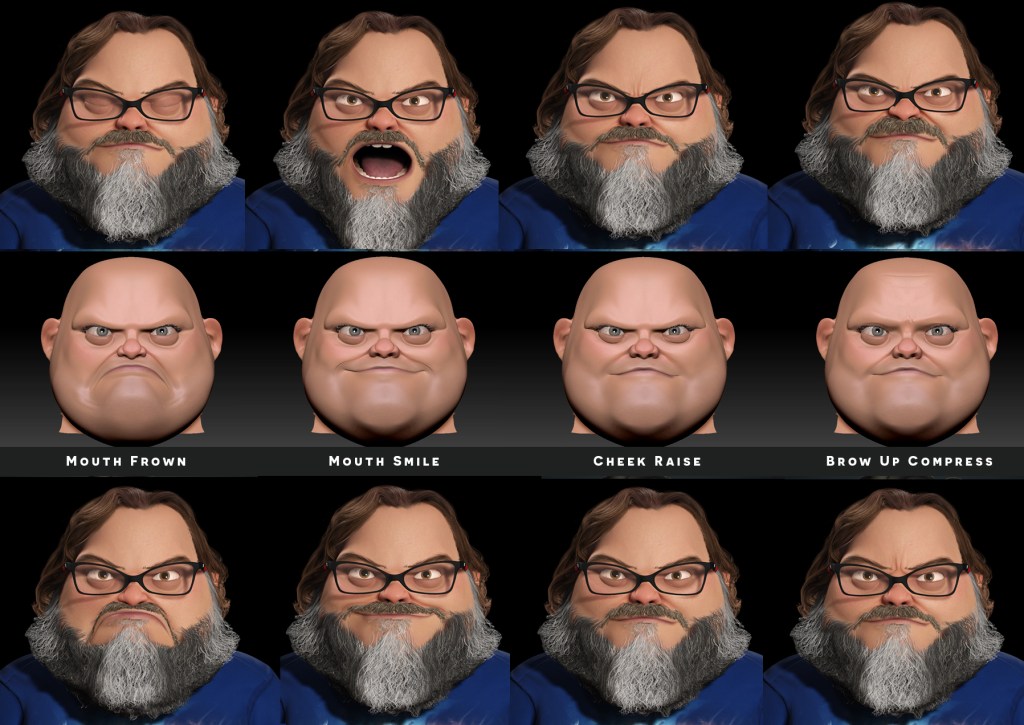
In the reference image below, you can see the various facial expressions we refined in ZBrush. The image above is a ZBrush screenshot. The one below is a Character Creator render. It is complete with hair and accessories.

Refining Wrinkle Maps
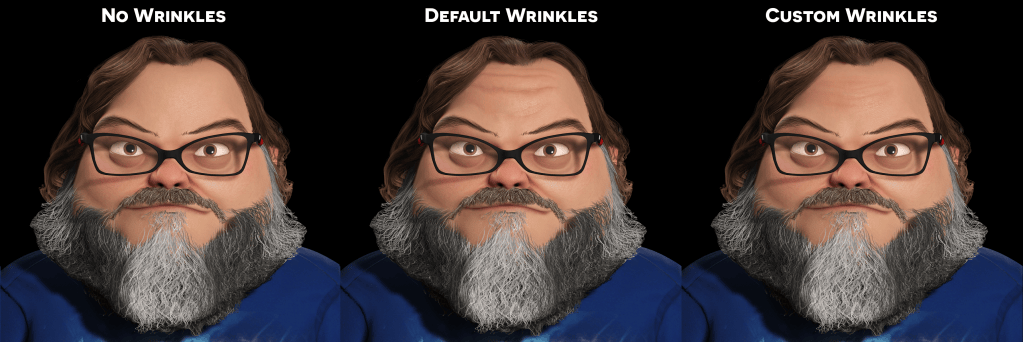
In the second part of our series, we focus on customizing wrinkle maps. The preset wrinkles in Character Creator are quite effective. The CC ZBrush Face Tools offers a more intuitive way to fine-tune these details. You can do this directly on the model in ZBrush. This approach enhances the normal maps. It also allows for direct painting onto the model, giving you greater control over the final look.
Wrinkle maps add a vital layer of realism to characters. With CC ZBrush Face Tools, the process becomes more experimental and creative. We kept the wrinkles subtle for our stylized Jack Black avatar. The video demonstrates how even small adjustments can make a significant difference. Additionally, wrinkle maps in Character Creator are compatible with other software like Unreal Engine. This compatibility makes them versatile tools in any production pipeline.
Facial Animation with iClone AccuFACE
The third and final part of our video series covers facial animation using iClone AccuFACE. This iClone tool excels in remote work scenarios. It allows you to create facial capture from prerecorded videos. These videos can be edited before finalizing the animation. This feature is particularly useful given that much of our work at Digital Puppets is done remotely.
AccuFACE supports both prerecorded and real-time facial capture, giving us flexibility depending on the project. One standout feature is its integration with iClone AccuLips, which records the viseme track simultaneously with the facial capture. This synchronization eliminates the need to align lip-sync and facial movements separately. It streamlines the animation process and enhances the natural flow of expressions.
In our demonstration, we show how combining AccuFACE with AccuLips produces more dynamic and lifelike animations. After recording, Character Creator’s robust toolset allows further refinement. You can achieve this by keyframing, re-recording specific elements, or using puppet tools for real-time adjustments.

Final Thoughts
The ZBrush Face Tools for Character Creator is a powerful addition to the Character Creator and iClone ecosystem. It enables faster and more efficient character development and animation.
Reallusion continues to push the boundaries of what’s possible in real-time production, making our work not only easier but also more detailed and expressive.
As the industry moves toward real-time workflows, tools like these will become indispensable for studios worldwide. I’m excited to see what future updates will bring and encourage anyone in character development to explore Character Creator and iClone.

Follow Digital Puppets UK
Website:
https://digitalpuppets.co.uk
YouTube:
https://www.youtube.com/@DigitalPuppets
Related Posts
- Animating Lewis Capaldi’s Someone You Loved with Character Creator Headshot and iClone for TikTok
- Recreating Snoop Dogg: Character Creator and MetaHuman Creator
- Digital Puppets | Interactive Animation Studio offers Turnkey Services with Character Creator iClone
- ZBrush Face Tools – Complete Head & Body Creation Workflow