This article was written by NVIDIA, and featured on NVIDIA Blog.
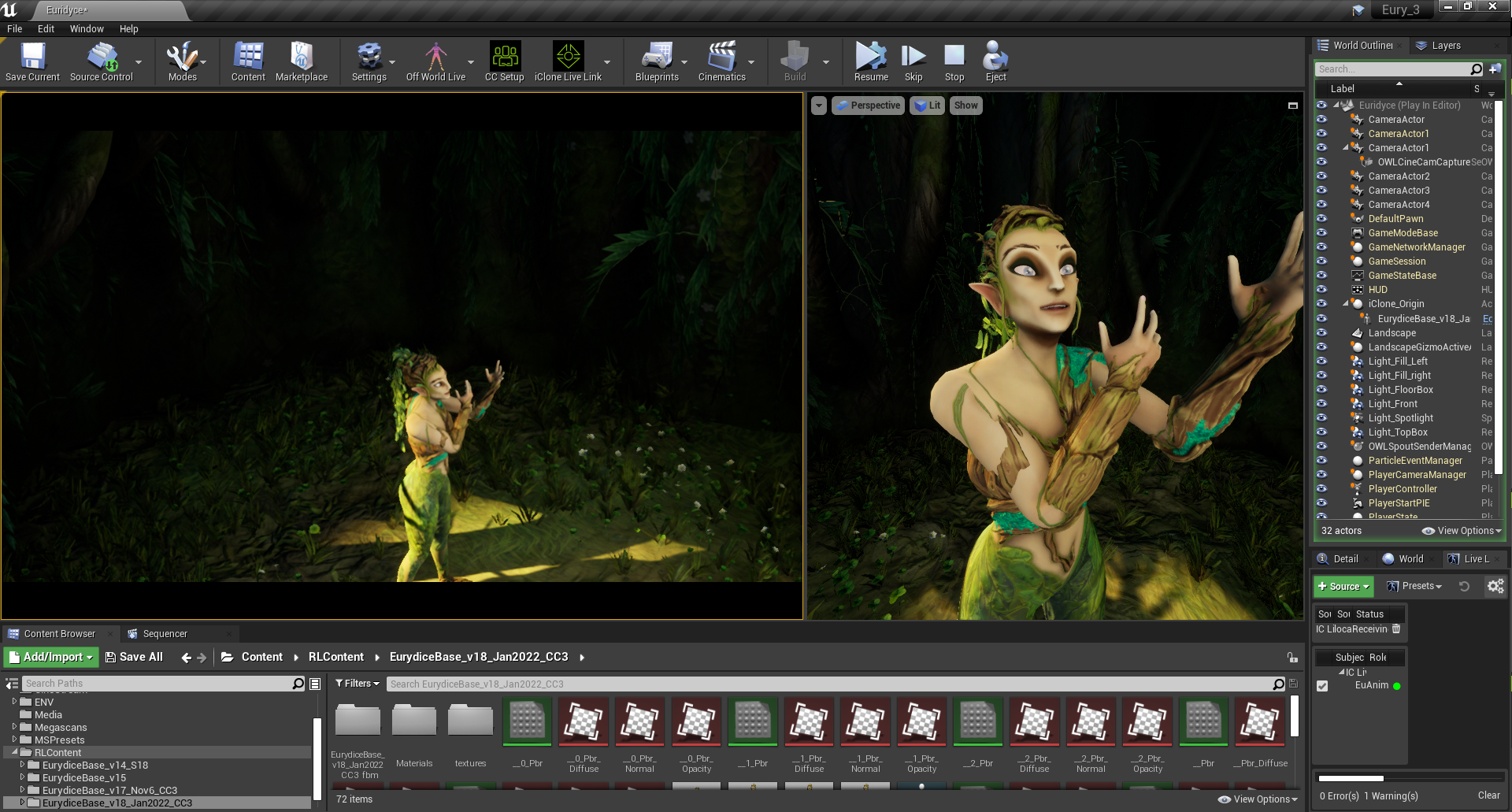
Helsinki-based Pekka Varis showcases browse-and-buy possibilities of digital art gallery, using NVIDIA Studio drivers, Reallusion and Lightmap software.
Pekka Varis’s artistry has come a long way from his early days as a self-styled “punk activist” who spray painted during the “old school days of hip hop in Finland”.
More than 30 years later, he’s embracing the future of graphics as a videographer who uses NVIDIA Omniverse, a physically accurate 3D design collaboration and simulation platform, to create vibrant virtual worlds.
His freelance video production company Catchline translates complex technology services into attention-snagging, easily digestible video messages or commercials.
A recent project was an animated ad for Artio, an app that brings a global digital art gallery to individual smart devices.
In the commercial, a digital family searches for the perfect piece of art to enliven their new home, visualizing options on the walls in real time. Plus, the parents unpack boxes filled with detailed items, a child plays with block toys, the dog shakes its head and wags its tail — all in a physically accurate way, thanks to Omniverse.
“NVIDIA Omniverse has given me more artistic power and a totally new level of freedom. It’s a trusty playground where I can bring in quality content and focus on creating designs, visuals, variations — all that fun stuff.”
Pekka Varis
Vivifying the Videography
The Helsinki-based videographer takes viewers through his creative process in a three-part tutorial that details his recent commercial project, in which Artio helps the digital family make their blank walls pop.
Watch the first installment of the tutorial series on demand and below:
as well as his steps for lighting and color correction in Omniverse:
His multi-app workflow — bringing characters to life with Reallusion software and perfecting the lighting with Lightmap HDR Light Studio — is made possible by Omniverse Connectors, plugins that connect third-party design apps with Omniverse, and NVIDIA Studio drivers.
He estimates a 90 percent savings in time and cost using Omniverse. “With Omniverse Connectors to Reallusion software like Character Creator and iClone, I can make commercial-quality characters quickly and easily, which I wouldn’t have even dreamed about before,” he said.
“Natasha,” made by Varis using Reallusion Character Creator and Omniverse Create.
“I see myself using Omniverse with every single work commission I get moving forward. And I hope my video tutorials inspire viewers to try using these superb tools to create their own artwork.”
Pekka Varis
When not creating videos, Varis makes music as a drummer who loves metal, rock and hip hop — and spends time with his six-year-old daughter, his source of inspiration.
OrpheusVR is an indie VR game prototype that I have been working on in conjunction with Debi Wong of re:Naissance Opera, Brian Lee Topp, and Youhan Guan. The project was conceived as a way to engage new virtual reality platforms with the ancient art form of opera. Live From The Underworld is a series of interactive live-stream performances featuring mythological avatars brought to life by real-time motion capture technology and live opera singers.
In 2018 a team of digital and opera artists came together to ask “what would opera look like if it were invented today?”. From that initial question OrpheusVR, an interactive, choose-your-own-adventure, virtual-reality opera was born. After completing the prototype in 2021, the OrpheusVR team started working in the digital live stream space, using iClone real-time animation software, iClone’s LIVE FACE mocap animation with Xsens body live motion capture technology and computer avatars from the OrpheusVR world to create live, interactive operatic performances that can be streamed from any device.
Debi Wong – Founding Artistic Director
Debi Wong
Debi Wong is an interdisciplinary performance artist that loves to weave together sound, text, movement, and technology to create contemporary stories. Her performances have been recognized as “unique and magical” (Rondo Classic) and “electric” (Schmopera).
As a soloist, Debi has performed with leading orchestras and ensembles across Europe and North America most notably with her lute and voice duo, White Sparrow at The Stockholm Early Music Festival, The Copenhagen Renaissance Music Festival, The BRQ Vantaa Festival (Helsinki), Garrick’s Temple To Shakespeare (UK) and the Venice Biennale. Debi is currently artistic director of re:Naissance Opera, a Vancouver-based indie opera company.
Debi is the founding artistic director of re:Naissance Opera in Vancouver, BC. With re:Naissance she has created #DidoAndAeneas (2014), an interactive, social-media opera; Acis & Galatea which was recognized by Vancouver Classical Music as one of the city’s best operas in 2017. In 2019, Debi spearheaded OrpheusVR, an interactive Virtual Reality Opera that was featured at the VIFF Immersed exhibit at the 2020 Vancouver International Film Festival and in 2020 she co-created the award-winning podcast The Apocrypha Chronicles (Finalist, New York Festivals Radio Awards).
Debi is a graduate of Yale University (M.Mus) and The Yale Institute of Sacred Music (Diploma in Sacred Music), where she studied vocal performance and was the recipient of the 2010 Margot Fassler Award for outstanding performances in sacred music. She is currently a Doctoral candidate at The University of the Arts Helsinki.
Conrad Sly
Conrad is a 3D Artist with a deep passion for the medium and its many platforms. He specializes in real-time graphics and has been producing architectural visualization for virtual reality projects for 4 years, and has worked on several iterations of the VR Theatre for SIGGRAPH in 2018 and 2019. He has a deep interest in the crossroads of experimentation with emergent technologies such as VR and AR, and traditional theatrical and art contexts.
Conrad and Debi began collaborating in 2018 when Debi took an interest in the digital art and virtual reality games Conrad was creating at the Centre for Digital Media. Their initial conversations led to the 2020 prototype of OrpheusVR, an interactive, VR opera for Oculus Quest, and Live From The Underworld (2021), a new interactive live stream that uses mythological CG avatars, motion capture, and dancers and singers to innovate live opera and online performance.
Conrad Sly – Art Director
“It is pretty complicated, but at the same time we’ve entered into these partnerships with, for example, Reallusion Software, and they’ve really created these user-friendly tools that have really helped us as indie producers.”
Debi Wong – Founding Artistic Director
Q: Greetings Debi and Conrad, welcome to our Reallusion Feature Stories! Kindly introduce OrpheusVR and what your team is trying to achieve with LIVE from the Underworld.
OrpheusVR is a mythological world we have been creating over the past three years. Inside this world, we’re trying to explore in what ways real-time gaming technologies and live motion capture technologies can bring something new to the table of traditional opera performance.
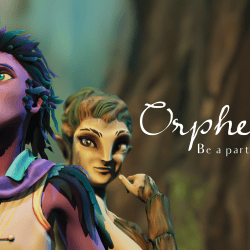
Eurydice character renderOrpheus character render
We’ve developed a prototype of a choose-your-own-adventure VR opera and we are now experimenting with live streaming our operatic avatars to mobile and personal devices. We’ve been having a lot of fun exploring what kind of design aesthetics we can create that you might not see in a traditional theatre and how livestreaming to personal devices allows for interactivity and new kinds of engagements from audiences.
Q: Please share with us how you were able to combine different performances to bring your avatars to life for a live experience. What are the biggest challenges in doing this in real time?
One of the biggest challenges of real-time motion capture has to do with capturing high quality data from live performances. We use the Xsens, which produces excellent results, but still has responsiveness limitations — but because everything is live, we don’t have the luxury of going back and cleaning anything up or doing any detailed work. Coupled with an indie setup for the face using a iPhone with iClone‘s LIVE FACE app, it starts to get pretty complicated in terms of how to manage the intake of data in a performant way for real-time graphics.
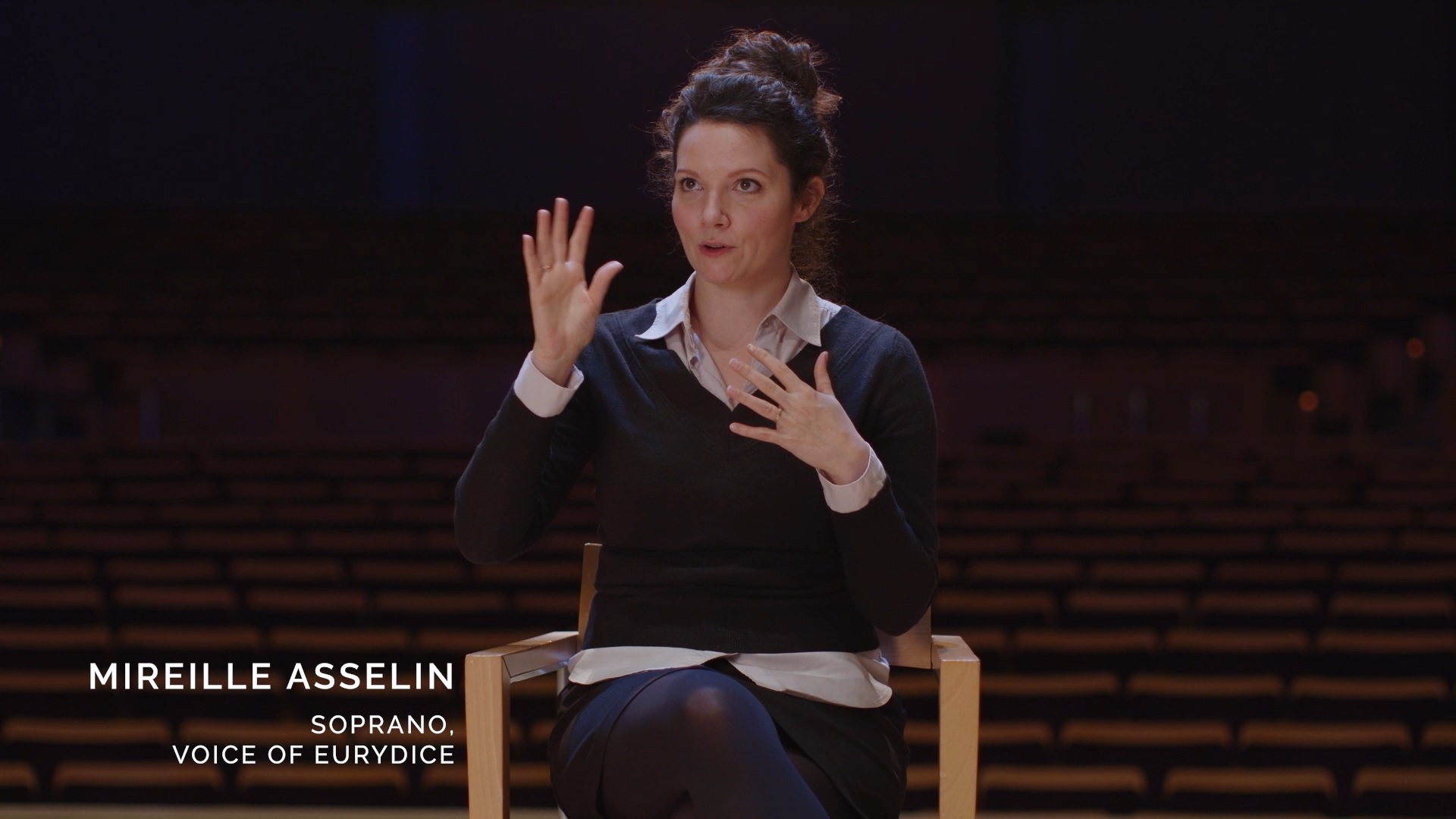
Mireille Asselin – Soprano, Voice of EurydiceMireille Asselin – Facial animation with iPhone LIVE FACE appMireille Asselin – Facial motion capture with iPhone LIVE FACE app
This meant we had to “rehearse” our avatars in very specific ways – we had to discover what kinds of movements read well with the suit and which movements do not produce great real-time results. We went through a similar process with facial capture and we also learned that mounting head rigs on opera singers is extremely cumbersome and limiting for their techniques.
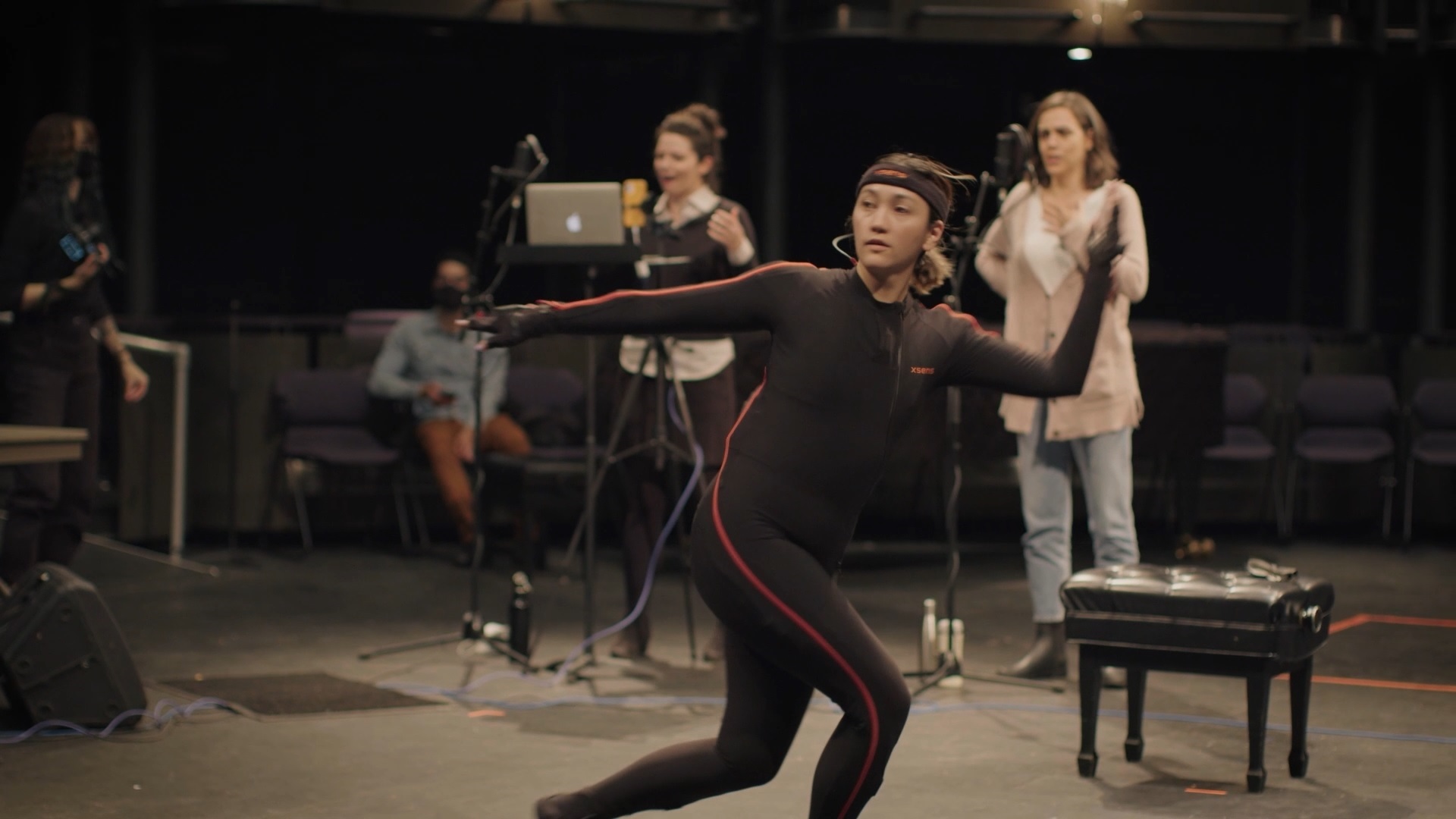
Erika Mitsuhashi – Choreographer, DancerErika Mitsuhashi – Motion capture connect to iCloneErika Mitsuhashi – Motion capture for virtual performance
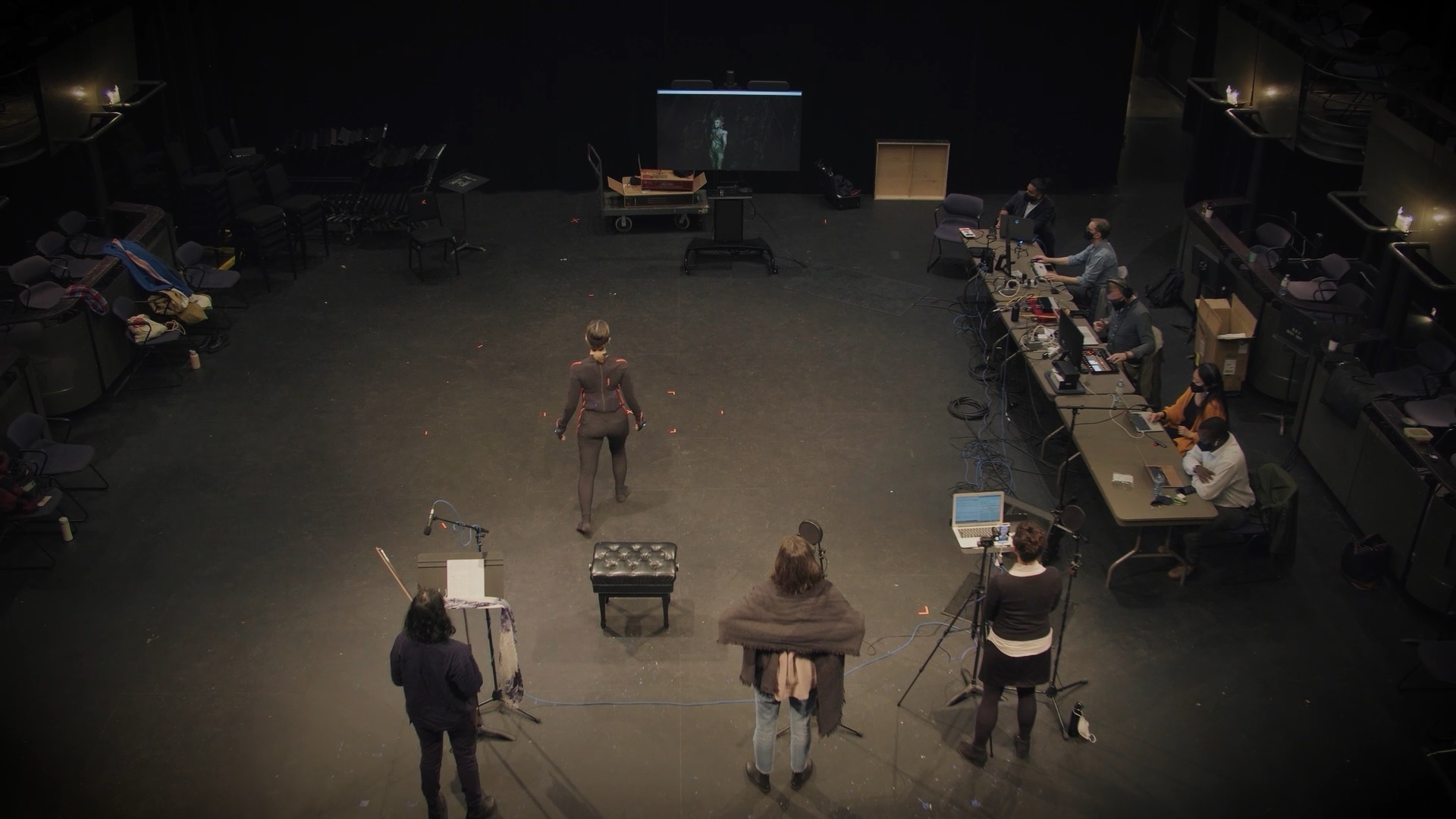
We decided to approach these challenges by compartmentalizing our motion capture and live performance art, dedicating certain workstations to specific tasks. We also started treating the avatars like puppets. We used dancer-choreographers to create vocabularies of movement for us and our singers did the same for facial gestures. In the end, we actually puppet our avatars with two performers: a dancer plays the body of character and an opera singer plays the face and voice. This lets us have a really diverse and expressive range of choreography and dynamic vocal acrobatics.
A team of directors, performers, mocap technicians, animators, sound engineers and more A collection of interdisciplinary arts coming together for a live virtual performance
Q: As a producer, how has iClone and its LIVE FACE mocap animation helped your production ? What combination of tools and hardware did you use for the live actor performance?
We’re an indie studio working in real-time so the great thing about iClone is the ease of use for our team and its ability to bring in many different data streams (for our livestreams, we use an Xsens suit with Rokoko Smartgloves to capture the dancer’s body and finger data and the LIVE FACE app running on an iPhone 12 mini to capture facial expressions from our singer.). It produces great results with our custom Character Creator (CC3) avatars and we are able to produce really exciting live results.
Eurydice inside Character CreatorOrpheus inside Character CreatorEurydice being motion captured inside iClone
LIVE FACE has also been a really powerful tool for us because it means any of our opera singers can take out their iPhones and capture data for us. We tested a few different options for facial capture because opera singers make pretty distinct facial animations when they sing and we discovered that calibrating facial movements and using LIVE FACE produced the most expressive real-time results for our singers.
iClone’s LIVE FACE app for iPhone facial motion capture
Both iClone and LIVE FACE are an integral part of our livestream production pipeline and they have been second to none.
Facial key editing inside of iClone animation software
Q: After LIVE from the Underworld, what other projects can the community look forward to from re:Naissance Opera ?
We have a few dreams we are entertaining – we’re curious about streaming live in 360 and how our Reallusion tools can help us accomplish that in Unreal Engine. We are excited to go further with our live performances and audience interactions – we want our audiences to feel like they are participating in gameplay when they join our livestreams.
Live streaming performance from iClone to Unreal Engine via the LIVE LINK plugin
We are continuing to explore and discover in what ways these emerging and increasingly affordable technologies can infuse the world of opera with new life.
Live streaming rendered inside of Unreal EngineOrpheus VR live virtual performances with iClone and Unreal Engine
Integrating 3D Character and Mocap Animation Collection with NVIDIA’s Collaboration Platform and Asset Store to Simplify Crowd Generation for Business Visualization
Reallusion, the developer of Character Creator and iClone real-time animation software, has released new ActorCore Content for NVIDIA Omniverse™. ActorCore offers a large selection of AI-controllable 3D characters and mocap animations, significantly reducing workflow and increasing production efficiency for crowd rendering for use in AEC (architecture, engineering, construction) simulations and visualizations.
Already deployed in digital twin projects including NVIDIA drive simulations and BMW manufacturing visualizations, ActorCore’s 3D content has been quickly adopted by professional animators not only in archviz applications but in media entertainment, games, and films.
“As a leader in 3D character animation, Reallusion continues to provide the most intuitive tools and premium content for creators,” said Charles Chen, Reallusion CEO. “The iClone and Character Creator Connectors have added a complete character animation pipeline to Omniverse. In response to the huge demand for business visualization, particularly digital twin, the latest release of ActorCore Omniverse Content empowers business users with massive interactive assets for real-time crowd simulation on the virtual platform.”
Collaboration with Photorealistic Simulation
NVIDIA Omniverse™ is an easily extensible, open platform built for virtual collaboration and real-time physically accurate simulation. Creators, designers, researchers, and engineers can connect major design tools, assets, and projects to collaborate and iterate in a shared virtual space. Additionally, developers and software providers can also build and sell Extensions, Apps, Connectors, and Microservices on Omniverse’s modular platform to expand its functionality.
NVIDIA Omniverse open platform made for AEC simulations (Image credit: Reallusion and Bentley Systems)
Animated 3D Crowd for Industrial Visualization
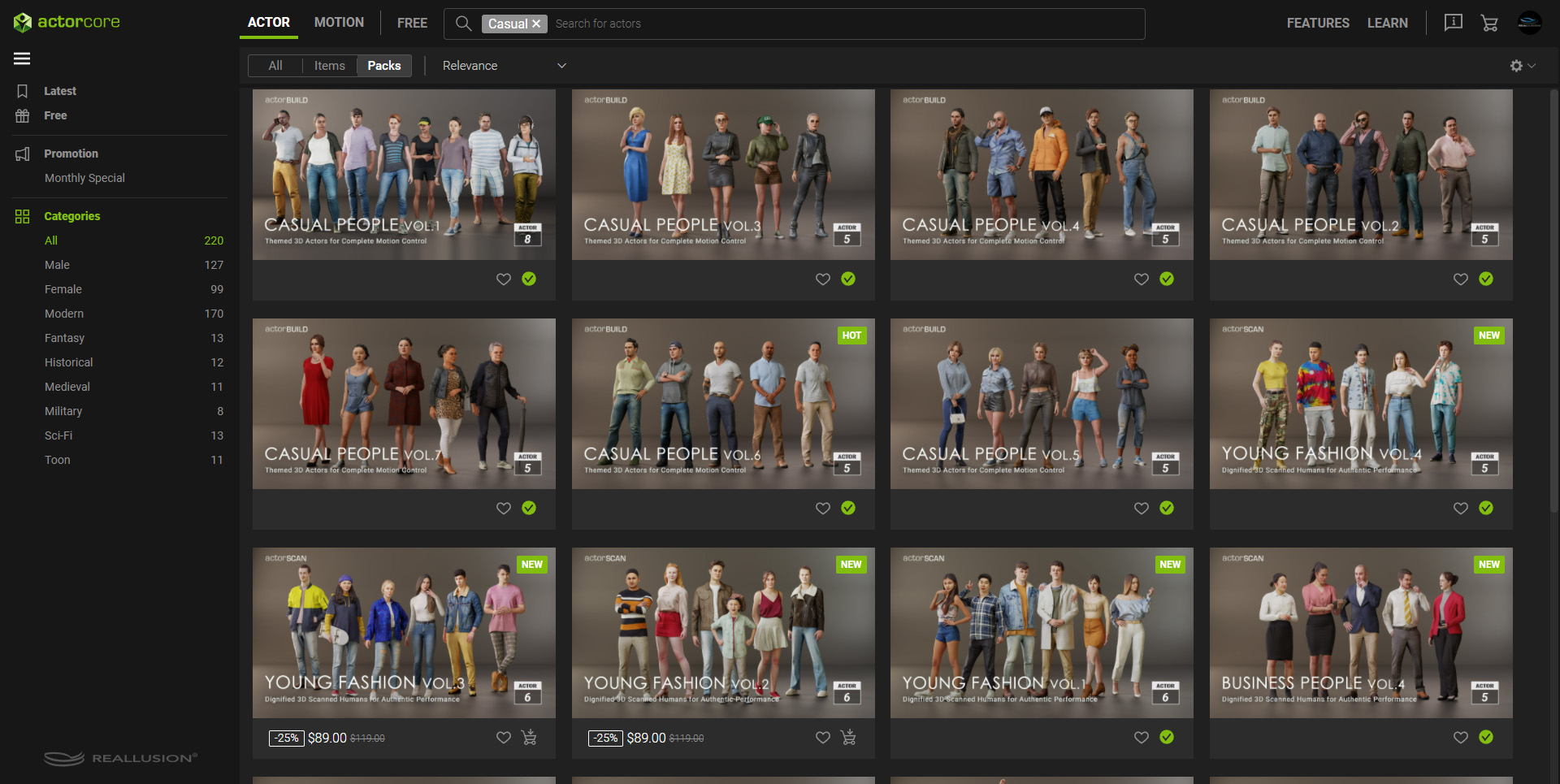
A cloud-based 3D character and mocap motion platform; ActorCore allows users to quickly search, view, and download photorealistic 3D people for crowd scene usage. ActorCore also provides thousands of AAA quality, well-themed mocap animations. Combining ActorCore and Omniverse, individuals or design teams can create a large group of 3D crowds to animate, and deploy for AEC simulations and visualizations.
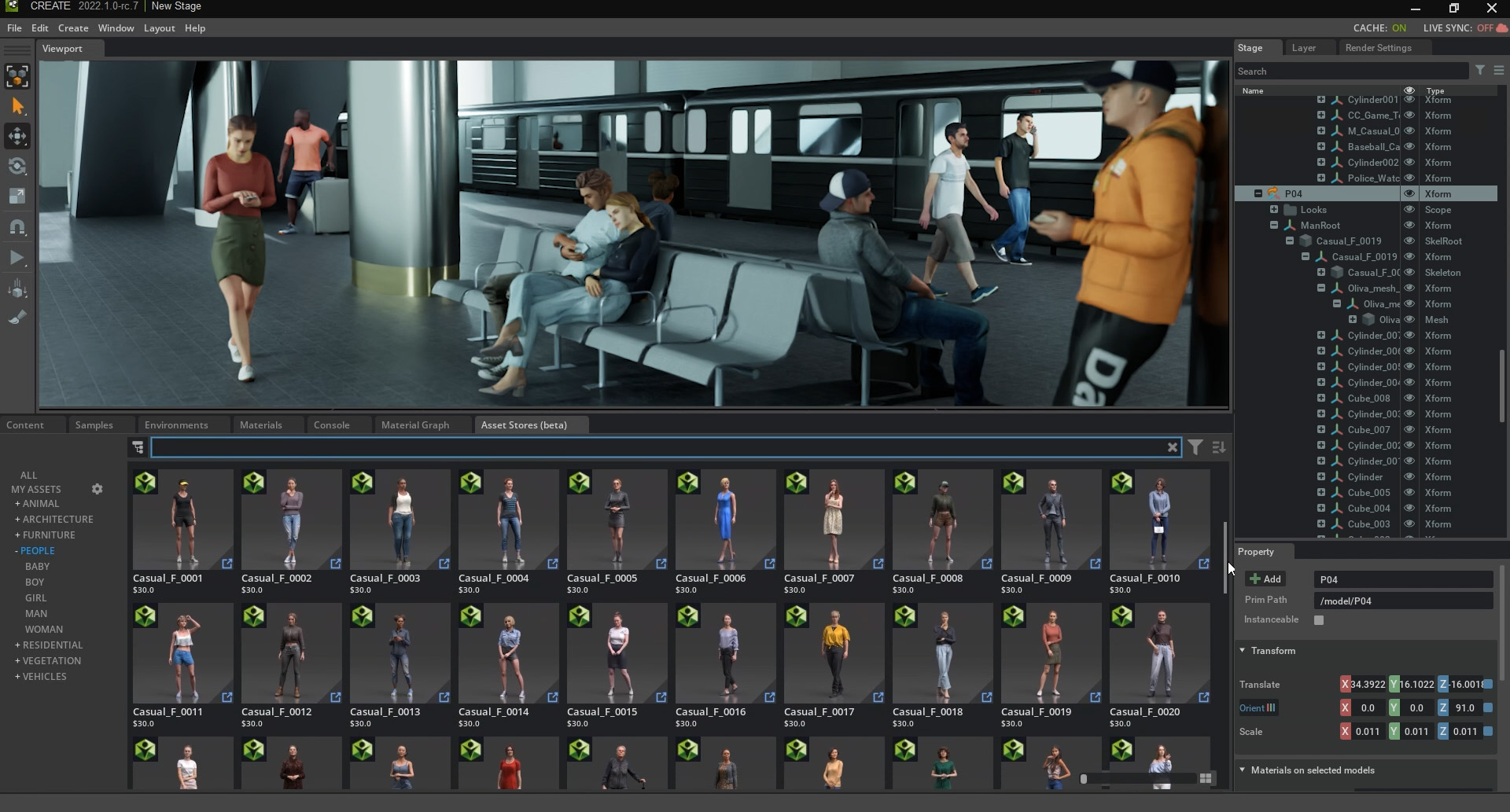
Drag and drop ActorCore 3D characters and animations directly to Omniverse (Image credit: Reallusion and Bentley Systems)
Interactive Lightweight Actors for Real-Time Rendering
In contrast to commonly used 3D models with no natural movements and expressions, ActorCore’s fully-rigged characters can perform lifelike facial and talking animations suitable for different camera ranges. PBR materials are merged for the best crowd rendering performance in real-time, and the actors are fully compatible with thousands of mocap motions available in ActorCore expansive libraries.
Rigged lightweight characters for real-time rendering (Image credit: Reallusion)A large collection of 3D people designed for business simulations (Image credit: Reallusion)
AAA Production with Seamless Motion Transitions
To meet demands from different industries, ActorCore offers professionally produced motions in well-planned themes. A specially designed motion system ensures smooth transitions between primary and secondary stance modes, offering high flexibility for professional animation production and interactive game character controls. Illustrated videos provide different usage scenarios to choose from, including individual, group, or paired motions for maximum compatibility.
Thousands of mocap animations organized with different themes.(Image credit: Reallusion)AAA production motion capture animations in ActorCore (Image credit: Reallusion)
Simplified Workflow and Optimized Asset Management
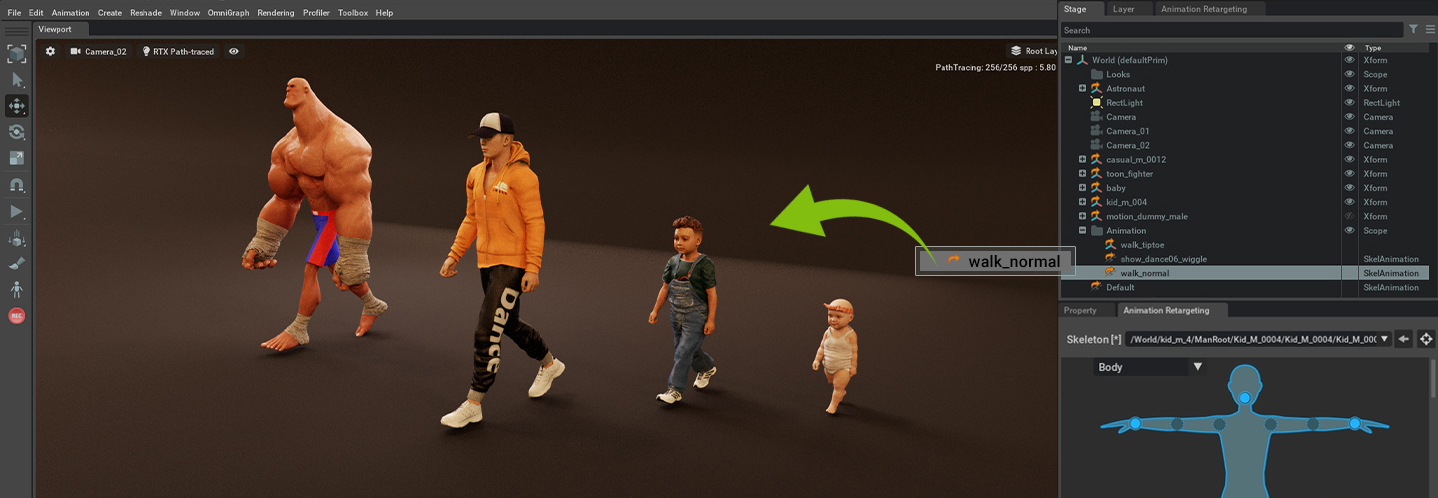
Users can directly export ActorCore’s rigged characters and motions to the USD (Universal Scene Description) format, and easily drag and drop the content to Omniverse apps to continue scene setup. With motion retargeting*, the same motion can be applied to characters with different body scales, optimizing ActorCore’s large content library and reducing effort for asset management.
*Motion retargeting will be supported by Omniverse Machinima version 2022.1.0 and after; it will also be supported by Omniverse Create. Please pay attention to NVIDIA’s official announcement.
Motion retargeting simplifies 3D animation workflow in Omniverse (Image credit: Reallusion)
Explore, Search, Interact – 3D Browser Experience
Exceptional performance on ActorCore gives users the best interactive 3D viewing experience on chosen characters and motions. Users can quickly search and explore thousands of contents through tags, categories, and keywords to find that ideal asset.
Quick search by keywords and interactive 3D preview on ActorCore (Image credit: Reallusion)
New Standard for 3D Crowd Simulation
ActorCore allows a variety of industries to access and deploy a large number of 3D people as task performers or citizens, defining the next generation of 3D character solutions for key industry simulation partners and technologies. For AEC, users can generate digital people to inhabit and interact with designs, buildings, and manufacturing sectors to simulate workforce and training.
Create industrial simulations with ActorCore in Omniverse (image credit: Reallusion, BMW Group, and NVIDIA)
Next-level Character Control with iClone
iClone’s easy facial and body controls allow full character performance with smooth bi-directional motion blending, FK/IK motion layer editing, and reach-target animation for advanced motion editing. Adjustable colors and materials allow for unlimited visual varieties while adding subtle facial performances and lifelike lip-sync animations for custom facial expressions.
Advanced character control of ActorCore content with iClone (Image credit: Reallusion)
Free ActorCore USD Character and Motion Resource
Get a first-hand experience of ActorCore with free 3D character and motion assets. Visit
Using cutting-edge AI, Concert Creator analyzes audio recordings and turns them into hyper-realistic music performances and music lessons. The AI was trained on real professional musicians, to faithfully present accurate and human-like results.
Concert Creator uses AI and cutting-edge graphics to produce hyper-realistic music animations. Inside users find tools to customize all aspects of the AI-generated music; from camera angles, key colors, lighting effects, and more.
The project is the brainchild of Fayez Salka; a medical doctor, software entrepreneur, 3D artist, and musician who is the co-founder of IMAGINE XR – a development studio that combines machine learning, computer vision, augmented reality, and real-time 3d graphics to deliver cutting edge experiences for handheld devices and XR headsets.
Concert Creator uses machine learning, with Character Creator avatars, to generate realistic musical performances using an audio input signal in the form of an MP3 or a MIDI.
Inside users can control different perspectives ranging from Top Camera, Chest Camera (mounted camera), Head Camera, Orbit Camera, and even a Director Camera for cinematic cuts that make it easy to use in high-quality productions.
This allows users to create everything from cinematic shorts, musical lessons, live concerts, and music animations straight from the downloadable software which you can currently use at no cost.
With these plugins, you can import both the texture and the mesh back to Character Creator with just one click!
INTRODUCTION
Russell Midfield is a freelance artist who enjoys making tutorials on YouTube around the 3D character development process, with a particular focus on Blender. With Reallusion’s commitment to developing their Blender Character Pipeline and the introduction of the Blender Auto Setup addon with CC3Python plugin, Russell decided to see how one may create their own character quickly using these very tools. Do the plugins work as advertised? Is it really that quick & easy? What would it be like to create your own character with this workflow? Well, there was only one way to find out.
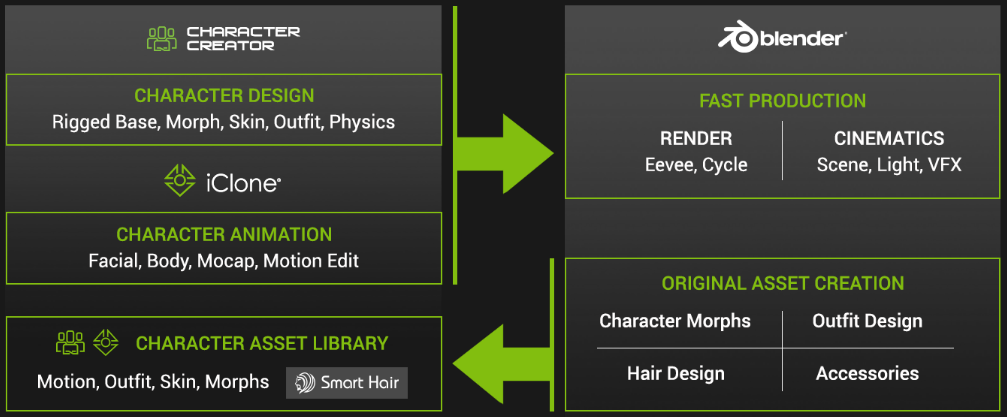
For this character, Russell makes use of a Character Creator / Blender “roundtrip” workflow, through the use of the Blender Auto Setup addon and CC3 Python plugin as touched upon above. The workflow would be as follows:
1.Start with a model generated in Character Creator 3 (CC3).
2. Import the CC3 model into Blender through the use of the Blender Auto Setup addon, to make some customization.
3. Import back into CC3 through the use of the CC3 Python plugin, for rigging and weighting.
If one wished to add animation, a simple transfer to Character Creator’s companion software, iClone, is just one click away.
Complementary Workflow between Blender, iClone and Character Creator
STEP #1: GENERATE A MODEL IN CHARACTER CREATOR 3
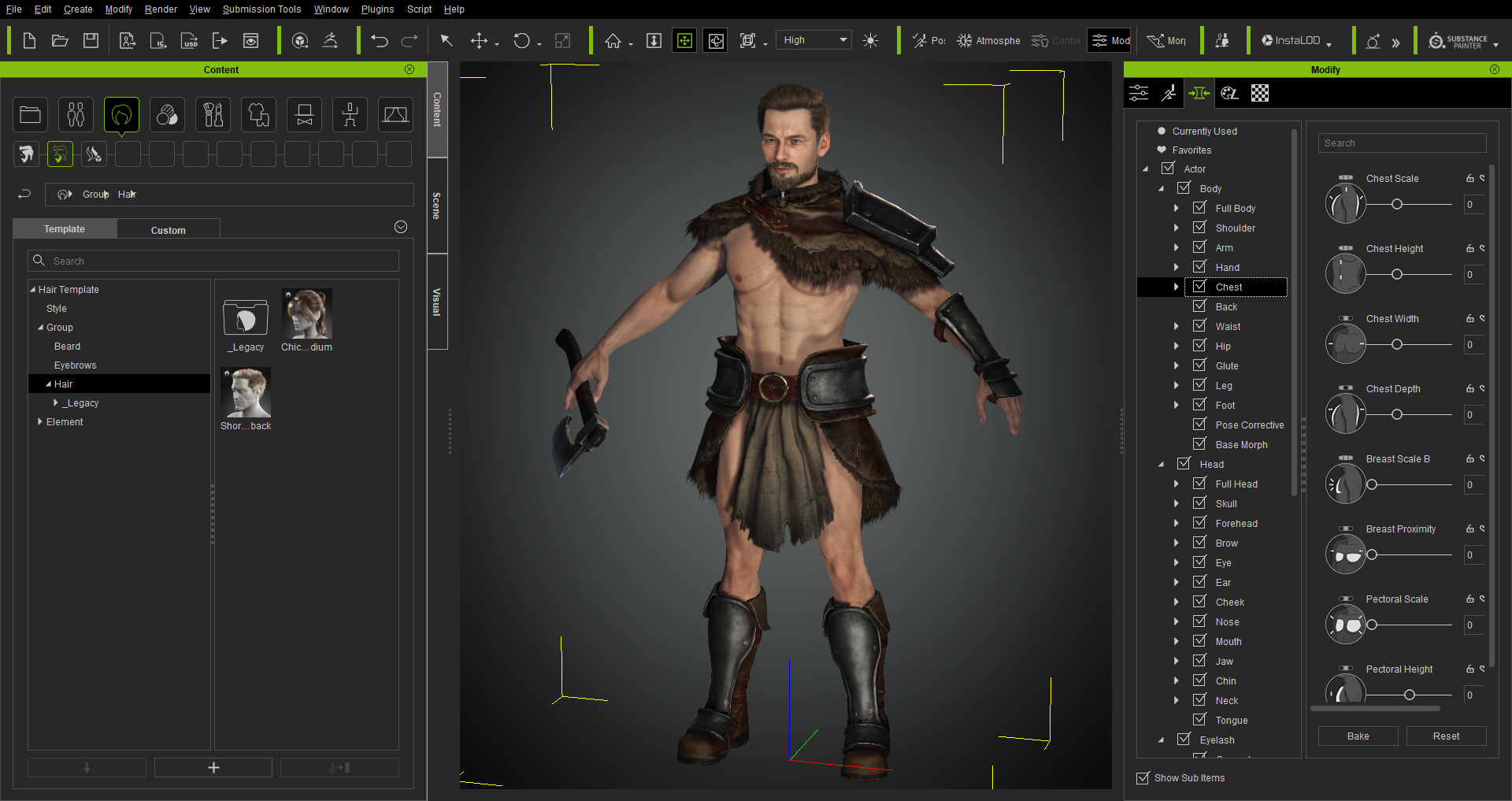
The first step of the process would be to generate a character model in Character Creator 3. There are a number of different options available in CC3 that make this task rather simple:
• Morph sliders allow one to modify the size, shape, and rotation of every part of the body;
• Content galleries allow one to quickly add basic clothing, hair, armor, and accessories; and
• The SkinGen plugin allows one to easily add micro-details such as wrinkles, veins, moles, and pores.
CC3 comes equipped with several tools to make Blender character creation quick and easy
Once the character model was complete, it was then time to export to FBX for further customization in Blender. CC3 has advanced FBX export options such as software presets, mesh and motion, texture embedding, and texture baking that make this transition easier.
Important note! Ensure that you select the Mesh Only option at this stage of the process, and not theMesh+Motion option. This ensures that the correct FBX key information is brought into Blender and is paramount to this roundtrip workflow working as intended!
Advanced FBX Export options available in CC3
STEP #2: CUSTOMIZE THE MODEL IN BLENDER
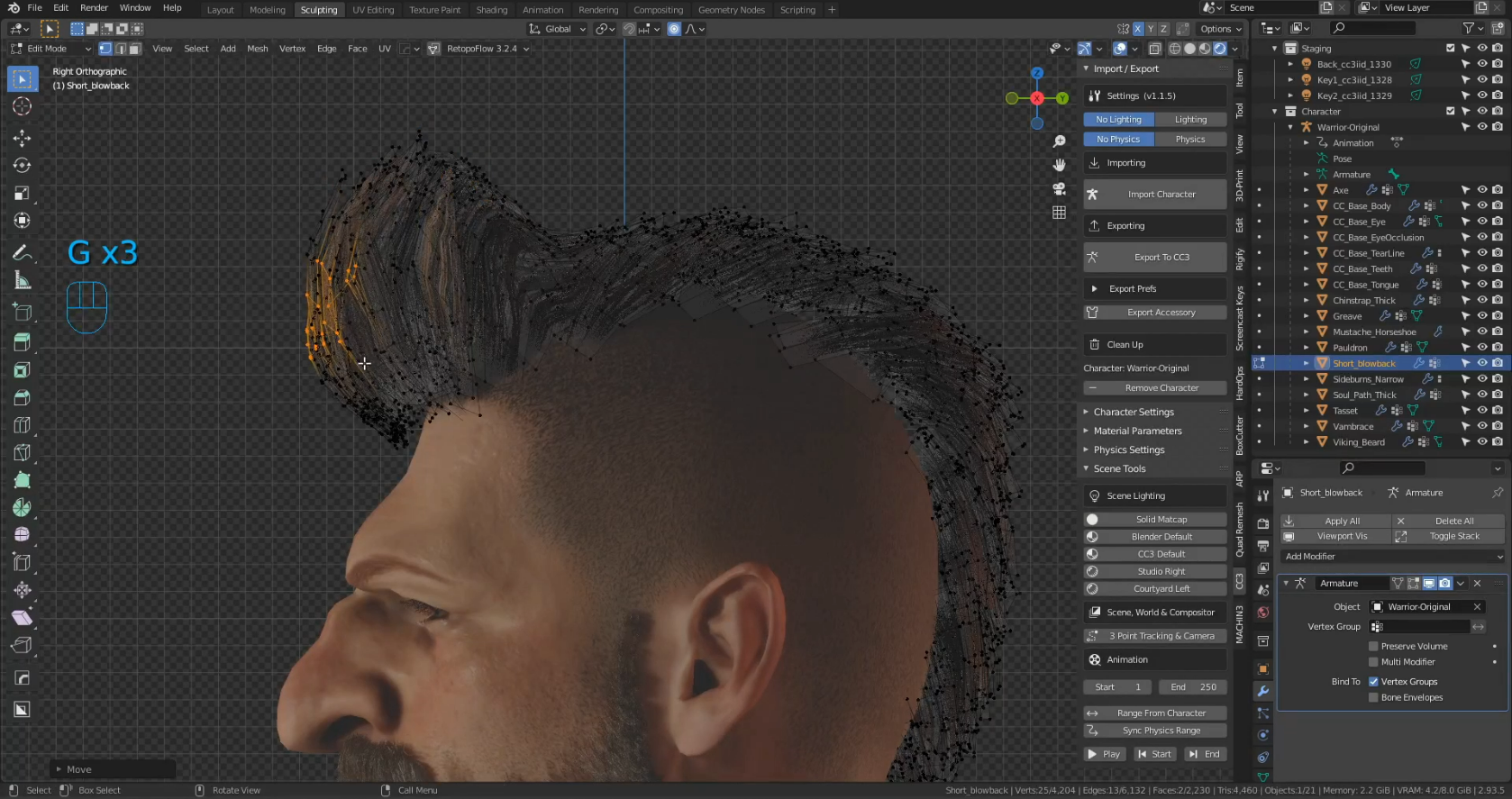
Blender comes fitted with a number of tools that allow the user to sculpt, model, and texture paint. It’s these tools that one can employ to further customize a model and add their own unique art style to a piece.
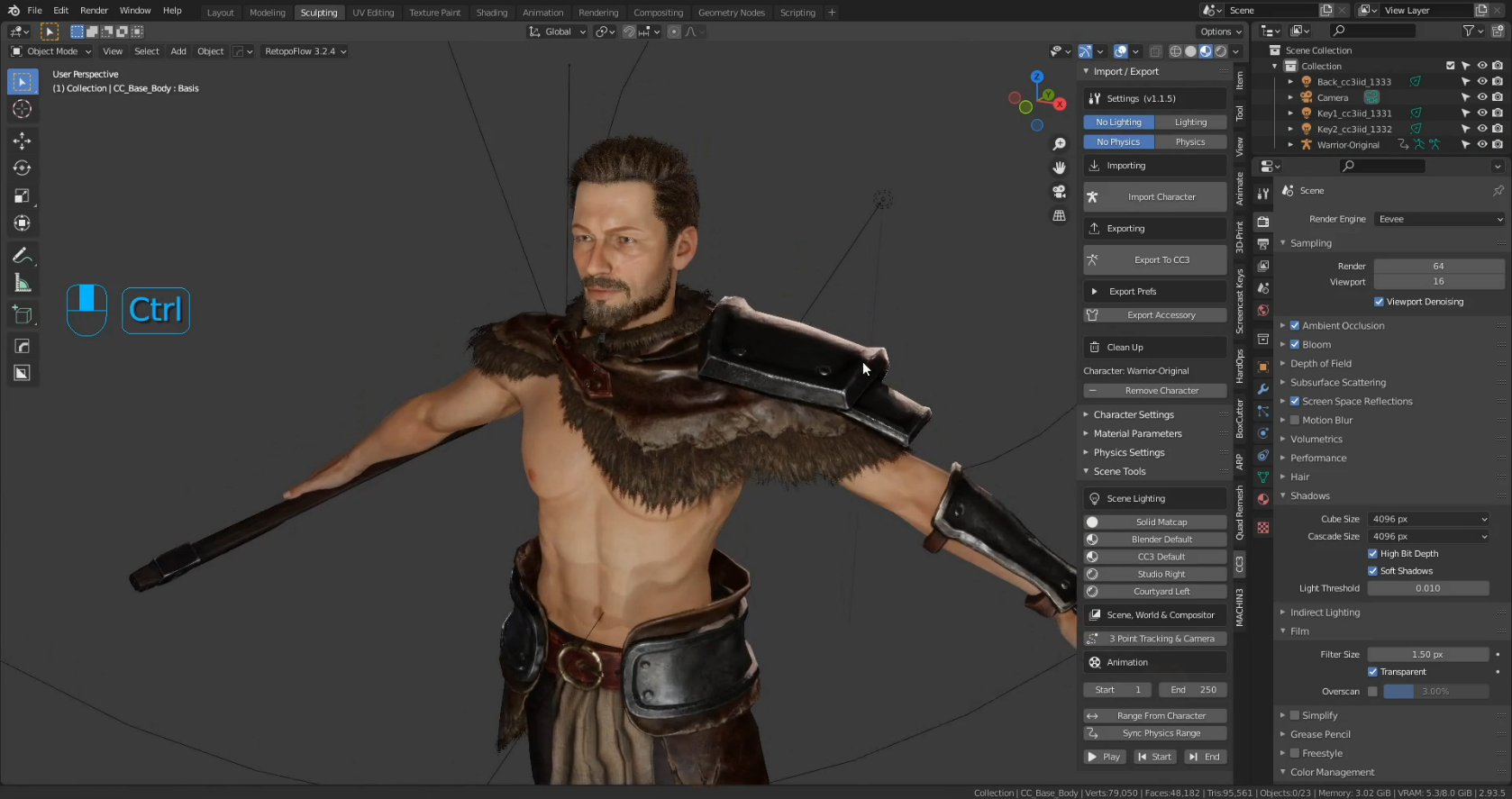
With the newly created FBX, the first plug-in of the round-trip workflow could be put to the test, the Blender Auto Setup addon. To use the addon it is quite easy, after you have installed the plugin, just press “N” on your keyboard for the Side Toolbar in the 3D viewport, and you will see a tab called “CC3”. Open it up and there will be a button labeled “Import Character”. Select your FBX file and the rest is taken care of.
If you would like more information on the installation method you can check out the Reallusion Forum Thread (by Victor.Soupday) or my video at the 4:56 timestamp.
Blender Auto Setup Addon in Blender 3D Viewport
Below you can see the difference between making use of the Blender Auto Setup addon and the default FBX import option in Blender’s File menu. The materials compile perfectly with the addon whereas some adjustments would be required under the default method. Both models are under the same lighting conditions.
Comparison of Auto Setup addon and regular FBX import
With the model successfully imported into Blender, now it was time to add some customization. Russell sculpted in some more stylized shapes around the face, hands, and feet to make the character align more with his own art style.
Blender’s sculpting tools allow you to add your own unique art style
Once the sculpting was done, some adjustments to the clothing and armor were required. This was done through a mixture of modeling and sculpting tools in Blender.
Adjusting clothing through the use of Blender’s modeling and sculpting tools
Russell also made use of the existing topology of the clothing and armor to make his own, custom armor by duplicating select portions and moving them around. This is a quick and easy approach to making your own Blender character creation with the help of CC3. Using an approach like this could allow you to make several different iterations of a soldier very quickly for a large army scene for example.
Duplicating existing topology allows you to quickly build custom clothing and armor configurations
CC3 uses a hair card system, which means that in Blender, Russell was able to shape his own beard and hairstyles by duplicating and transforming the hair cards.
Create your own custom hair styles in Blender using CC3’s hair card system
Utilizing Blender’s texture painting tools, Russell was able to add some custom skin textures and designs.
Create your own character hairstyles in Blender using CC3’s hair card system
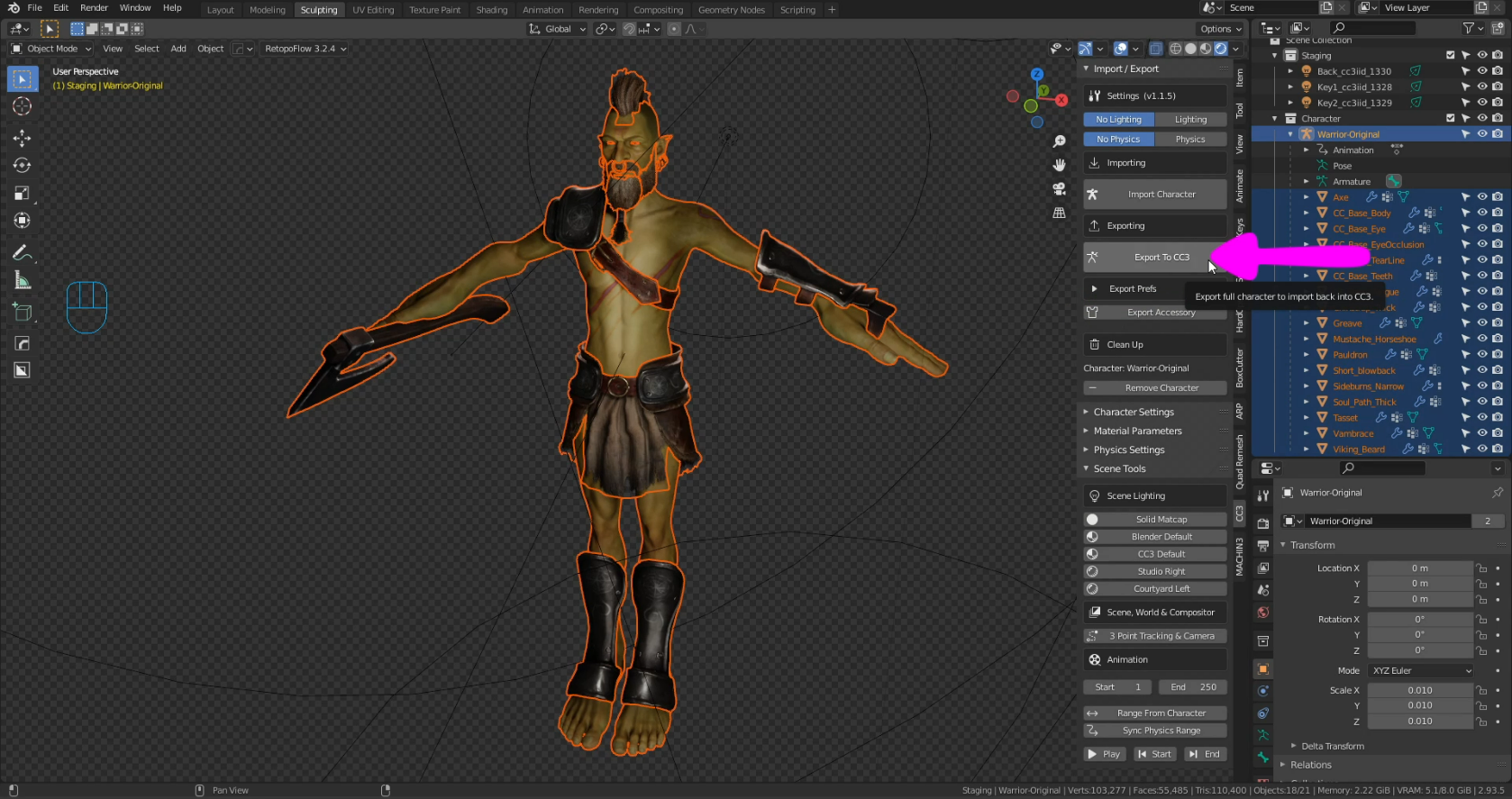
With all of the customizations complete, it was then time to export back out to FBX again. With the Blender Auto Setup addon it is incredibly easy, just select all the components of your model and go over to your Blender Auto Setup tab on the right, and click Export to CC3.
Easy one-click export to FBX with the Blender Auto Setup addon
STEP #3: RIG & WEIGHT PAINT IN CHARACTER CREATOR 3
And so to complete the roundtrip, we are back in CC3. It was now time to call into action the second plugin, the CC3 Python Plugin. Similar to the Blender Auto Setup addon, this one is incredibly easy to use, once installed just go up to your Plugins menu in CC3 and select Blender Auto Setup, Import from Blender, and select your FBX. The rest is taken care of automatically. All of the materials are automatically configured for you with no extra work required.
Easy one-click FBX import into CC3 from Blender with the CC3 Python Plugin
Below is a comparison between the CC3 Python Plugin and the default FBX import option through CC3’s File menu. The materials compile perfectly with the addon whereas none of the materials compile properly under the default method, manual adjustment is required. Again, both models are under the same lighting conditions.
Comparison between default FBX import and CC3 Python Plugin
Just a note, if you have changed the body of your character significantly, you can adjust the bones to match the body better by going up to the Modify menu here, Adjust Bones, and Auto-Position. This makes apply skin weights to your customized model more accurate, which in turn makes animation and posing much easier.
Adjust the bones of the CC3 armature quickly and easily with the Auto-Position feature
Now if one wished, you could adjust skin weights for posing here in CC3. Or, you could also transfer to CC3’s companion software, iClone, for animation and rendering.
Pose your character in CC3 quickly using the poses included in the Content GalleryAnimate your character in CC3’s companion software, iClone
The verdict is in: the Blender Auto Setup addon and CC3 Python plugin work perfectly and make the integration of Blender and Character Creator quick and seamless!
Stay tuned because Reallusion will be releasing more Work-In-Progress videos for their new software, Character Creator 4 & iClone 8 from January. Check out Reallusion’s website, YouTube channel, and other social media for all the latest news! Expect much more to come this year in 2022 as well as Reallusion is really making strides to connect with the Blender community, joining the Blender Development Fund and becoming a Corporate Silver Partner in January! Some links below for more information :
In WIP I, we demonstrated the huge potential future of inclusive 3D character creation by unveiling Character Creator 4’s capability to enliven any character and animate any rig.
In WIP II, we’d like to emphasize the freedom of Scalable Expression Editing with the help of 60 to 140 morphs. One such feature is to offer 140 morphs to help create convincing details on digital humans in real time. Meanwhile, providing 60 morphs for users to easily adapt mo-cap data with optimal files, making Character Creator 4 a complete pipeline for major 3D platforms.
With the real-time Smart Skin Shader, the skin regions of characters can be identified automatically for quick color adjustment. Not only can skin color be adapted to avatars of any ethnicity with ease, but also high-fidelity digital humans can be efficiently created from scratch to make your own characters.
Scalable Expression Editing : 60 to 140 Morphs
In Character Creator 4, Standard level (60+) and Extended level (140+) are provided to help users edit expressions with adjustable morphs. The 60+ morphs in the Standard level are compatible with major 3D software supporting ARKit, while the 140+ morphs enable fine control over the nuances of the character’s expressions.
• Standard level: 60+ morphs
Covering 11 main facial features for the 3d head in the Standard level : Brow, Eye Blink, Eyelid, Eye Look, Nose, Cheek, Mouth Base, Mouth Blend, Jaw, Tongue, and Head.
• Extended level: 140+ morphs
Other than the additional sliders added to the 11 features of the Standard level, the Extended level has 4 extra features (Eye Lash, Eye Ball (pupil), Neck and Ear) for adding nuances.
• Flexibly upgrade to Extended level or downgrade to Standard level with a single click.
Smart Skin Shader: Fast Color Alteration
The world comprises a variety of ethnic groups, and we believe that should be represented in the digital world as well. To faithfully reflect the diversity of human beings, Character Creator 4 provides four color bases: black, red, yellow, and white to speed up the process of creating different ethnicity at the beginning.
Users can quickly switch between different color bases to customize their own characters by adjusting luminosity, or blending with other colors of the skin. In addition, by directly choosing the desired colors, users can enjoycreating new skin colors for the characters they dream up – recreating the Hulk or The Mask, for example.
Non-skin areas will be automatically detected and excluded while adjusting the skin tone.
Smart Skin Shader: Solid Skin
By adjusting the Blend Strength slider, users can change skin colors while maintaining the original details of the characters. One can optimize the skin textures either by altering the Color Tones or importing different Blendmaps. Furthermore, thanks to the real-time skin shader design, users can instantly change the character’s skin tone across four hi-res skin materials (face, body, hands, and legs) all at once.
Smart Skin Shader: Skin Optimization
(for Headshot plugin)
For Headshot plugin users, the Solid Skin feature can easily de-noise the excessive details, and neutralize the deviation of the front and the side textures to derive the most life-like skin. In effect, helping to create more natural 3D heads with high fidelity and refined appearances that can be appreciated on close-up and from afar.
Bake shader color to texture
Once users finish their customized design, they can easily bake the shader color to the skin texture by clicking the Bake Skin Color to Diffuse Map button, which is exportable and ready for Live Link.
You can check the 3D Character Creation & Animation webpage for more information about the free upgrade offer, feature comparison, and FAQs. If you’re interested in the Character Creator 4 motto of “Enlivening any Character” and “Animating any Rig”, you can refer to the article ‘Working in Progress: Part One‘. For more technical details, please have a look at our latest New Features Introduction, which will be updated continuously in the coming months.
Discover how Reallusion brought the author of Snow Crash to the forum as a 3D character.
(Image credit: SBS / Reallusion)
The Seoul Broadcasting System’s SBS D Forum is one of South Korea’s most important annual forums for discussions on the future of tech. In 2021 it had a special guest speaker: Neal Stephenson, the bestselling author of speculative fiction such as Snow Crash and creator of the terms ‘metaverse,’ and ‘avatar’. Neal would be appearing remotely for his talk and video interview for the D forum from his hotel in San Francisco, but the team at SBS wanted to do something a little bit more special.
Early in October, producer Jun Park contacted the 2D and 3D character creation and animation software developer Reallusion to discuss creating a special experience for the guest speaker. Park wanted to create a metaverse avatar of Neal to deliver the first segment of his appearance. The D Forum was to take place barely a month after on November 18. Neal was put in touch with Reallusion and the work began.
The work to create the 3D avatar animation and voice began with Neal providing video of him making his introduction so that his voice and facial gestures could be used as a reference to create a stylized character and animation. The performance was captured with Xsens Awinda, iPhone for Face with iCloneAccuLips lip-sync animation, and iClone Motion Live. With that material banked, Reallusion took care of the character design, teaming up with Actor Capture for the motion capture and character animation.
Neal Stephenson’s novel Snow Crash first introduced the concept of Metaverse and 3D Avatar in 1992. (Image credit: Random House)
The metaverse avatars were made with Character Creator and the character animations were made with iClone. James Martin, Max Thomas, and Joel Mack from Actor Capture took the characters and generated the audio, lip-sync animation, and mo-cap for the final performance. Epic Games generated the environments and surrounded Neal’s 3D avatar and the stage with virtual world landscapes for a unique experience and a fitting tribute to Stephenson’s work and future scapes.
JuJun Park, Chong AE Lee and Neal Stephenson (Image credit: SBS / Reallusion)
“When Neal Stephenson’ took the stage as a digital human it was so incredible, obviously a big moment for the broadcasting industry and SBS D Forum.”
Jun Park | SBS News
John Martin, vice president at Reallusion, said: “Neal’s cooperation on the project brought a real-world literary hero into our work and we are honored and grateful to partner with SBS and with such a visionary like Mr. Stephenson.”
You can see a full recording of Stephenson’s appearance at the SBS D Forum on YouTube.
A lot of illustrators and animators find the 2D Marketplace a wonderful source of income from their hobby, including Maxim, who has created a side business for himself creating characters, backgrounds, props and more which can be used by individuals and companies looking to create professional explainer videos, 2D animated projects and print media.
In this interview Maxim talks about his influences, why he choseCartoon Animator (CTA) as his preferred 2D animation software and how he hopes one day to turn his hobby into a full time job.
” Cartoon Animator is the best program for quick animation creation right now. Creating characters is an easy process thanks to the templates available inside. It was a good opportunity to expand my opportunity to sell my art, and I am pleased I made the decision. “
EPIC GAMES VIRTUAL PRODUCTION WEEKGOES BEHIND THE SCENES WITH PROXI
Epic Games Virtual Production Week spotlighted a behind the scenes of stunt legends, Proxi Virtual Production. Guy Norris and Harrison Norris speak about the filmmaking process for action design and the workflow. The array of footage showcases ReallusionCharacter Creator digital human actors in many scenes. Watch the video to see the action with Unreal Engine and read on for more about how Character Creator and iClone helped populate and animate Proxi’s action design scenes seen in the video.
Following the filming of The Suicide Squad (2021), Proxi founders Guy Norris and Harrison Norris gave some insight as to how the Reallusion character and animation pipeline fit into their workflow. Proxi is behind the stunts and techviz for action design on movies like The Suicide Squad, Mad Max: Fury Road, X-Men: Dark Phoenix, Netflix’s Triple Frontier, Disney+ The Mandalorian, and more.
PROXi’s Guy Norris and Harrison Norris on incorporating the Reallusion Pipeline and Unreal Engine
“Virtual production is a fast-paced workflow requiring tools that add speed to creativity and integrate effectively with our Unreal Engine pipeline. Character Creator 3 and iClone’s Live Face from Reallusion provide us the speed to create 3D likenesses of the production’s actors, while iClone’s facial animation brings performances to life. Facial mocap with the iPhone using Motion Live allows us to perform and instantly capture face and voice; edit the capture, or punch-in changes on-the-fly. “
“Before Live Face we used very little facial mocap, due to lengthy turnaround times, increased cost, and/or a reliance on external service teams. But thanks to the Reallusion software’s rapid turnaround and ease of use, facial has become a standard part of our toolkit, and will continue to be for all productions in the foreseeable future”
“Virtual Production goes far and away beyond traditional previz, as we empower a creative sandbox approach that’s entirely new. Using Unreal as a backbone, we create entire sequences in 3D space as an unbroken piece of action, that can be adjusted or re-lensed at any time. This sandbox allows the Director, DP, Production Designer, Costume, Editor and all other key-creatives that wish to be involved, to communicate, collaborate and experiment with an evolving version of the sequence to a point of practical refinement, before a single dollar is spent in production. Incorporating the character creation and facial capture suites from Reallusion has allowed us to provide additional creative offerings within this sandbox, while conclusively saving both time and money as an organization.”
Evolving Digital Human Actors with Character Creator and Headshot
“Beginning with our work on Xmen: Dark Phoenix, Character Creator 3 has evolved the way we build our digital actors. With real-time tools and a rigged character base that gives us animation ready models. Prior to Character Creator we worked with sculpting artists and much longer production times, now with Character Creator we can generate all the characters we need, dress them with a wardrobe system and send them directly to Unreal Engine.”
“Being the first studio to pilot the artificial intelligence behind Character Creator 3’s new ‘Headshot’ tool, gave our team a fascinating exploration into producing digital likenesses of our cast from a single photo. Anytime we can combine speed with quality it’s the perfect match for virtual production, and Character Creator 3 is a solution that rapidly populates our scenes with faces and characters, helping the production visualize key moments, well before costly principal photography even begins.”