首頁 » Page 6

Creating a Stylized Arnold Schwarzenegger 3D Caricature with CC5, ActorMIXER & Blender

Mythcons

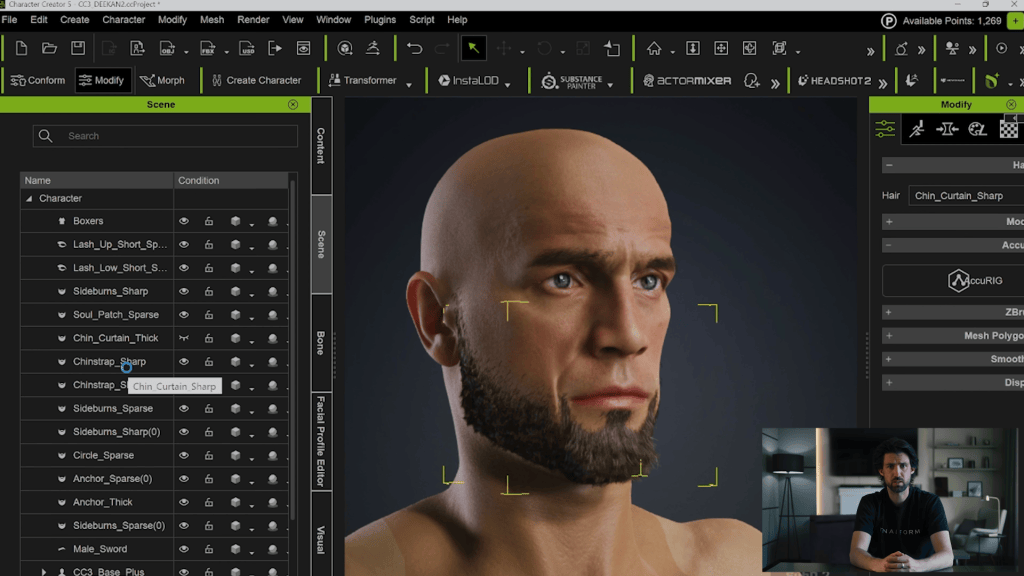
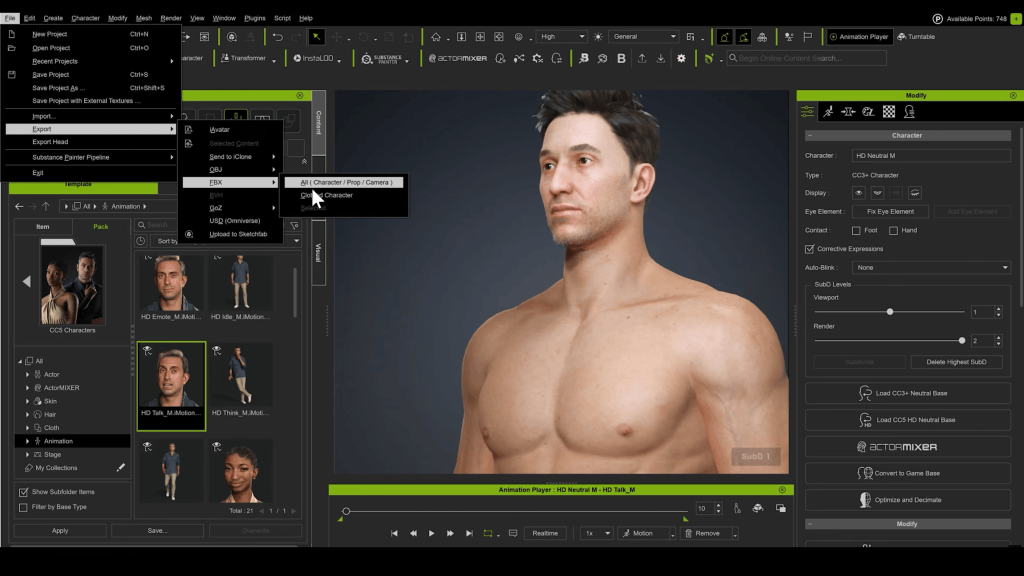
Greetings, my name is Peter Alexander. In this demonstration, I’m going to walk you through how you can leverage Character Creator 5‘s new ActorMIXER as a powerful stepping stone to create unique, stylized characters. We’ll use the CC Base Mesh as our foundation, and ActorMixer will provide the next layer from which to build, making professional character creation that much easier. For this demo, I’ll be creating a stylized version of Arnold, using the Blender Autosetup pipeline, which is both cost-effective and efficient for creating characters and assets.

Visit Mythcons’ ArtStation

In this tutorial, I will walk you through the steps to create a celebrity-style 3D caricature—specifically a stylized Terminator—using Character Creator 5, ActorMIXER, and the Caricature MIXER pack. We will move between AI generation, Reallusion tools, and Blender to refine the look.

Tools Used:

  • Character Creator 5 (CC5)
  • Headshot 2.0
  • ActorMIXER & Caricature MIXER Pack
  • Hyper3D (AI)
  • Blender (with CC Auto Setup Addon)
  • Krita (or any raster editor)

Step 1: Generating 3D Reference with AI

While you can sculpt manually from photos, creating a 3D reference mesh gives us a faster starting foundation.

  1. Generate Image References: Ask an AI image generator for front and side views of your subject (Arnold), ensuring you request to remove hair for a cleaner mesh.
  2. Generate the 3D Reference: I used Hyper3D for this workflow.

Note: I chose Hyper3D because other platforms (like Hunyuan) produced results that were already too stylized. I wanted a more neutral base to apply my own stylization to. 

Step 2: The Foundation (Headshot 2.0)

Once you have the .OBJ or mesh from Hyper3D, load it into Headshot 2.0 inside Character Creator.

  1. Select the Mesh option. 
  2. Alignment: Align the corresponding points on the reference mesh to the CC base mesh.

  1. Refine: Use the included brushes to add, delete, or switch between subdivisions to ensure details align correctly.
  2. Generation Settings: Set the generation type to Male and select a Masking Style (this helps blend the reference details into the CC base smoothly).

Step 3: Body Shaping & Exaggeration

He isn’t a Terminator without an imposing physique. This is where we start pushing the style.

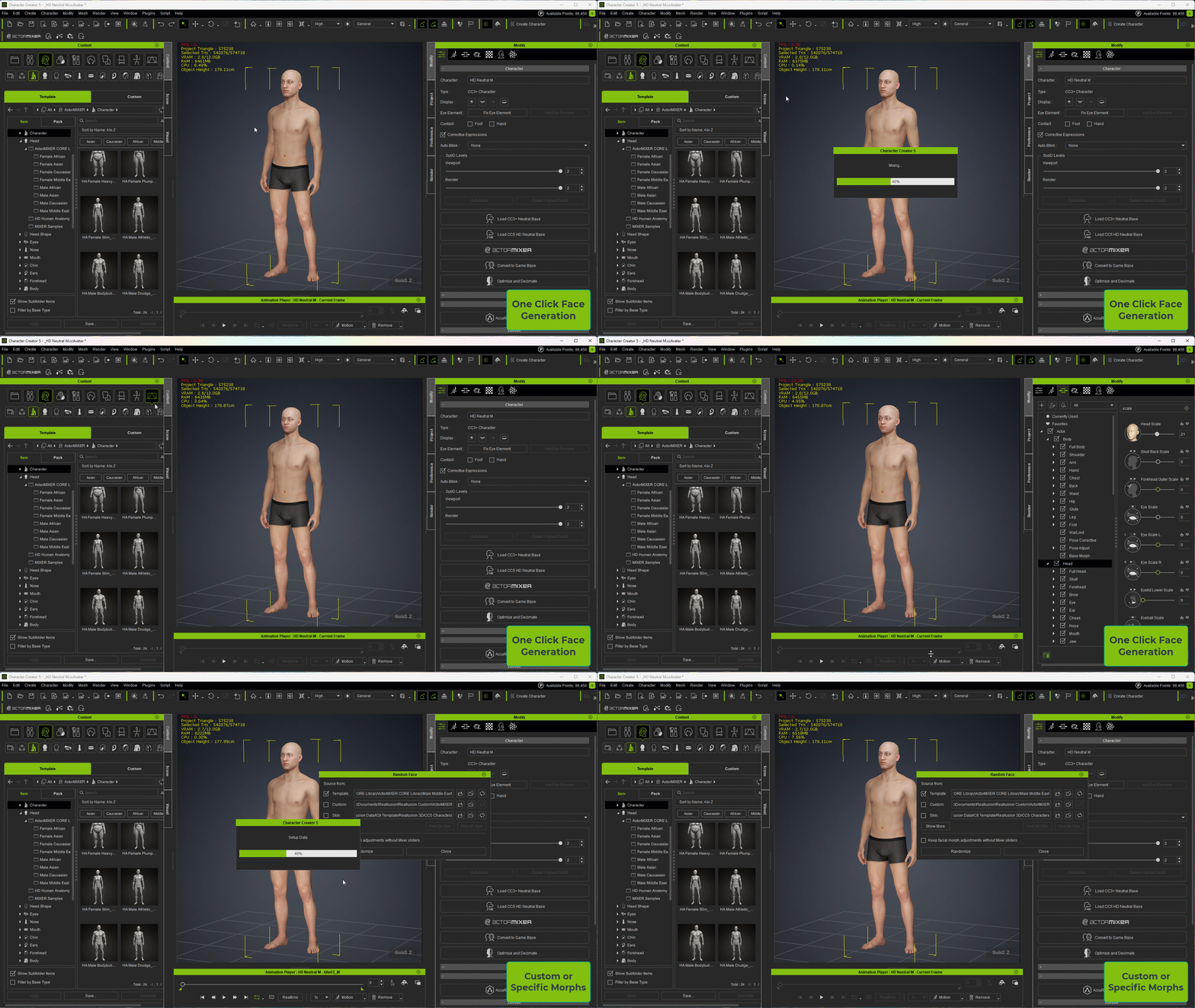
  1. Open ActorMIXER

2. Blend elements from the Caricature MIXER pack with standard muscle morphs.

3. Cycle through combinations to find the right balance of “Brute” and “Caricature.”

4. Mesh Correction: If areas don’t blend well, use the Edit Mesh brushes.

Technique: Reduce the mesh to low resolution, smooth out the artifacts, and then mirror the changes to the other side.

Troubleshooting Tip: Fixing Symmetry & Bone Alignment If you find that your mesh edits aren’t mirroring correctly, the bone coordinates might be off.

  1. Select the bone (e.g., Head, Jaw Root, or Upper Jaw).
  2. Check the Move and Rotation values.
  3. Move X should generally be 0
  4. Rotation is often not zero. If you see a value like -89 degrees, change it to -90 or 90 degrees. Correcting these values usually solves mirror symmetry issues.

Step 4: Texture Cleanup

The AI projection will likely leave unwanted shadows on the face texture.

  1. Export the texture to a raster editor (I use Krita). 
  2. Paint out the heavy baked-in shadows.
  3. Note: You will lose some likeness, but for a caricature, clean textures are often better than noisy photo-real ones.

Step 5: Sculpting in Blender (Round 1)

Now we need to push the shapes beyond what sliders can do.

  • Use the Blender Auto Setup Addon.
  • Send the character using Morph Edit at SubD 2 (we don’t need a low-res pass for this).
  • Sculpting: Use the Grab/Move brush to push the stylization. Since CaricatureMIXER gave us a good foundation, we are just refining shapes here.
  • Send back to CC5: Once updated, check the silhouette.

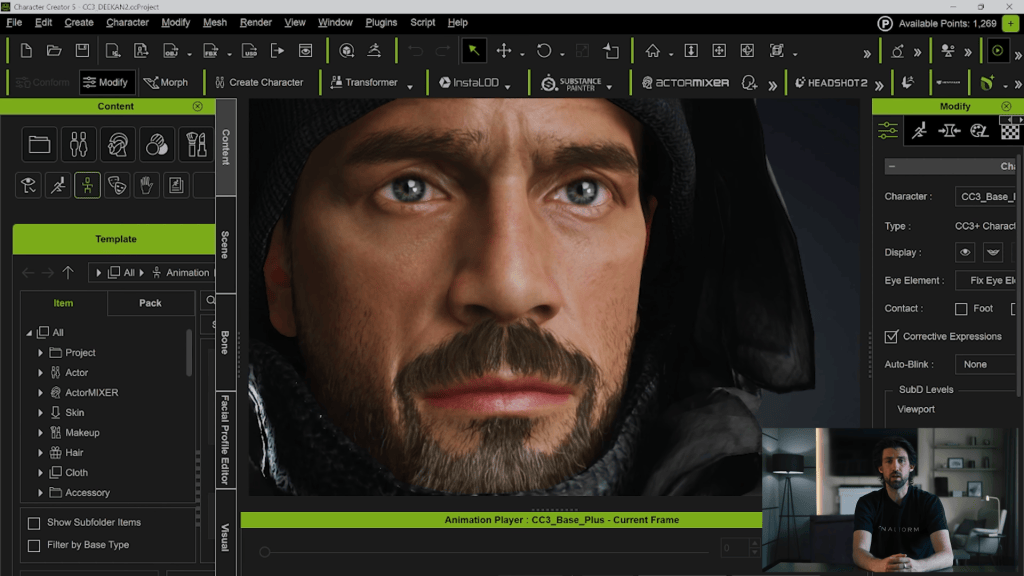
Iteration Note: After applying hair in CC5, I realized the forehead was too low. I simply sent the character back to Blender, adjusted the forehead height, and updated the mesh again.

Step 6: Clothing & Smart Search

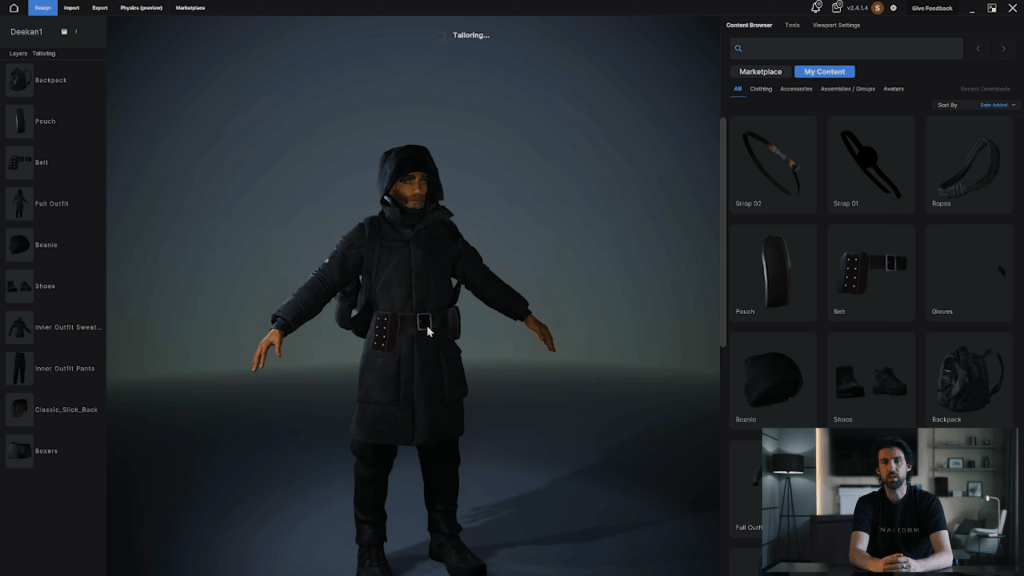
To dress the character, we can use the Smart Search feature in the Content Panel.

  • Trial Function: You can download a watermarked version of clothing to test the fit.
  • Deep Search: Use “Deep Search Similar” to find assets that match the vibe of the items you are looking at.
  • Licensing Explained:
    • i-Content: For use strictly within iClone/CC.
    • Standard: Required if you plan to export the mesh to Blender or ZBrush (which we are doing).

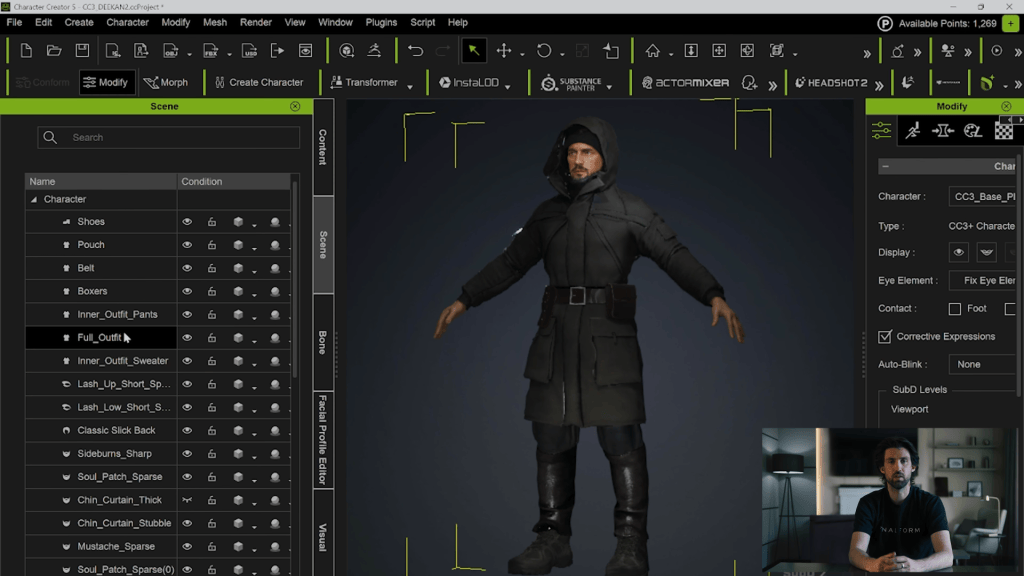
Layering Tip: Check your Clothing Layer Settings. Ensure the Leather Jacket is layered above the shirt and jeans to prevent mesh collision.

Step 7: Fitting Clothes to Extreme Shapes

Because this caricature has exaggerated proportions, standard clothing won’t fit perfectly out of the box. We need to fix the stretching.

  • Establish DataLink: Make sure your CC5 character and Blender are connected via the Pipeline addon.
  • Bind Pose: Ensure the character is in the default Bind Pose in CC5.
  • Send to Blender: Send the character (mesh) to Blender.
  • Sculpt the Fit:
    • Use the Grab brush to pull clothing over the muscles.
    • Caution: The Smooth brush in Blender is very strong. Lower the strength significantly before using it on clothing.
  • Update CC5: In the Blender Pipeline addon, under DataLink, select Mesh. This updates the vertex positions inside Character Creator. 

Step 8: Final Polish

Once the clothing fits:

  1. Adjust facial expressions to verify that the rig handles the new shapes correctly.
  2. A lot of the likeness comes through in the expression (the squint, the stoic mouth).
  3. Set up your lights and render!

Summary

This workflow is designed specifically for caricaturizing characters efficiently, without sacrificing control or pipeline flexibility.

At the core of this process is ActorMIXER, combined with the CaricatureMIXER Pack, which dramatically lowers the barrier to stylized character design.

Reallusion’s rich content ecosystem further accelerates the workflow. With a wide range of ready-to-use clothing and assets, plus the Smart Search and Deep Search Similar features, finding outfits that match a specific character archetype or visual vibe becomes frictionless

When custom refinement is needed, the full Blender pipeline ties everything together. Thanks to CC Auto Setup and DataLink, both character shapes and clothing adjustments can be sculpted directly in Blender and seamlessly synced back to Character Creator.

Related Posts

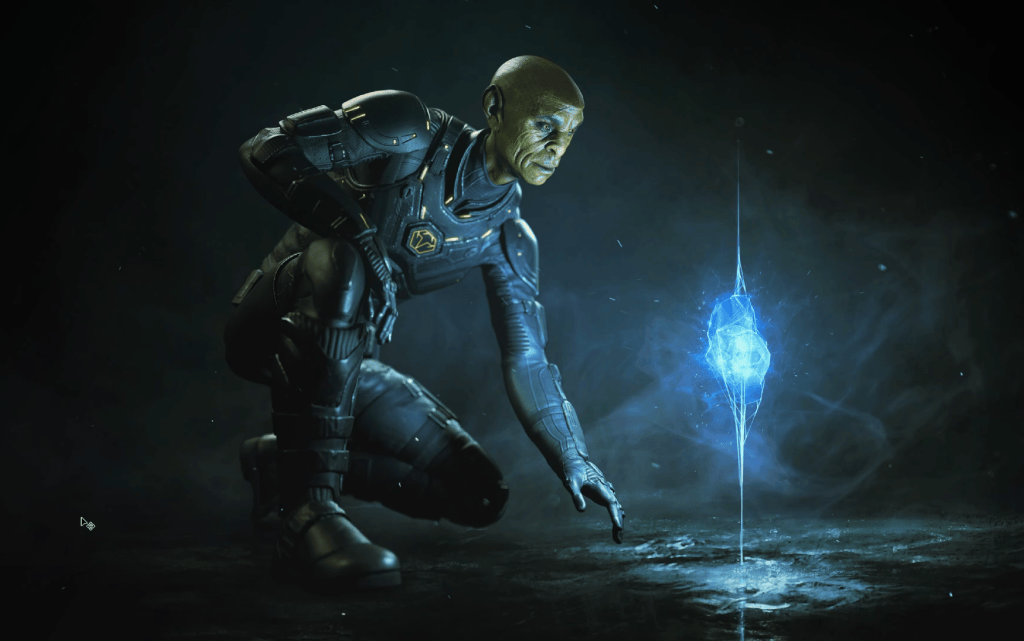
CC5 x ZBrush: Create a HD Sci-Fi Vanguard (1/7)- Character Base Creation with ActorMIXER

Character Creator 5 dramatically improves the workflow for fast character iteration, stylization, and asset customization. It’s now paired with an even smoother HD GoZ pipeline all the way to Marmoset Toolbag rendering.

This article is the first in a seven-part series, where we break down a complete CC5 → ZBrush → Substance Painter → Marmoset Toolbag 5 workflow for creating high-quality sci-fi characters. Each chapter focuses on a different stage of the pipeline, and together they form a full production-ready guide for artists.

In this first part, we’ll walk through choosing your base mesh, prototyping with the ActorMIXER, refining morphs, previewing facial rigging, and preparing clean skin edits to set the foundation before sculpting begins.

Pablo Munoz Gomez

Hello, my name is Pablo Munoz Gomez, and I’m an enthusiastic 3D concept and character artist who is deeply committed to the spread of knowledge. My expertise lies in 3D sculpting, visual development, and engaging in mixed-media projects. I take immense pride in being the creator of Pablander Academy, serving as an outlet for showcasing my work, sharing my workflows, and assisting fellow artists in honing their skills across a wide range of subjects.

Pick a Mixer-Ready Base

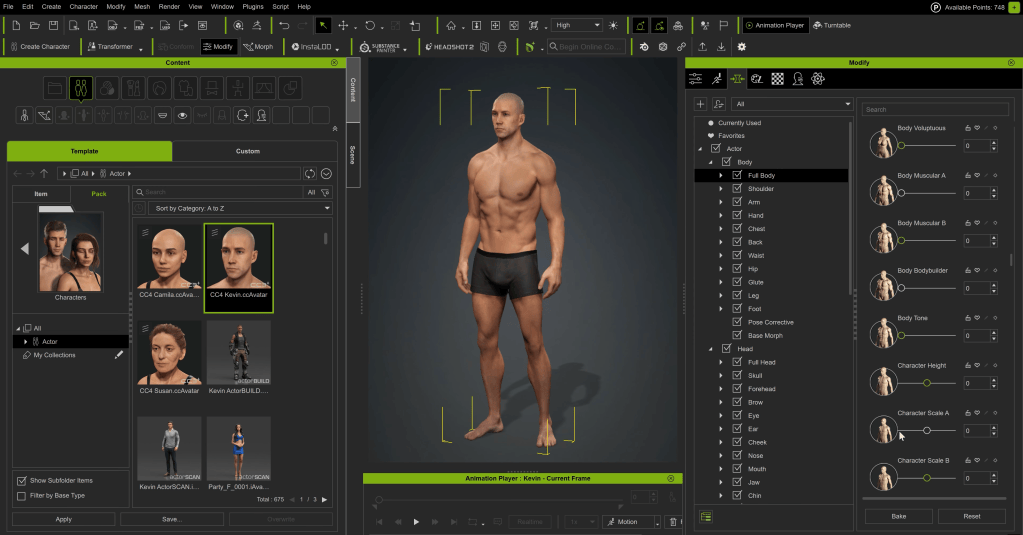
Start inside Actors → Content → Character → Mixer Ready. These assets are specifically optimized for CC5’s new ActorMIXER workflow, making them ideal starting points for rapid character prototyping.

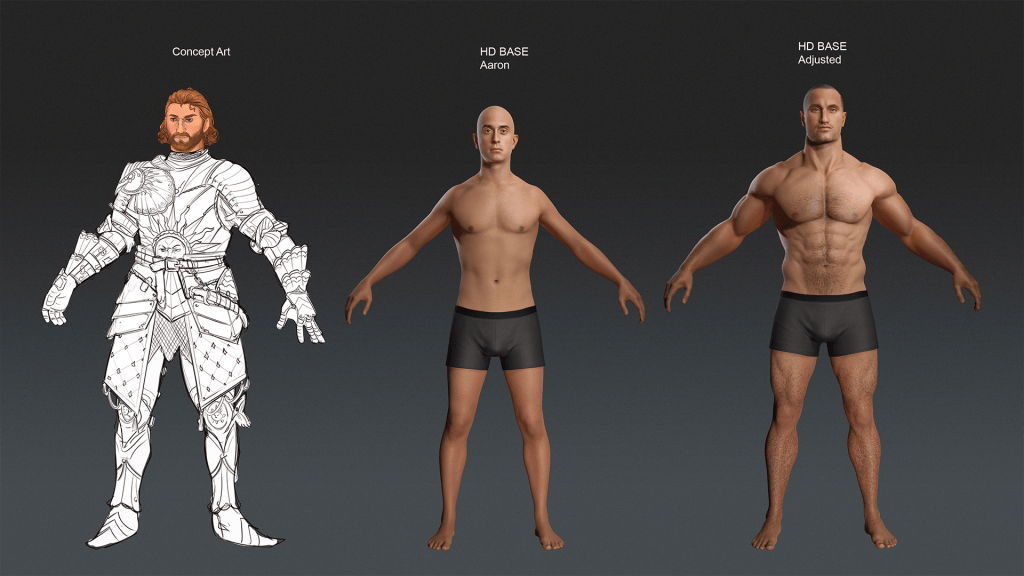
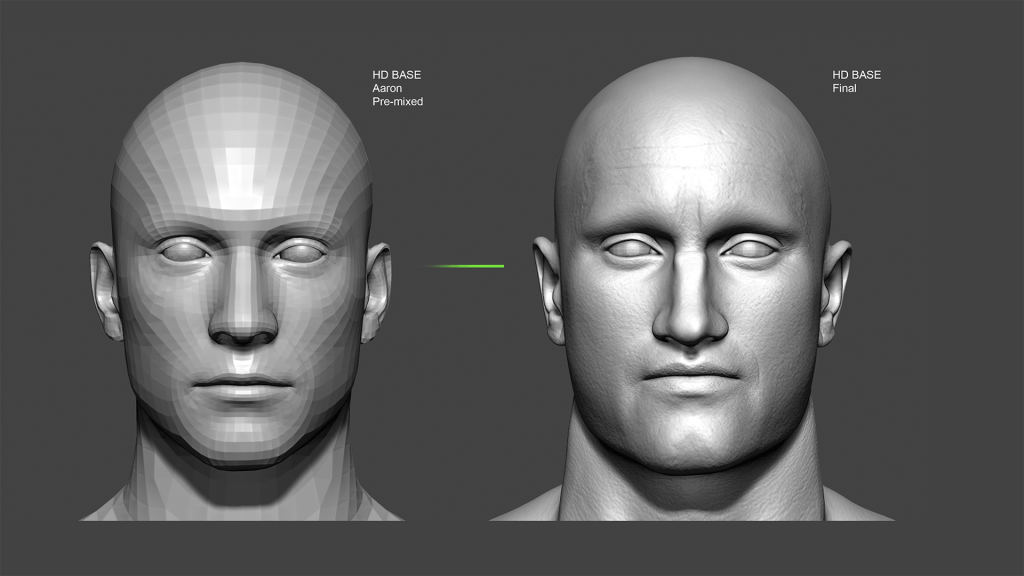
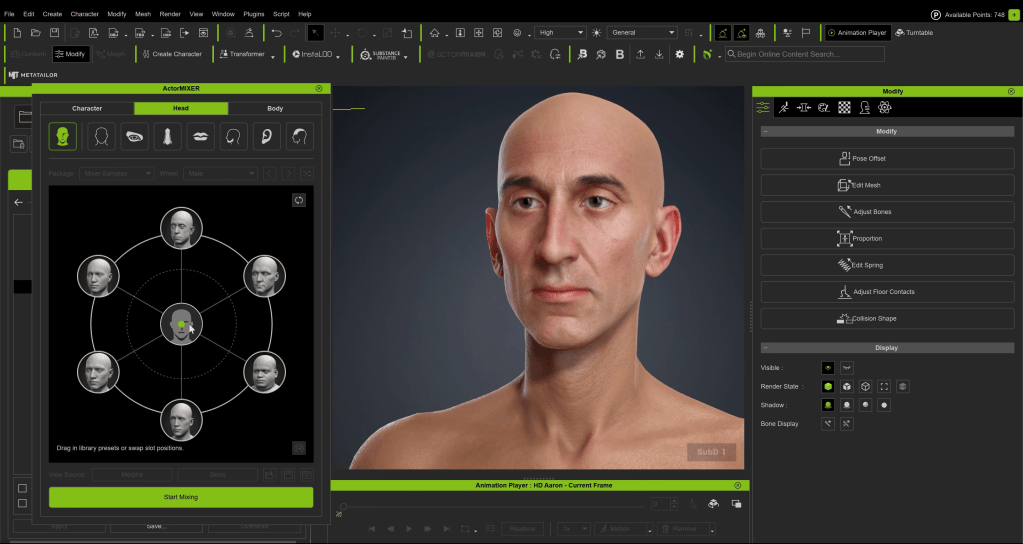
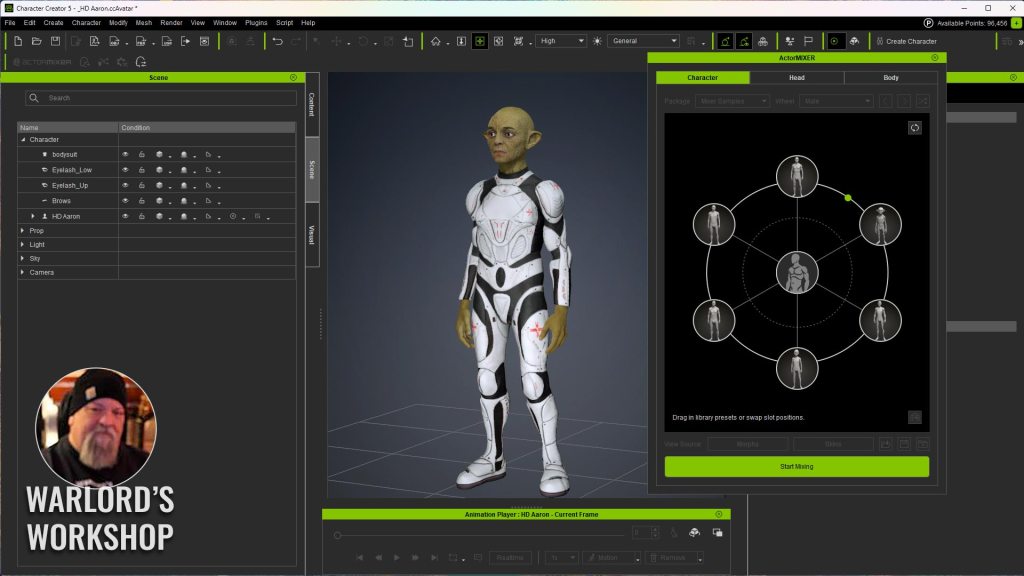
For a male creature, select an HD base such as the HD Aaron asset. Drag and drop it into the viewport. Once loaded, remove any geometry you won’t use so you are working with a clean base mesh.

Fast Morphing with Viewport Click-and-Drag

While CC5 still provides a huge library of sliders, a faster and more intuitive approach is to morph directly in the viewport. Enable the viewport morph switch, hover over the model, and simply click-drag to push or pull shapes. You can quickly adjust neck thickness, jaw length, eye spacing, and so on.

This direct manipulation is ideal for exploring exaggerated or stylized proportions quickly. Small adjustments give immediate personality without fiddling through long slider lists.

ActorMIXER: The Big New Feature

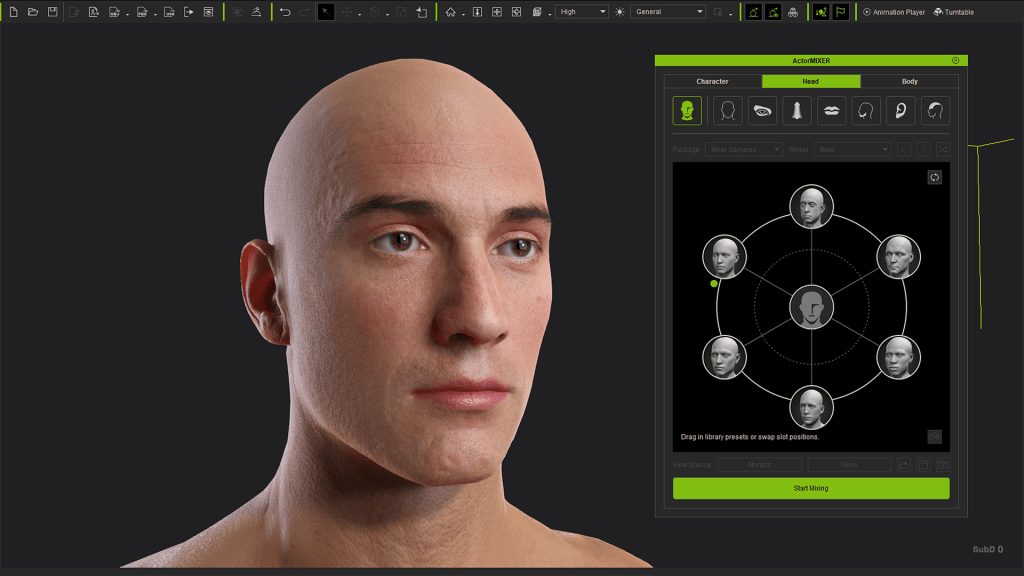
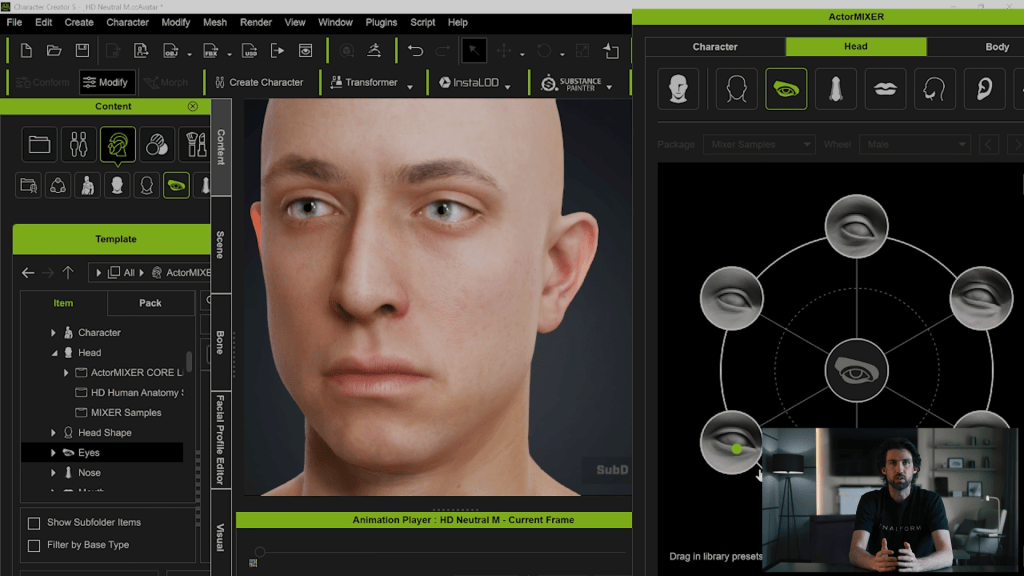
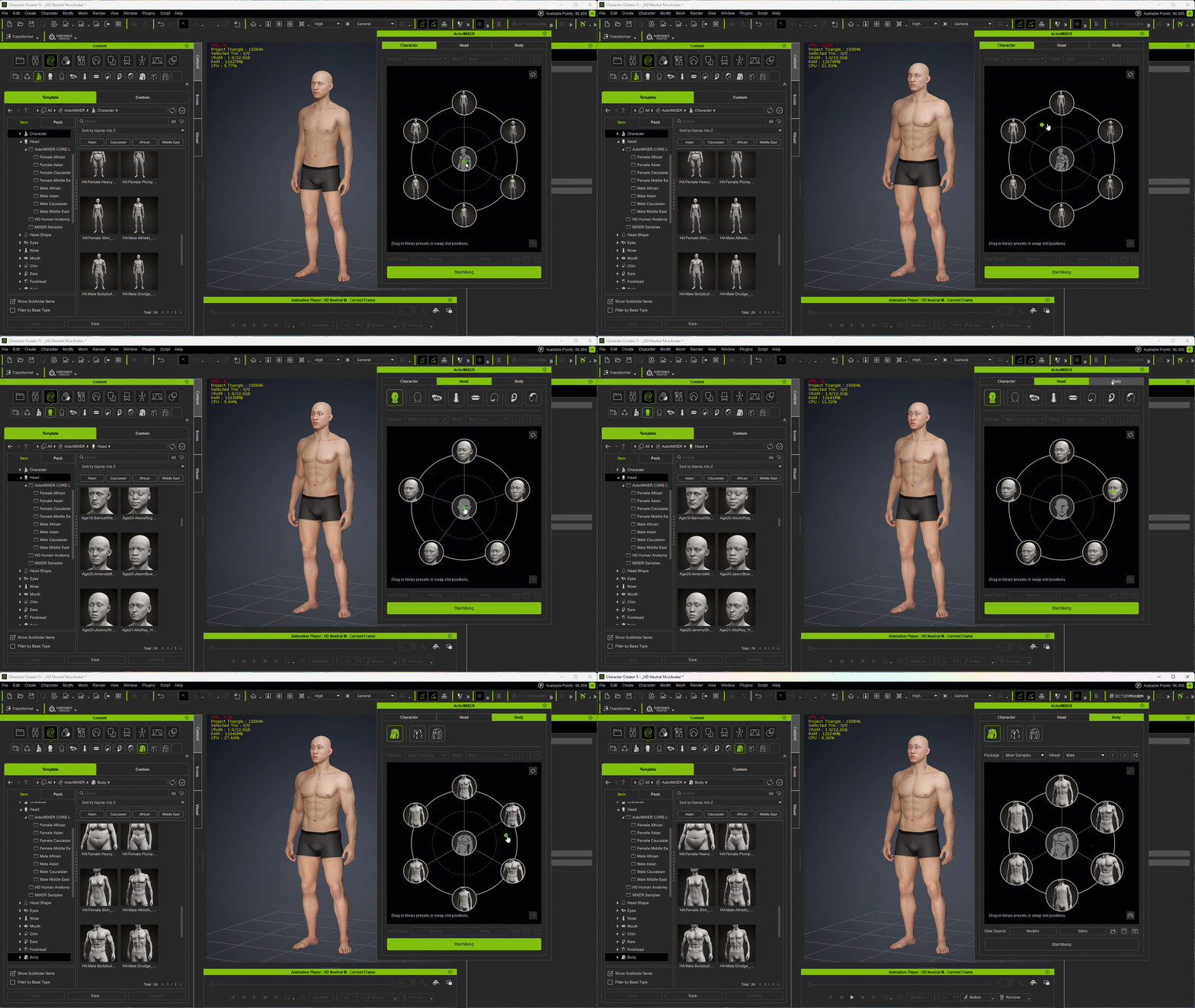
ActorMIXER is the new standout feature in CC5. It provides a radial visual controller that lets you mix multiple body or head presets and refine the results quickly. Available under Modify → Settings → Mixer (Current), it works with the full character, head only, or body only. 

Open it via Modify → Settings → Mixer (Current).

You can work with:

  • Full character
  • Head only
  • Body only

Drag the central control point toward different zones to blend presets, stylized, muscular, aged, or softer forms.

Why ActorMIXER is a Game Changer

  • Visual blending helps you pick the perfect in-between looks without guessing slider values.
  • Independent head/body mixing allows character hybridization, like realistic bodies with stylized alien heads.
  • Rig-aware ratios ensure bones automatically follow mesh changes, keeping animation deformation natural.
  • Optional proportion editing gives full artistic freedom when stylizing creatures or non-human silhouettes.

This tool allows you to generate a unique character identity extremely early in the process — before sculpting or outfit modeling even begins.

Refining Expression and Facial Rigging

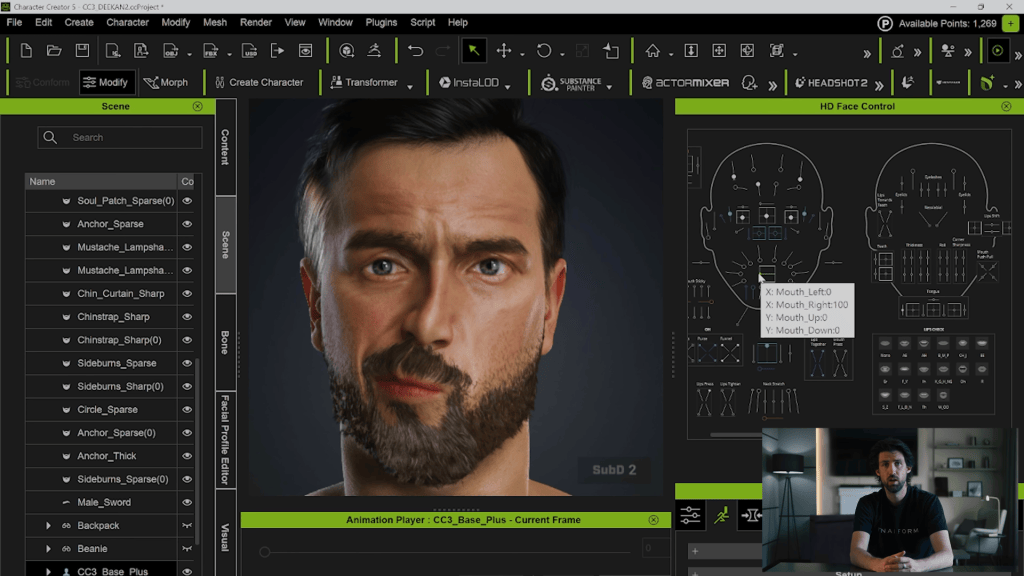
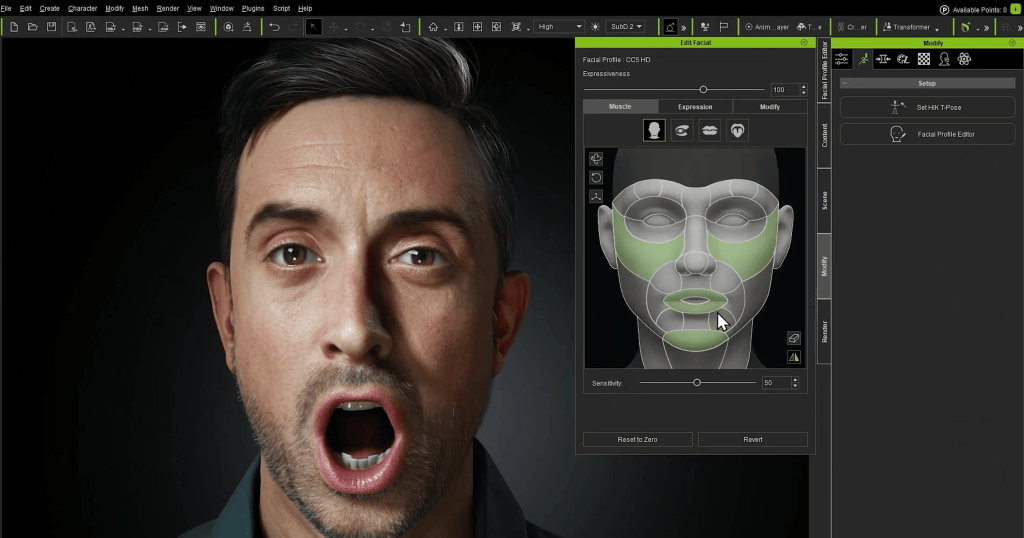
Before committing to sculpting or clothing, test the character’s facial movement. Go to Modify → Motion → Edit Facial and use the controllers to preview the range of motion for the jaw, brows, eyes, and more. Use the middle mouse button to drag controllers and watch how parts move.

CC5 retains the powerful dynamic wrinkle system first introduced in CC4. These wrinkles auto-activate based on expression intensity, giving instant feedback on how the face behaves in animation.

Why This is Important before Sculpting

  • You can identify where folds should be emphasized or softened in ZBrush.
  • Lets you avoid sculpting wrinkles that will later conflict with the dynamic system.
  • You get a roadmap of natural compression zones — directing the sculpt rather than guessing.

If you want to go deeper, CC5 also supports custom dynamic wrinkle profiles, letting you design completely unique expression maps. I have another in-depth series on the YouTube channel covering this process specifically, in case you are interested.

Skin Editing with the Activate Editor

The skin editor is also very powerful and flexible. Open the paint palette section and click Activate Editor to access base textures, IDs, and material resources.

I like to work on the face first, especially since in this project the body will be covered by a suit or armour. Use brightness, hue, and saturation to push toward a stylized tone. Remember that different regions, like lips or specialized body parts, might use separate material IDs and therefore require individual editing. After adjusting the face, click Update to propagate changes across the body. Deactivate the editor to bake the textures.

It’s best to check specific areas like the lips, eyes, teeth, and accessories immediately upon import, as these often come with separate IDs that require manual adjustment to function correctly. Of course, none of this is necessary for the project but I wanted to share with you because the options are in there and are quite useful to know. 

Exporting the Base Mesh to ZBrush with GoZ

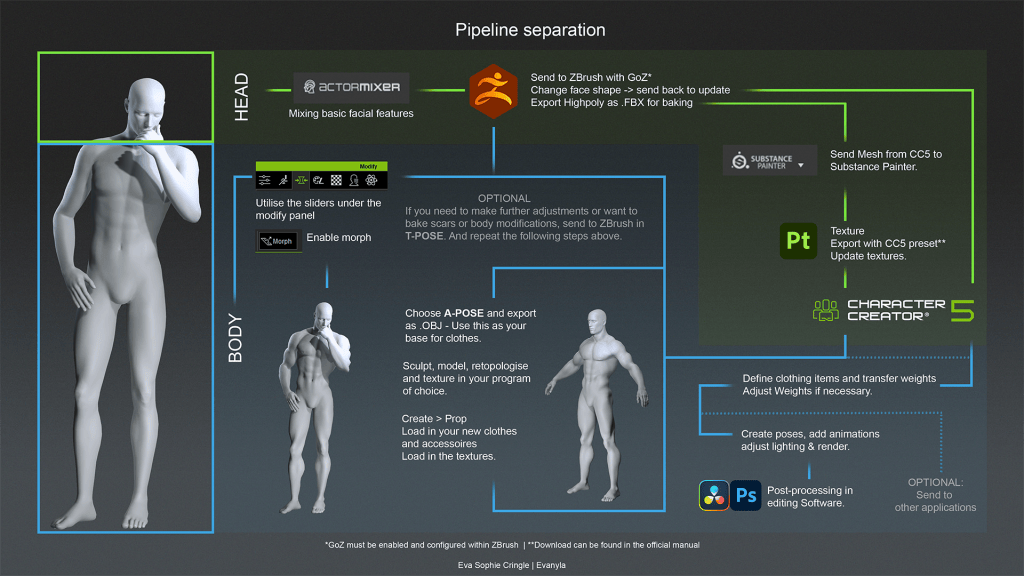
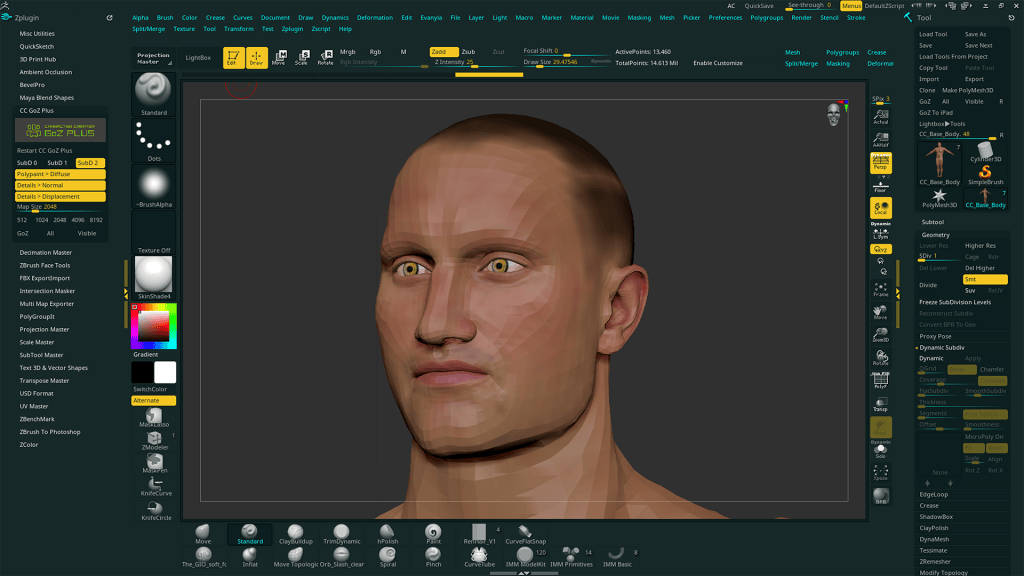
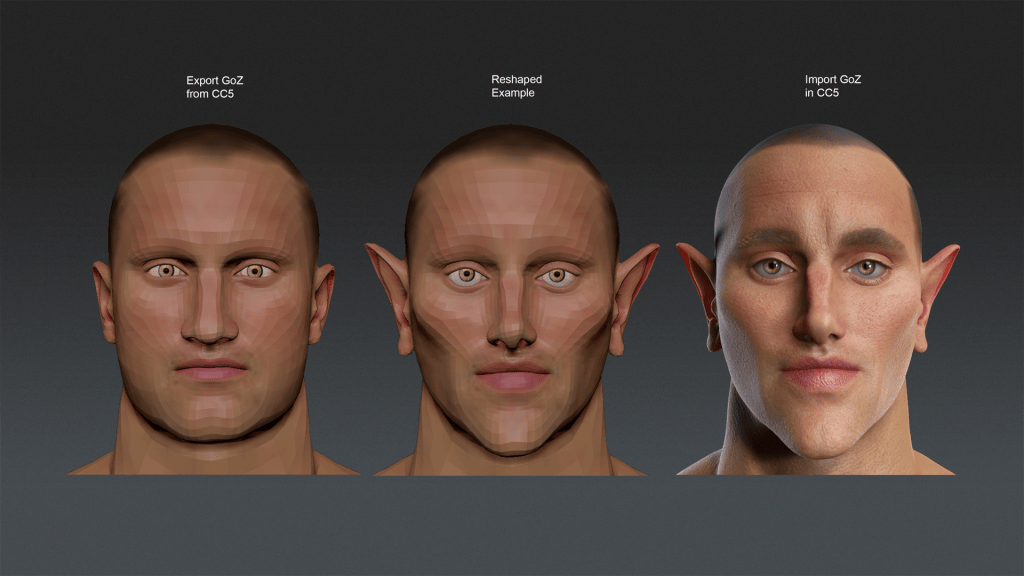
Once the CC5 base is established, send the mesh into ZBrush using the GoZ button in the Scene tab. Choose Create Template > A-Pose (recommended for sculpting).

Character Creator transfers normal map details into a ZBrush sculpting layer as high-fidelity detail. That means pores and micro-skin texture are preserved and editable as a layer, very useful for toggling intensity or removing detail during broad-form sculpting.

Fixing Brush Scale in ZBrush for CC5 Meshes

Due to CC5’s real-world scale, ZBrush brushes may feel too small, even at maximum diameter. Go to Preferences > Draw and choose 5000 for Max Brush Size and 50 for Dynamic Brush Scale.

This dramatically improves the usability of brushes when working on full-body meshes with millions of polygons.

Coming Up in Part 2

In the next chapter of the series, we’ll take the CC5 base mesh into ZBrush using GoZ, begin sculpting primary and secondary forms, and block out the sci-fi suit. We’ll also explore how to manage CC5’s transferred microdetail layers, fix brush scale issues, and prepare a clean sculpt for subdivision workflows before sending everything back into Character Creator 5.

Related Posts

AccuPOSE INFINITY: One-Time Purchase Unlocks 1,400+ AI-Trained Poses

Thank you for supporting AccuPOSE and helping us shape this new generation of motion editing. Based on user feedback—and now that we’ve released more than 1,400 AI-trained poses—we are transitioning AccuPOSE INFINITY from a subscription model to a one-time purchase ($149 USD), effective January 6.

AccuPOSE INFINITY was originally offered as a subscription to support multiple content drops and to deliver this technology to users as quickly as possible. Over the past few months, all content planned for this year has been released. With the full library now available, we believe creators can fully benefit from the breadth and diversity of AccuPOSE INFINITY without an ongoing subscription, which is why we are transitioning to a perpetual license.

While we will continue adding new models and improvements over time, these updates will not follow a fixed schedule.

Cartoon Category Added to AccuPOSE INFINITY

This update also includes AccuPOSE INFINITY Expansion 6, introducing a brand-new Cartoon category designed for exaggerated, expressive animation styles.

  • Cartoon category
    • Stylized, highly flexible poses for cartoon-like animation
    • Includes Male, Female, and Kid poses
    • Ideal for expressive storytelling

In addition to the Cartoon category, this update also adds the following pose themes:

  • Free Fight
  • Panther Lady
  • Aerial Fighter

With these new additions, AccuPOSE INFINITY now offers over 1,400 poses in total, all available through a single purchase.

Check out the full library of poses

Our Thanks to AccuPOSE INFINITY Early Supporters

To ensure fairness and to thank our early adopters:

All users who have ever subscribed to AccuPOSE INFINITY — whether the subscription is currently active, expired, or renewed — will automatically receive the full perpetual license

✅ Perpetual License Delivery

The perpetual license redeem link is provided below for your convenience.

>> Redeem HERE

To ensure all eligible users receive their copy, notification emails will also be sent on December 29 and January 6.

Please check your inbox (including spam or promotions folders) on or after these dates for confirmation.

✅ For Users Who Renewed Their Subscription

If you have renewed your AccuPOSE INFINITY subscription:

  • The renewal fee will be refunded in the form of Reallusion Bonus Points (BP)
  • BP notification emails are scheduled to be sent before January 12

✅ Workgroup Subscribers

Workgroup subscribers will receive separate emails with instructions tailored to their specific subscription status.

One Purchase. Long-Term Ownership

This change allows creators to invest once and own AccuPOSE INFINITY permanently, making it easier to integrate into long-term workflows without recurring costs.

Thank you again for your trust and continued support. We look forward to growing AccuPOSE with more enhancements in the future.

Garry Pye: Using AI and HeadShot in Character Creator

Building Lulu’s Head: AI, HeadShot, and Hope

In the first Lulu entry, Garry Pye set out with a clear goal: to apply everything learned from building Carl and approach 3D character creation with more confidence and intention. Now, in this second chapter of Lulu’s journey, that mindset is put to the test where it matters most—the face. This post dives into the creative and technical process of turning a 2D illustration into a living 3D head, blending AI tools with Character Creator and its Headshot plugin to shape Lulu’s identity from the ground up.

When it comes to creating 3D characters, the part that still makes my brain hurt a little is the face. As I start thinking about facial rigging, lip synching, and all those tiny muscle movements in sculpting software, my brain goes on holiday. So for now, I’m sticking with what I know works, using Headshot 2.0 for my character’s head and Character Creator for everything else.

The process starts with a bit of AI magic. I take one of my 2D illustrations, in this case, my design for Lulu, and feed it into an AI program (for Lulu, I used Krea) to create a 3D stylised version of her. 

The goal here isn’t to copy the AI result exactly. It’s just a visual guide or inspiration. To get a better sense of her form, I use AI again to generate images of her from different angles, making sure I can clearly see her head shape and hair from every side. Once I’ve got those angles, I take them into another AI tool, Rodin, which converts the reference into an actual 3D model of Lulu’s head. It’s like jumping ten steps ahead in the creative process. I then export that head as an FBX file and import it into Character Creator as a prop, ready to bring it into Headshot, where the real fun begins.

Inside Headshot, I start plotting face markers, little dots that tell the program where all the important facial landmarks are. Because Lulu’s head is more stylised than a realistic human face, I place extra markers wherever I need them, making sure to define everything from the top of her head right down to the base of her neck. The more time you spend here, the better the results later on, and the best part is that Character Creator lets you make changes in real time. You can shift a marker, hit generate, and see the update instantly. It’s a process that feels creative rather than technical, which is the way I work best.

A handy little trick I’ve picked up is to temporarily replace the skin texture with a grid pattern. It might sound odd, but it gives you perfect symmetry guides while you’re placing points, a lifesaver when you’re still learning to eyeball things accurately.

Once all the markers are where they should be, I generate the new skin. If something looks off, I can simply go back, nudge a few points, and regenerate. There’s no pressure. The freedom to keep redoing this process makes this whole step surprisingly enjoyable.

Then comes Refine Mesh, the digital equivalent of smoothing out a clay sculpture. Using the Project tool, I can make sure the new face sits snugly against the base mesh, pressing all those surfaces together. It’s like watching a mask slowly become a face.

And just like that, Lulu’s head is born.

For me, this was one of those quiet “wow” moments. The point where you suddenly realise how far you’ve come. I couldn’t help but notice how much faster I’d reached this stage compared to my first character build. Credit for that has to go to Character Creator, which makes it incredibly easy to make adjustments on the fly. Everything happens right there in front of you, updating in real time, so instead of guessing and waiting, you’re sculpting and seeing instant results. 

Already, I could see the beginnings of Lulu’s personality emerging. The face wasn’t perfect, not yet at least, but it had that unmistakable spark of life. And for anyone who’s ever built a 3D character from scratch, that’s the moment that hooks you. That’s the moment you fall in love with the process.

This image has an empty alt attribute; its file name is Garry-Pyes-profile-image-edited.jpg
Garry Pye – 2D/3D Animator, Cartoonist, Content Developer

Garry Pye – 2D/3D Animator | Content Developer

Garry Pye is an Australian illustrator, animator, and Cartoon Animator instructor with over a decade of experience in the animation industry. Known for his unique blend of creativity and humor, Garry’s work spans from teaching animation techniques to creating innovative content that helps both novice and experienced animators improve their skills.

Garry’s enthusiasm for storytelling and animation shines through in all his projects, whether it’s creating animated shorts, preparing educational tutorials, or sharing his expertise by teaching. With a passion for making animation accessible and fun, Garry has built a community of learners who not only appreciate his knowledge but also his infectious sense of humor and dedication to his craft.

Follow Garry Pye’s iClone Page2D Animation Page2D Marketplace

Related Posts

2026 Reallusion Software Subscription Options: Expanding Your Creative Freedom

Starting January 6, 2026, Reallusion will introduce new subscription-based licensing options, giving you greater flexibility to choose the plan that best fits your needs. Alongside the existing perpetual licenses, these subscription plans significantly expand creative possibilities across Reallusion ecosystems for Character Creator, iClone, and Cartoon Animator. All subscription plans provide the same rights and privileges as perpetual licenses under the Reallusion Software EULA, ensuring a fair and consistent experience for all customers.

Subscription Model Benefits

Available with monthly or annual renewal options, subscription licensing offers a flexible and budget-friendly solution for short-term projects and creators new to the Reallusion family of products.

  • Same EULA Rights
    Enjoy the same commercial-use rights and features as perpetual license holders, fully covered under the Reallusion EULA.
  • Stay on the Cutting Edge
    Always access the latest software versions—including major upgrades (e.g., iClone 8 to iClone 9)—at no additional cost during your active subscription.
  • Full Ecosystem Access
    Get unrestricted access to plugins and content purchases that integrate seamlessly with your existing pipelines and third-party tools, including Blender, Unreal Engine, Unity, Maya, ZBrush, and more.
  • Upgrade Perks
    Receive an exclusive member discount when upgrading your subscription or switching to a perpetual license. Transitions are seamless, with no service interruption, and discounts are automatically applied at checkout.

Reallusion offers seven subscription plans, available with both monthly and annual billing options. Get started with Character Creator for as little as $8.30 per month, or iClone for just $16.90 per month. For detailed plan information and comparisons, please visit our official website.

Perpetual Model Benefits

Reallusion continues to support perpetual licensing for creators and studios that value the reliability and long-term stability of permanent software ownership.

  • Pay Once, Own Forever
    Make a one-time purchase with no recurring fees to secure a lasting production tool for your pipeline.
  • Stable Production Environment
    Ideal for long-term projects that benefit from consistent version control and a predictable, uninterrupted production environment.
  • Collaborative Synergies
    Perpetual licenses remain essential for teams requiring advanced software management and allocation, including floating license control, shared content and project purchases, and seamless collaboration with external clients and partners.

License Recommendation

Perpetual Licenses are ideal for users who prefer permanent ownership, and for companies, studios, or educational institutions that need multi-seat licenses, team-based content sharing, floating license, and seamless external collaboration via Workgroups. We recommend purchasing our two most popular bundles to get started and save over 35%, or you may visit our Software Store to mix and match your own custom bundle.

Subscription Licenses are best for personal use, short-term projects, or budget-conscious creators. The Reallusion 3D Suite 365 plan is the premier option for a complete CC & IC toolkit. Choosing the Annual Plan provides the most cost-effective value to get started.

License TypesPerpetual LicenseSubscription License (365)
Best For 1. Permanent use
2. Content sharing, team collaboration
3. Studios and businesses 
1. Personal use
2. Short-term projects
3. Budget-conscious creators
User Rights1. Commercial use rights (EULA)
2. Access to full content and add-on platforms
3. Pipeline support for 3rd-party integrations
Unique Benefit1. No recurring fees
2. Multi-seat licensing and workgroup management
1. Access to most up-to-date versions
2. Flexible upgrade options
PaymentOne-time Purchase (No recurring fees)Recurring Payment (Billed monthly or annually)
Refund Policy14-day money-back guaranteeNo refund, Cancel anytime (next billing)
LimitationPersonal license only
(Not suitable for workgroups or educational licensing)

Learn More

Explore the software subscription store

Software EULA

Reallusion Store FAQ

Researcher Thies shares complete character workflow and honest review with CC5, iClone and Blender. He uses the latest Video Mocap Plugin and get the animation to Blender for final rendering.

Influencer Spotlight: Character Creator 5 Review by Thies Grünewald

Researcher Thies shares complete character workflow and honest review with CC5, iClone and Blender. He uses the latest Video Mocap Plugin and get the animation to Blender for final rendering.

Thies Grünewald

Hi, my name is Thies Grünewald, I am 37 years old, and have been working in film and video production for over 15 years. I have continuously expanded my expertise in the areas of camera, lighting, and audio, and have constantly sought to improve my skills through numerous image films, interviews, explanatory films, music videos, and above all, my own short film projects. In post-production, in addition to editing and color grading, I now focus heavily on 2D- and 3D-animation. Over the years I have added workflows between the programs Blender, Zbrush, and Substance Painter, as well as Marvelous Designer and Character Creator for character design/animation. In compositing, I have been working with Adobe After Effects and other plugins such as Red Giant, Element 3D and Mocha AE since the beginning of my professional career.

Thanks to my job at the university, I have the opportunity to impart knowledge and, at the same time, constantly broaden my own horizons through exchanges with young students and keep pace with the rapid technological developments in the field of AI.

Visit Thies Grünewald’s YouTube Channel

My experience with Character Creator 5

I have been a loyal Character Creator 4 user for a couple of years. Anyone who has ever designed a CGI character from start to finish knows what it means: sculpting, retopology, texturing, shading, rigging, weight painting. With Character Creator, I can focus on my actual strengths: every character I create with Character Creator, whether it’s realistic or stylized, is production-ready and fits seamlessly into my existing workflow.

So sharing my opinion for CC5 becomes a no-brainer for me. Character Creator 5 has become an important part of my work. This allows me to invest more time in my creative processes.

”As a one-man band, it is essential for me to work with tools that allow me to implement my creative projects faster and more efficiently in a professional manner without compromising on quality. For me, CC5 has become indispensable.“

Thies Grünewald, Researcher at University of Applied Sciences South Westphalia

Exploring the Next-Gen Features of Character Creator 5

Let’s quickly talk about the new CC5 features, as I have integrated all of them into this character. First, we have a new subdivision level that allows for incredible detail. We also have a realistic skin system to dial in micro-details, alongside an upgraded facial performance system.

Of course, we have the ActorMIXER. Within seconds, you can play around with models to create unique characters. My goal was to create a specific concept, and I ended up with this female character using the mixer’s various morphs. Whether you are looking for a standard change or a fantasy-style character, you can achieve it with the click of a button — or in this case, by dragging the mouse. For those of us who aren’t primarily character artists, this is a game-changer.

Blender Pipeline and Performance Optimization

Let’s discuss production-ready workflows, specifically integrating this into Blender. If you are working on a slower PC and can’t handle Subdivision Level 2 characters, no problem. You can use the “Create” section to bake your normal maps down to Level 0 or 1. This ensures your characters work fluently even without high-end hardware.

To export to Blender, navigate toPlugins > Blender Pipeline > Export Character. A menu will appear, allowing you to choose your subdivision level; I recommend Level 1 for better playback feedback. Once exported, you can use the free Reallusion add-on for Blender. This tool handles texturing and rigging automatically, removing the technical hassle usually associated with character creation

Rigging and Facial Animation

Once imported, ensure you enable ray tracing in Eevee to make the eyes look their best. The character comes with a high-quality rig and perfect weights from Character Creator. You can also use the Rigify setup in the advanced options to generate a control rig for your animations.

The face rig is particularly impressive. If you’re familiar with Unreal Engine, it will look familiar as it’s based on the MetaHuman system. We even have wrinkle maps for realistic micro-details.

Motion Capture and AI Technology

For animation, you can import mocap data or use the new video mocap feature – Video Mocap Plugin. Reallusion has partnered with QuickMagic AI for “motion-suit-less” animation. You simply upload a video — QuickMagic recommends a static camera, but it works with slight movement — and the AI identifies the silhouette for full-body and finger tracking.

While each generation costs about 250 Reallusion points (roughly $2.50 USD), it provides a handy way to get nice animations without an expensive mocap suit. Each generation takes approximately ten minutes, and the software retargets the motion to your character automatically.

Face Mocap and Retargeting

If you prefer different options, the Blender add-on supports face mocap using ARKit. You can use the free Live Link Face app (exclusively for iPhone) to record a CSV file. Uploading that file onto the “proxy face” in Blender applies the mocap data directly to your character’s shape keys.

Additionally, you can import animations from sources like Mixamo. Simply download the Mixamo rig, select your character as the source armature, and preview the retargeted animation. If the rotation is off, just apply a 90-degree X-axis rotation to the character and everything should work fine.

Conclusion

We’ve created a complete, lifelike animation using a character designed in Character Creator 5 (with all its new features), combined with a free face mocap app, and free Mixamo animations. All of this was implemented into an existing 3D scene in Blender, easily and without the need for deep technical knowledge of the complex character animation process.

Related Posts

In-depth Blender lecturer CG Dive offers a comprehensive review of Character Creator 5.

Influencer Spotlight: Character Creator 5 Review by CGDive (Blender Rigging Tips)

In-depth Blender lecturer CG Dive offers a comprehensive review of Character Creator 5.

Todor / CGDive (Blender Rigging Tips)

Hi, I’m Todor of CGDive. CGDive is a Blender-focused YouTube channel dedicated to making complex 3D concepts clear and approachable. The channel is known for deep-dive explorations, structured workflows, and tutorials that go beyond button-pressing. CGDive aims to teach the why and how behind the tools. We break down technical topics such as rigging, add-ons, or new Blender features into actionable steps that artists can immediately apply to their own projects. Our goal is simple: help beginner to intermediate Blender users master technical 3D skills without the overwhelm and move towards the advanced level.

Visit CGDive’s YouTube Channel

My Experience with Character Creator 5

I’ve heard a lot about Character Creator from some of the most productive CG artists I know, who absolutely swear by it. So, I dived in and explored the new Character Creator 5. As a longtime Blender user, I was surprised by how much time it can save me. Blender gives us incredible freedom, but when you have to create multiple human characters, especially as a solo creator or a small team, all the modeling, texturing, and rigging quickly turns into a mountain of work.

CC5: The Dedicated Digital Human Solution

Character Creator addresses exactly these pain points by giving you a full production-ready human base that you can customize as much as you want. You can achieve any style from realistic to cartoony and even bespoke characters sculpted by hand. So, what is Character Creator 5? It is the latest version of a standalone application from Reallusion that specializes in one thing: high-quality humanoid characters. It gives you a fully customizable human mesh and textures, clothes that adapt to the custom character’s shape, an automatic body and face rig, and easy export pipelines not just to Blender, but to almost any popular 3D software like Unreal, Unity, ZBrush, and many others.

Diving into Character Creator 5

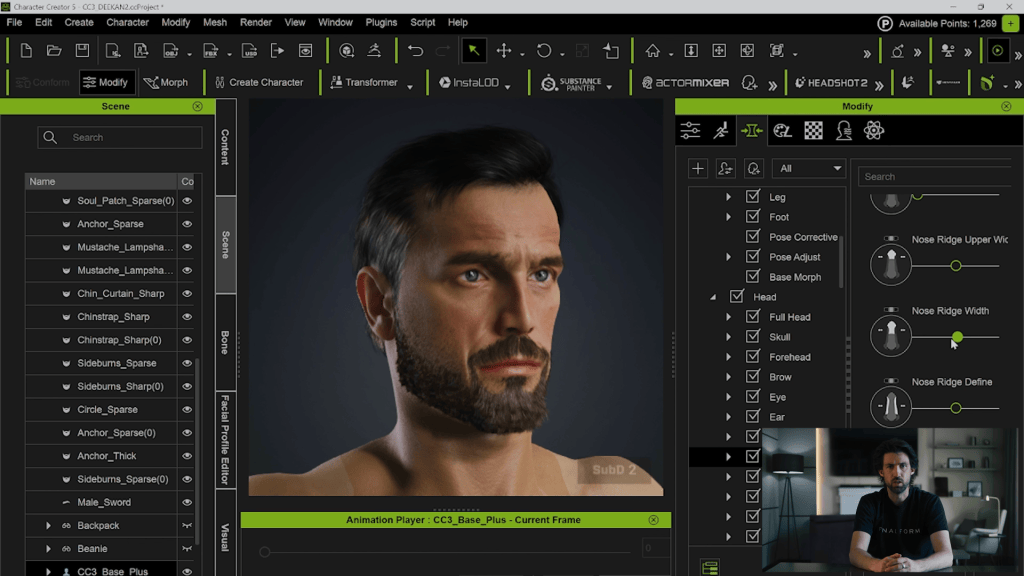
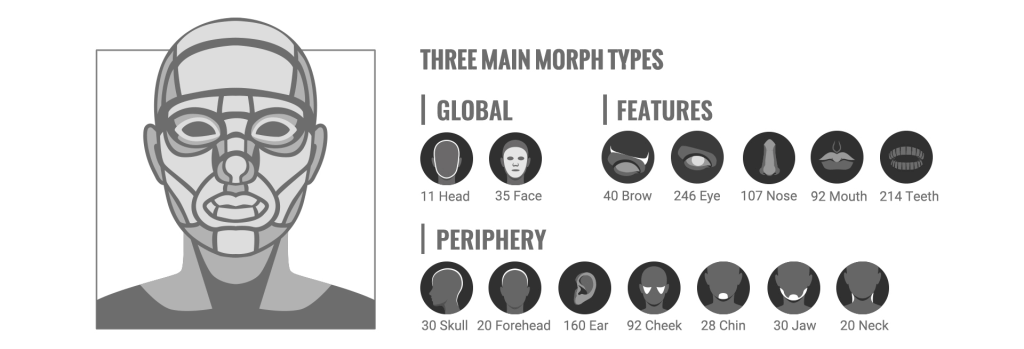
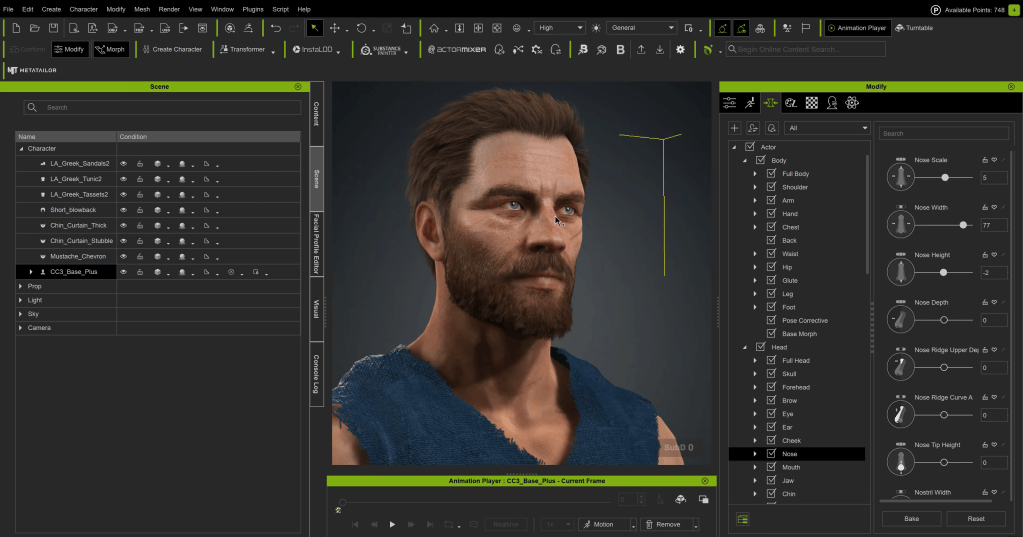
You have a couple of approaches for generating characters in CC5. If you just need a great-looking character quickly, you can drag and drop a preconfigured character and use it as-is or continue customizing. Alternatively, start from a neutral base (male/female, realistic/cartoony). Enable morphs and start clicking on parts of the character to tweak them. The morph sliders offer an enormous amount of customization — you can even tweak the shape of each individual tooth. This deep customization is simplified because every character uses the same core system (topology, rig, materials, and facial animation). The choice is simply where you begin.

The ActorMIXER Workflow

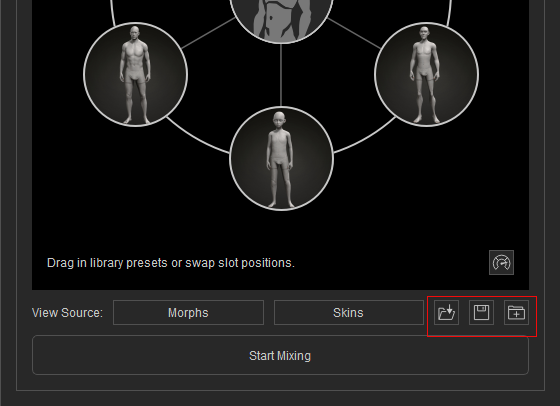
My favorite workflow is the ActorMIXER. It consistently helps create appealing characters. Start with a new base male (or female). Click “Start Mixing” and drag a dot towards other preset characters to blend shapes. You can mix between three characters at once: the base and the two in the dot’s current section. Play around to find the shape you like. If needed, stop mixing, replace the blend characters, and mix again. You can then focus on the head, tweaking its overall shape and then individual parts like the eyes, nose, mouth, and ears.

Texturing and Detailing

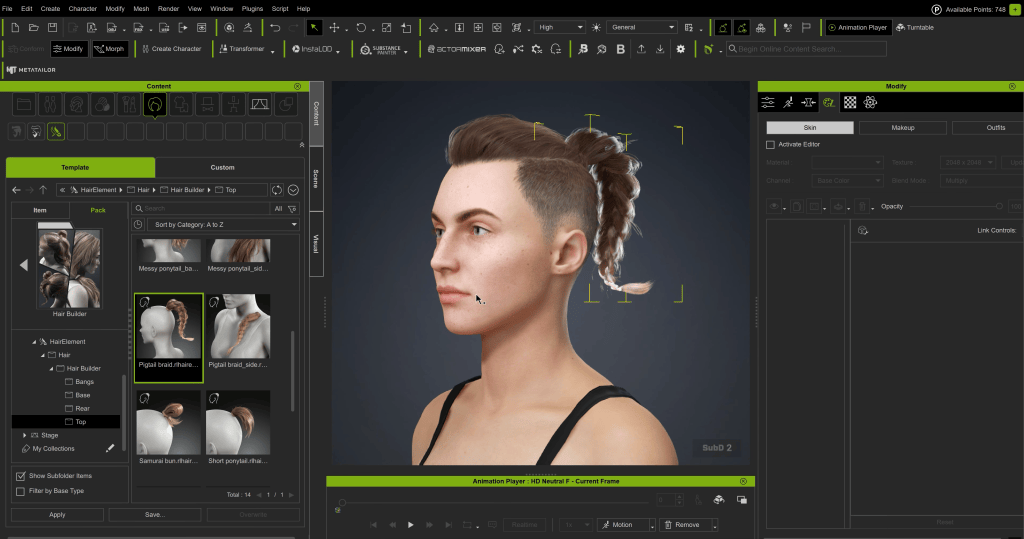
Once satisfied with the shape, focus on textures. After selecting a base skin, use the texture layering utility to add effects like dynamic wrinkles, imperfections, tattoos, scars, and facial hair. You can detail both the head and the body this way. If your texture looks good but needs a slight color tweak, go to the texture tab and adjust the color. You also have the option to apply makeup. Hair is crucial, and you can layer different hair parts for unique looks.

Clothing and Final Touches

Finally, add clothing using the usual drag-and-drop functionality. Shoes change the character’s height; for example, high heels will adjust the height accordingly. What’s cool is that you can keep tweaking the character’s shape even after the clothing outfit system is applied, and the garments will react to the changes.

HD Morphs

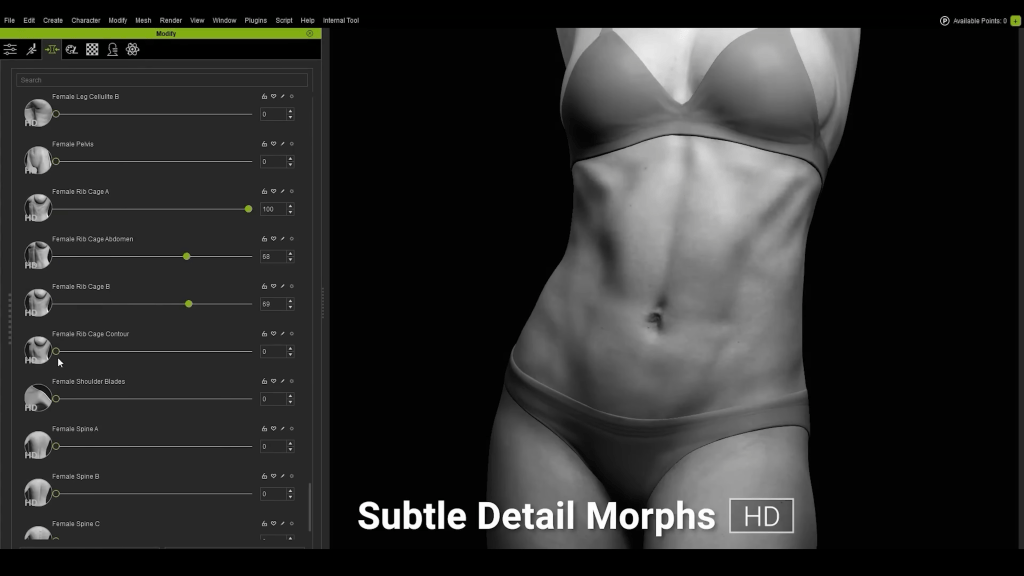
If you temporarily delete the shirt, you can see the HD Morphs. CC5 characters can be subdivided. Using the highest subdivision of two, you can find the morphs labeled HD. These are fine details that displace the geometry and change the silhouette, making your character look professionally sculpted. They are great for adding muscle details, and unlike normal maps, they are true geometry displacement. They can also be used to simulate aging.

Blender Pipeline

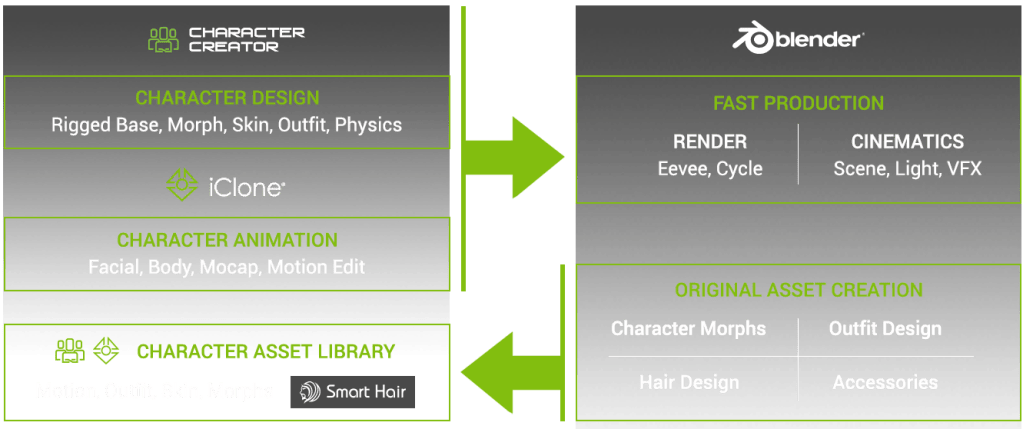
Now, let’s get into exporting this character into Blender. That used to be possible and fairly easy, even in older versions of Character Creator, but now, under plugins, we have a Blender Pipeline plug-in. You simply click “Export Character to Blender” to export and start Blender. In Blender, you need to install the official and free Character Creator pipeline add-on. In the pipeline tab, you can go to “Import Character” and import the FBX. You will get the character exactly as you designed it. This add-on has a ton of features, including the ability to tweak the parameters of your materials, such as adding an overlay color over the skin or changing the roughness.

Automatic Rigging

For animation, you can generate a Rigify rig with just one click. This will take a while, but when it is done, you will be happy with the results. The advanced face rig is particularly impressive. This is the most complex face rig I’ve ever seen inside Blender. If this reminds you of the MetaHuman Meta rig, that is because the CC characters are compatible with MetaHumans, which is a whole other topic often covered by channels focused on Unreal. Reallusion has a dedicated tutorial for this, and I will share it below.

Final Thoughts

These are some of the core workflows with CC5, and I wanted to talk about the limitations. Character Creator focuses on humanoids. So, it might be challenging to create your full production inside CC5, but that is what we have Blender and Unreal Engine for. As long as your character has two arms and two legs, you can easily customize it to your liking, but non-standard and non-humanoid characters are outside the scope of the program.

For many Blender hobbyists, there are modules within, and the final fee might add up. So this may turn off some hobbyists. On the other hand, busy professionals may instantly see the value of the software in the time it will save them. My advice is to only buy it if you can clearly see the value. Yet, Character Creator 5 isn’t here to replace Blender. It is an extension to help you speed up your character workflow and let you focus on the storytelling and the bigger picture of your production.

Related Posts

2025 Virtual Production Summit: Reallusion & Vicon in Chile

Reallusion & Vicon Lead Real-Time Mocap Innovation at the 2025 Virtual Production Summit in Chile

The 3rd Virtual Production Summit in Santiago, Chile, held from December 5–7, 2025, brought together global creators, technologists, and industry leaders to explore the cutting edge of virtual production — a blend of real-time rendering, motion capture, LED volumes, and immersive workflows reshaping film, TV, and interactive media. Hosted by Madis Films, a pioneer in real-time and ICVFX production technologies, this year’s summit marked a significant milestone for Latin America’s vibrant virtual production community.

Reallusion was invited by HCG Technologies and Madis Films to be a Silver Sponsor in collaboration with Vicon’s optical motion capture systems, and CenterGrid’s Virtual Studio service, co-presenting a landmark joint workshop titled “Vicon MoCap Integration for Real-Time Animation in Character Creator.” This flagship session showcased how creators can combine Character Creator 5, iClone 8, and Vicon mocap workflows to produce real-time character animation for film, previs, and digital production.

A Hub for Virtual Production Innovation in Latin America

The Virtual Production Summit has rapidly become the most important event of its kind in Latin America, originally born in Mexico and now taking place in Santiago de Chile. Hosted at the state-of-the-art facilities of Madis Films, known for operating Chile’s largest permanent ICVFX LED volumes and cutting-edge production resources, the summit served as a crossroads for filmmakers, animators, virtual production technologists, and educators across the region and beyond.

This three-day summit featured an extensive program of talks, panels, demos, and workshops designed to demystify real-time pipelines and accelerate adoption of next-gen production tools across creative industries. Attendees ranged from student creators and educators to studio professionals seeking to push the boundaries of digital content creation.

Empowering Creators: The Reallusion × Vicon Workshop

One of the summit’s standout sessions was the Vicon MoCap Integration for Real-Time Animation in Character Creator workshop — a comprehensive five-hour, hands-on experience that guided participants through real-time character creation and motion capture workflows.

What the Workshop Covered

Participants learned how to:

  • Build and customize a AAA digital human character using Character Creator 5
  • Configure real-time control setups for face and body animation
  • Integrate Vicon Shogun body-capture data with iClone 8
  • Capture synchronized full-body and facial mocap in real time
  • Troubleshoot latency and synchronization issues in a full realtime pipeline
This structured learning path allowed technical professionals — from previs artists to virtual production supervisors — to experience a complete mocap-to-animation workflow in a single immersive session.

The workshop was led by industry experts, including:

  • Enoc Burgos, Director of Partnership Marketing at Reallusion (guiding CC5 demo and pipeline strategies)
  • Rodrigo Muñoz, Sales Account Manager at Vicon, bringing deep expertise in motion capture systems
  • Nelson Quimbay, Motion Capture Stage Manager at HCG Technologies, a visual artist with extensive experience in mocap and virtual production

Together, this team demonstrated practical workflows that marry realtime character animation with professional mocap systems, empowering creators to take full advantage of modern digital pipelines, while giving them full IP ownership over their creations for further transmedia asset revenue stream generation.

Connecting with the Latin American Creative Community

During the summit, Reallusion’s Director of Marketing, Enoc Burgos, seized the opportunity to connect with Latin American creators, partners, and longtime fans — sharing the latest advances in Reallusion’s ecosystem and gathering valuable feedback from real-world practitioners.

Reallusion also engaged with many distinguished professionals who contributed to panels and networking events throughout the summit, enriching discussions and fostering collaboration across disciplines:

  • Erik Weaver — Head of Virtual & Adaptive Production, known for AI-driven workflows and cloud-integrated pipelines.
  • Jamie Hurcomb — Unreal Engine Education Advisor, driving real-time education.
  • Fabian Albarracin — Real-Time Graphics Director at NBC Universal / Telemundo.
  • Marcelo Siqueira — Visual Effects Producer & Supervisor at SENNAVFX.
  • Pablo Accame, Daniel Cappelletti, Nicolas Gonzalez, Ignacio Pol (Control Studios Team) — Creators behind Netflix’s “The Eternaut,” blending virtual production and cinematic content.
  • Sandro Di Segni — VFX Executive for Amazon Prime Video.
  • Sonia Contreras — Virtual Production Supervisor at Industrial Light & Magic.
  • Fernando Rivas-Manzaneque — CEO & Co-founder of Volinga.
  • Fernando Palermo — CEO and Founder of 555 Studios with team Carlos Vecchi, Head of VP, and Juan Fernando Collazos Colorist and presenter
  • Eric Pinkel — Cloud Virtual Production Specialist at CenterGrid.

These interactions weren’t limited to scheduled sessions — informal mixers and networking receptions gave attendees the chance to exchange ideas, build relationships, and explore creative collaborations that extend beyond the summit itself.

Advancing Real-Time Pipelines with Reallusion Tools

The summit spotlighted the increasing relevance of tools like Character Creator 5 and iClone 8 in collaborative production environments. When paired with professional mocap like Vicon’s Shōgun software and real-time engines, these tools empower creators to iterate faster, visualize ideas live, and streamline complex animation pipelines.
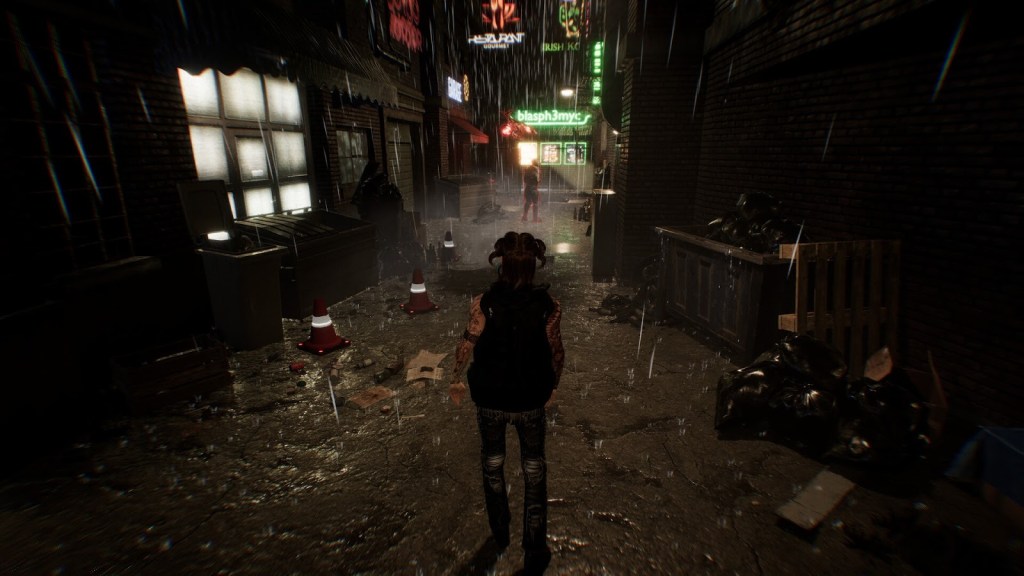
Recent updates to iClone 8, such as advanced timecode synchronization and deep integration with mocap hardware like Vicon, further enhance the platform’s viability for professional workflows in film, TV, and interactive media. These capabilities allow synchronized capture across multiple devices and media sources, boosting real-time performance and reducing post-production friction — a perfect match for virtual production environments.
A Summit to Remember — and What’s Next

Reallusion was delighted to not only participate in the Summit’s official programming but also engage deeply with the audience and partners throughout the event. The collaborative spirit, shared insights, and excitement around emerging real-time workflows made the 2025 Virtual Production Summit a standout moment for the community.

From hands-on workshops and expert panels to relaxed evening mixers, this gathering strengthened global creative bonds and showcased how real-time animation and motion capture technologies are transforming storytelling.

It was a fantastic event, and Reallusion extends heartfelt thanks to all partners, speakers, and fans who visited the booth or joined sessions. The company looks forward to reconnecting at next year’s summit, sharing new innovations, and continuing to support creators worldwide on the frontier of virtual production.

FAQ

How does Vicon motion capture integrate with Character Creator and iClone?

Vicon motion capture integrates with Reallusion’s Character Creator and iClone through real-time data streaming, allowing body motion captured in Vicon Shogun to drive fully rigged digital characters instantly. This setup enables live preview, rapid iteration, and synchronized animation workflows ideal for virtual production and previs.
What are the benefits of using Character Creator 5 and iClone 8 for virtual production?

Character Creator 5 and iClone 8 provide a streamlined digital character pipeline, offering rapid character generation, facial and body animation, real-time motion capture integration, and engine-ready export. These tools reduce production time, lower technical barriers, and enable creators to work interactively in real-time environments.

Who is the Vicon MoCap Integration workshop designed for?

The workshop is designed for 3D animators, virtual production supervisors, previs artists, filmmakers, educators, and studios interested in real-time animation workflows. It is suitable for both beginners entering motion capture and experienced professionals seeking to optimize real-time character animation pipelines.

Can Reallusion tools be used in professional film and streaming productions?

Yes. Reallusion tools are widely used in professional environments for previs, animation, virtual production, and real-time storytelling. When combined with industry-standard motion capture systems like Vicon and real-time engines, they support scalable pipelines used in film, television, streaming, and interactive media productions.

Related Topics

Garry Pye: Starting Fresh with Lulu in Character Creator

Meet Lulu: My Second 3D Adventure

After four months of trial, error, and hard-won breakthroughs, Garry Pye’s first 3D character, Carl, marked the end of one chapter—and the beginning of another. The From 2D to 3D journey proved that learning 3D character creation from scratch is possible with persistence and curiosity. Now, armed with those lessons, Garry starts fresh with a new challenge: Lulu. This new series isn’t about starting over—it’s about building smarter, pushing further, and applying everything learned along the way, one character at a time.

Having finally completed my very first 3D character for iClone using Character Creator, I’m about to dive straight into my second. And I couldn’t be more excited. This time around, I feel like I might actually know what I’m doing, or at least enough to make fewer mistakes.

My first 3D character, Carl, took me just under four months from start to finish. That might sound like a long time, but considering I started with absolutely zero knowledge of Character Creator, iClone or Blender, it still amazes me that I ended up with a fully rigged, lip synched actor who could blink, smile, and move like a real person. It proved something important to me, that you don’t need to be a genius to make a 3D character, you just need curiosity, persistence, and a healthy sense of humour when things go wrong.

Now it’s Lulu’s turn.

This time, my goal is to create a character who’s a little more complex, something that pushes me past my comfort zone. I want to see if I can bring one of my own 2D character designs to life in 3D form, with all the quirks and personality that make my 2D work obviously mine. I also want to try new things I avoided the first time because they looked too scary, like sculpting more complicated hair and modelling clothing from scratch. And I want to understand more of why things work instead of just blindly following tutorials. Most of all, I’d like to work a bit faster and spend less time staring blankly at the screen wondering what I broke this time.

I decided to document every step of the process. It’s partly for anyone else out there who’s brand new to 3D and feels like it’s all too overwhelming, but mostly it’s for me. Because in a few weeks, I’ll have forgotten how I did half of it and it will be a nice guide for my own work moving forward. 

If creating my first 3D character Carl was like learning to walk in 3D, then making Lulu is my attempt to jog, probably awkwardly, most likely in the wrong direction, but with enthusiasm. I want to build her faster, smarter, and with more intention than before. I want to see if the lessons from my first build actually stuck.

So here we go again. I’m ready for the wins, the frustrations, the late-night “aha” moments, and the occasional “why is her face melting?” crisis. But that’s all part of the adventure.

Let’s begin!

This image has an empty alt attribute; its file name is Garry-Pyes-profile-image-edited.jpg
Garry Pye – 2D/3D Animator, Cartoonist, Content Developer

Garry Pye – 2D/3D Animator | Content Developer

Garry Pye is an Australian illustrator, animator, and Cartoon Animator instructor with over a decade of experience in the animation industry. Known for his unique blend of creativity and humor, Garry’s work spans from teaching animation techniques to creating innovative content that helps both novice and experienced animators improve their skills.

Garry’s enthusiasm for storytelling and animation shines through in all his projects, whether it’s creating animated shorts, preparing educational tutorials, or sharing his expertise by teaching. With a passion for making animation accessible and fun, Garry has built a community of learners who not only appreciate his knowledge but also his infectious sense of humor and dedication to his craft.

Follow Garry Pye’s iClone Page2D Animation Page2D Marketplace

Related Posts